This free Toy Story PowerPoint template is a cheerful 4-slide deck with a sky blue background, soft white clouds and the most famous toys from the films. Woody waves from the edge of the content slides, Buzz Lightyear stands ready on the section slide, and the title slide shows the whole gang, from Rex to Hamm. It is a simple, ready-to-use design for kids' presentations, classroom lessons and birthday slideshows.
What's Inside
The template is short and practical, with 4 slides in widescreen 16:9 that cover everything a basic presentation needs. Each one is simple enough for kids to edit on their own:
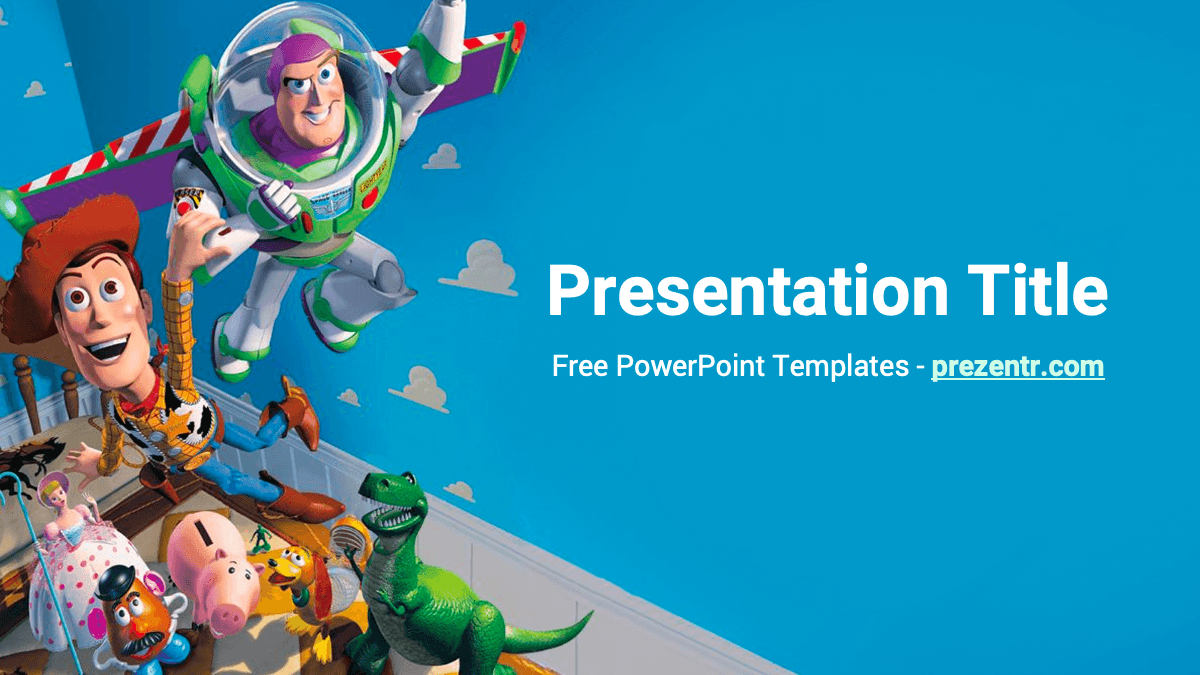
- Title slide: a large white "Presentation Title" and subtitle on bright blue. On the left, Buzz flies above Woody and a crowd of toys, including Rex, Hamm, Bo Peep and Mr. Potato Head. It is the most detailed slide and makes a strong first impression.
- Content slide: a white slide with a blue title and bullet points. A curved blue panel with clouds runs down the right side, and Woody waves from inside it. The sample text explains that the template uses the Roboto font.
- Section title: a full blue slide with a white section heading and a line of text, with Buzz Lightyear standing on the right in his space suit.
- Blank content slide: the same white background with Woody and the blue curve, but no text, so you can add pictures, a video, a chart or anything else.
Because the slides come from slide layouts, you can add as many as you need. Duplicate the content slide for each topic and use the section slide to separate parts, and a 4-slide template quickly becomes a 15-slide presentation.
Design and Style
The Toy Story PPT template uses a bright cyan blue inspired by the sky-and-clouds wallpaper that fans will recognize from the films. Small cartoon clouds float in the blue areas, and the white slides keep plenty of room for text. The characters are full color, polished 3D-style renders cut out against the background, so they look lively and true to the movies. Text is set in Roboto, a clean and friendly sans serif that is easy for young readers. Titles are big and bold, either white on blue or blue on white, which keeps everything readable even on a classroom projector. The overall mood is playful, bright and positive, and the limited palette of blue, white and the characters' own colors keeps the deck from feeling busy.
The curved edge that separates white and blue on the content slides adds a little movement and makes each slide feel framed without crowding the text.
Since the design is so simple, it is also very forgiving. Kids can add their own drawings, photos or clip art to the white slides and the result still looks neat, because Woody and the blue curve hold everything together. For older students, the clean layout leaves enough room for real content, such as a short essay, a timeline or a chart.
Who Is This Template For?
This Toy Story PowerPoint template is aimed at younger audiences and the people who teach and entertain them:
- Elementary school students giving a book report, show-and-tell or "my favorite movie" presentation.
- Teachers who want a friendly design for lessons on friendship, teamwork or toys through history.
- Parents planning a Toy Story themed birthday party with invitations, games and a photo slideshow.
- Kindergarten and daycare staff preparing schedules, welcome slides or parent meetings.
- Film club members presenting a review or analysis of animated movies.
- Toy collectors and hobby groups sharing a collection, a swap meet plan or a club newsletter.
How to Customize It
- Install Roboto: it is a free Google font. Installing it keeps titles and bullets looking as designed.
- Replace the text: click "Presentation Title", "Slide Title" or "Section Title" and type your own words.
- Add slides: click New Slide on the Home tab and choose a layout from the template, or right-click a slide and select Duplicate Slide.
- Add photos: drop your own pictures on the blank slide. For a birthday, add photos of the birthday kid next to Woody.
- Change pictures: right-click a character image and choose Change Picture to swap in a different toy or a photo.
- Recolor titles: select a heading and pick a new font color, such as Woody's yellow or Buzz's green, for a fun accent.
- Add a little motion: the slides are static, so if you want movement, select a title or picture and add a simple Fade or Fly In from the Animations tab.
To edit the Toy Story slides in Google Slides, upload the PPTX to Google Drive and choose Open with Google Slides. Roboto is already available there, so the text looks the same as in PowerPoint. You can also share the deck with classmates so everyone can add a slide for a group project.
Presentation Ideas
- A "my favorite toy" show-and-tell for class, with a photo of the toy on the blank slide.
- A lesson about friendship and teamwork, using the toys as examples.
- A Toy Story birthday party slideshow with the schedule, games and a thank you slide.
- A history of toys project, comparing old and modern toys.
- A movie review of an animated film, with sections for story, characters and favorite scenes.
- A welcome back to school slideshow for a kindergarten class.
- A reading club slideshow introducing the book of the month.
- A class rules or classroom jobs chart, with one rule per slide and Woody cheering on every page.
Related Templates
For more animated movie designs, try the Inside Out PowerPoint Template, the Encanto PowerPoint Template, the Frozen PowerPoint Template and the Disney PowerPoint Template. Browse the full collection of Movies and Netflix templates.
Frequently asked questions
- Is the Toy Story PowerPoint template free?
- Yes. You can download it free from Prezentr and use it for school, parties and personal projects.
- How many slides does the Toy Story template have?
- It has 4 slides in 16:9: a title slide, a content slide, a section title and a blank content slide. You can duplicate them to build a longer deck.
- Does the Toy Story template work with Google Slides?
- Yes. Upload the PPTX to Google Drive and open it with Google Slides. Roboto, the font used in the template, is available there by default.
- Which characters are on the slides?
- Woody and Buzz Lightyear appear on the slides, and the title slide also shows a group of toys from the films, including Rex, Hamm, Bo Peep and Mr. Potato Head.
- Is it a good template for a kids' birthday party?
- Yes. The bright blue sky design and familiar characters make it a fun choice for party invitations, game slides and photo slideshows.
- Is the template affiliated with Disney or Pixar?
- No. It is a free fan-made template inspired by the films and is not affiliated with or endorsed by Disney or Pixar.