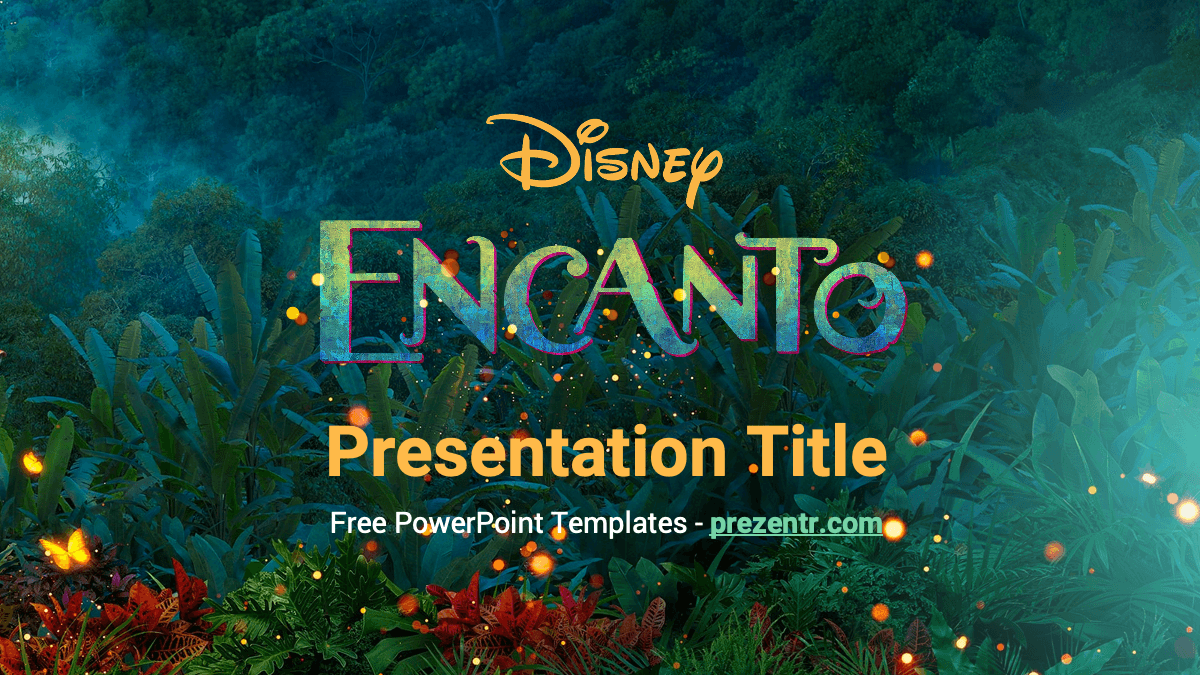
The Encanto PowerPoint template is a free, fan-made theme inspired by the Disney film, with a lush jungle title slide full of glowing lights and yellow butterflies, a content slide featuring Mirabel and a section slide showing the colorful Madrigal family house. It includes 4 starter slides and 9 layouts in emerald green, gold and white. It also works in Google Slides, which makes it an easy pick for school projects and family events.
What's Inside
This Encanto PowerPoint template is theme-style: a few richly decorated slides plus a full set of layouts you can add as often as you need. The 4 starter slides are:
- Title slide: the Encanto logo over a dark green jungle scene with red flowers, sparkling lights and butterflies, with a big gold "Presentation Title" and a subtitle line. Your cover slide.
- Title and content: a clean white slide with a mint green title, little yellow butterfly bullets and Mirabel standing on a green wave on the right. This is the slide for most of your text.
- Section header: the Madrigal house covered in pink and purple flowers, with family members at the windows, set against misty green mountains. A gold section title sits on the left.
- Blank background: a soft glowing gradient from teal to lime green with bokeh lights and butterflies. Great for photos, a quote or a closing message.
From Home, New Slide you can also add the other built-in layouts: Two Content, Comparison, Title Only, Content with Caption and Picture with Caption, so you can build a longer deck without losing the look.
A simple structure works well: use the title slide as your cover, the content slide with Mirabel for most of your points, the house slide each time you start a new section, and the glowing blank slide for photos, a quote or your final thank you. Because these designs are part of the layouts, any new slide you add with the same layout will carry the same artwork.
Design and Style
The colors come straight from the film's magical mood: deep emerald and teal greens, warm golden yellow for titles, white for body text on dark slides and pops of pink, purple and red from the flowers. The theme font is Roboto, a clear, modern sans serif that keeps text readable even over busy backgrounds.
The artwork does most of the storytelling. The title and section slides use rich, full-screen film-style scenes, while the content slide stays mostly white so long text is easy to follow. Small details tie it together: butterflies as bullet points, glowing specks of light and a curved green shape that frames Mirabel. The result feels warm, playful and a little magical.
When you add your own content, keep long text on the white content slide and use the darker jungle and house slides for short titles. Gold and white text stand out best over the artwork, while dark gray or green text is easiest to read on the white slide. If you add photos to the blank green slide, a thin white border helps them stand out from the glowing background.
Who Is This Template For?
This Encanto PPT template suits anyone who wants bright, family-friendly slides with a touch of movie magic:
- Students presenting a book or movie report, a project about family or a talk about Colombia.
- Teachers creating colorful lessons, classroom welcome slides or reading activities.
- Parents planning an Encanto birthday party, invitations or a party slideshow.
- Music and drama clubs introducing a sing-along, a school show or a talent night.
- Disney fans sharing character profiles, trivia or favorite scenes.
How to Customize It
- Edit the text: click "Presentation Title", "Slide Title" or "Section Title" and type your own words.
- Install the font: the template uses Roboto. Download it free from Google Fonts and install it before editing so the text looks as designed.
- Add slides: go to Home, New Slide and choose a layout. Duplicate a slide you like with Ctrl+D.
- Change the backgrounds: the jungle, the house, Mirabel and the glowing gradient are part of the slide layouts. Open View, Slide Master to move, swap or remove them; changes apply to every slide using that layout.
- Add your own pictures: use Insert, Pictures, then right-click and choose Change Picture whenever you want to swap an image without resizing it again.
- Adjust colors: pick a text box and use Font Color to try gold, mint or white so it stands out from the background.
- Use Google Slides: open the Google Slides version, make a copy to your Drive and edit it there. To change layout backgrounds, use Slide, Edit theme.
Before presenting, click through the whole deck once in Slide Show mode to check that titles do not overlap the artwork, especially on the section slide where the house fills most of the screen. If a title is hard to read, move it slightly or add a soft dark shape behind it with a little transparency so the artwork still shows through.
Presentation Ideas
- Meet the Madrigals: a character profile for each family member and their gift.
- A movie report on Encanto with sections for story, characters and music.
- "My family's magic": a class project about what makes each family member special.
- An introduction to Colombian culture, nature and food.
- Encanto birthday party plans, from decorations to games.
- Encanto slides for a sing-along or school talent show program.
- A lesson on butterflies and rainforest animals, using the jungle backgrounds.
Related Templates
For more Disney magic, try the Disney PowerPoint Template, the Moana PowerPoint Template or the Frozen PowerPoint Template. If you love animated family stories, the Inside Out PowerPoint Template is another colorful option. You can browse more films and shows in our TV shows and movies templates.
Frequently asked questions
- Is the Encanto PowerPoint template free?
- Yes, it is free to download on Prezentr. It is a fan-made template and is not official or endorsed by Disney.
- How many slides are in the Encanto template?
- It comes with 4 starter slides, a title slide, a content slide with Mirabel, a section slide with the Madrigal house and a blank background, plus 9 layouts you can reuse.
- Can I use the Encanto template in Google Slides?
- Yes. It is available for both PowerPoint and Google Slides, so you can edit it online and share it easily.
- How do I change or remove Mirabel or the backgrounds?
- The artwork is part of the slide layouts. In PowerPoint open View, Slide Master; in Google Slides use Slide, Edit theme.
- Which font does the Encanto template use?
- It uses Roboto, a free Google font. Install it before editing for the best look.
- Is it good for a school movie report?
- Yes. The title, content and section slides give you a simple structure for a movie report, a character study or a project about family.
This is a fan-made template inspired by Encanto PowerPoint Template. Prezentr is not affiliated with, endorsed by, or selling assets from Encanto PowerPoint Template. All brand names, logos, and trademarks belong to their respective owners.