The animated Stitch PowerPoint template is a free 10-slide deck in bright teal and green, scattered with yellow tropical leaves and starring a 3D Stitch character on almost every slide. The slides are animated and built around a fun "Experiment 626" theme, with one slide for each of Stitch's playful superpowers. It is a great pick for a school project, a birthday party plan or any presentation that needs a smile.
What's Inside
The deck tells a little story from the title to the thank you slide. Here is what each slide does:
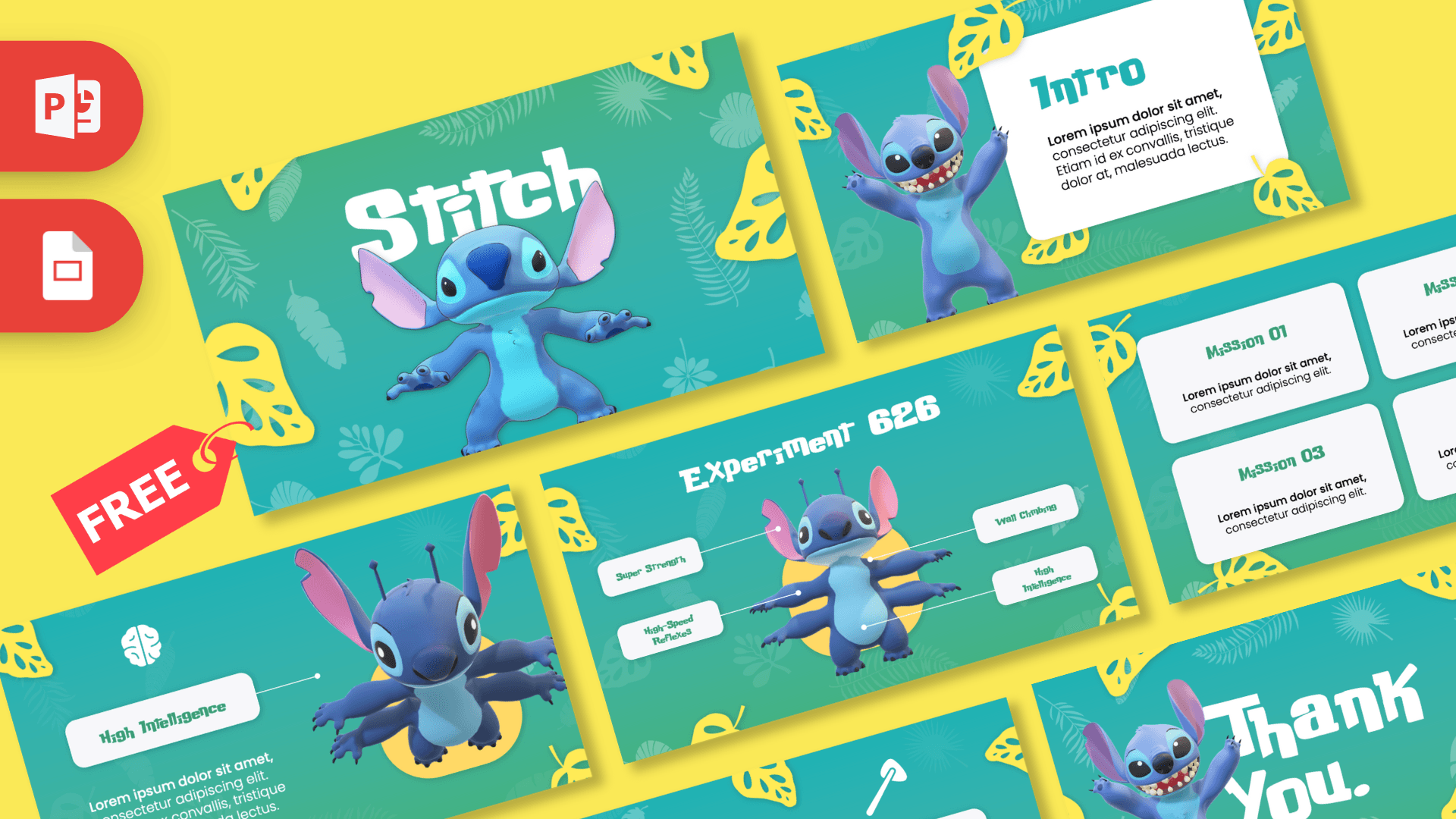
- Slide 1, Title: a big white "Stitch" headline above Stitch standing with his arms out, surrounded by yellow and teal leaves.
- Slide 2, Opening text: a centered paragraph with Stitch peeking up from the bottom of the slide. Use it for your introduction or a fun fact.
- Slide 3, Intro: a white rounded card titled "Intro" next to a grinning Stitch with his arms raised, ideal for setting up your topic.
- Slide 4, Experiment 626: an overview slide with Stitch in the center and four labels pointing to him: Super Strength, High-Speed Reflexes, Wall Climbing and High Intelligence. It works like a mind map or a feature overview.
- Slides 5 to 8, Superpower slides: one slide each for Super Strength, High-Speed Reflexes, High Intelligence and Wall Climbing. Each has a simple white icon (a dumbbell, a tool, a brain and a pulley), a labeled tag, a text block and a four-armed Stitch pose on a yellow shape.
- Slide 9, Missions: four white cards labeled Mission 01 to Mission 04, perfect for goals, steps, tasks or chapters.
- Slide 10, Thank You: a cheerful closing slide with a giant "Thank You." and a happy Stitch waving his arms.
The structure is easy to reuse for almost any subject. The Experiment 626 slide acts as a summary of four main points, and each superpower slide then explains one of those points in more detail. Rename the four labels to fit your topic, for example four planets, four book characters or four healthy habits, and the deck turns into a ready-made lesson or report. The Missions slide works well as a wrap-up, a homework list or a set of next steps.
Design and Style
The background is a smooth teal-to-green gradient covered in faint palm and tropical leaf patterns, with bold yellow leaves framing the edges. It feels sunny and island-like, a nod to Stitch's Hawaiian home in the Lilo and Stitch films. Content sits on white rounded cards and tags, which keeps text readable against the bright background.
Titles use a chunky, playful display font with uneven letters, while the body text is a clean rounded sans serif. Stitch himself appears as a glossy 3D-style render in several poses, including his four-armed alien form on the superpower slides. Because the template is animated, elements move in as you click through, which adds energy without any extra work. This is a fan-made template and is not an official Disney product.
The bright teal background works best with short text, so the layouts keep paragraphs compact and put them on white cards or directly next to the character. That makes the slides easy to read on a classroom screen or a projector, even from a distance, and keeps the focus on your main points.
Who Is This Template For?
This template is made for presenters who want a friendly, colorful deck that young audiences will enjoy, while still keeping the content organized.
- Kids and students who want a fun look for a class presentation or show and tell.
- Teachers preparing a lesson opener, a classroom rules deck or a reward slide.
- Parents planning a Stitch-themed birthday party, with guest list, games and schedule.
- Disney fans and fan clubs sharing trivia, quizzes or movie night plans.
- Youth leaders and camp counselors who need a playful deck for activities or team missions.
How to Customize It
You can edit this Stitch PPT template in PowerPoint without any design experience.
- Replace the text: click on any title, tag or paragraph and type your own words. The superpower labels can become your own headings, like "Fact 1" or "Step 2".
- Change the pictures: right-click a Stitch image and choose Change Picture if you want to use a different character pose or your own photo.
- Change the icons: select an icon and delete it, then go to Insert, Icons to pick a new one that fits your topic.
- Adjust the animations: open the Animations tab and the Animation Pane to see how each element enters. You can change the effect, the timing or remove an animation if you prefer a calmer deck.
- Reorder or duplicate slides: drag slides in the thumbnail panel, or duplicate a superpower slide if you need more than four.
Play the slideshow from the start (F5) to check that every animation runs in the order you want.
Presentation Ideas
- "My Superpowers": a fun self-introduction for the first day of school.
- A Stitch birthday party plan with games, food and a mission list.
- A Lilo and Stitch movie trivia quiz for a class or family night.
- Four facts about Hawaii, one per superpower slide.
- Classroom goals for the term, presented as Mission 01 to Mission 04.
- A science lesson on real animals with surprising abilities, using the superpower layouts.
Because each superpower slide has room for a short paragraph, the deck works best with clear, simple points. Keep each slide to two or three sentences so the character and animations can do the rest.
Related Templates
Love Disney characters? Try the Disney PowerPoint Template, the Moana PowerPoint Template for more island adventure, or the Toy Story PowerPoint Template. For another playful character deck, the Minions PowerPoint Template is a good match. You can also see every template with motion in the animated templates collection.
Frequently asked questions
- Is the animated Stitch template free?
- Yes, the full 10-slide animated Stitch deck is free to download. It is a fan-made template and is not affiliated with or endorsed by Disney.
- How many slides does the Stitch template have?
- It has 10 slides: a title, an opening text slide, an Intro slide, an Experiment 626 overview, four superpower slides, a Missions slide and a Thank You slide.
- Are the Stitch slides really animated?
- Yes, this version is animated in PowerPoint. You can view and change each effect in the Animations tab and the Animation Pane.
- Does the Stitch template work in Google Slides?
- This template is offered as a PowerPoint file. You can try uploading it to Google Drive, but Google Slides support is not confirmed and PowerPoint animations may not carry over.
- Can kids use this template for a school project?
- Absolutely. The text areas are short and easy to fill in, and the superpower and mission slides make it simple to split a topic into clear parts.
- Can I change the superpower names?
- Yes. The labels like Super Strength and Wall Climbing are normal text boxes, so you can rename them to match your own topic.
This is a fan-made template inspired by Animated Stitch PowerPoint Template. Prezentr is not affiliated with, endorsed by, or selling assets from Animated Stitch PowerPoint Template. All brand names, logos, and trademarks belong to their respective owners.