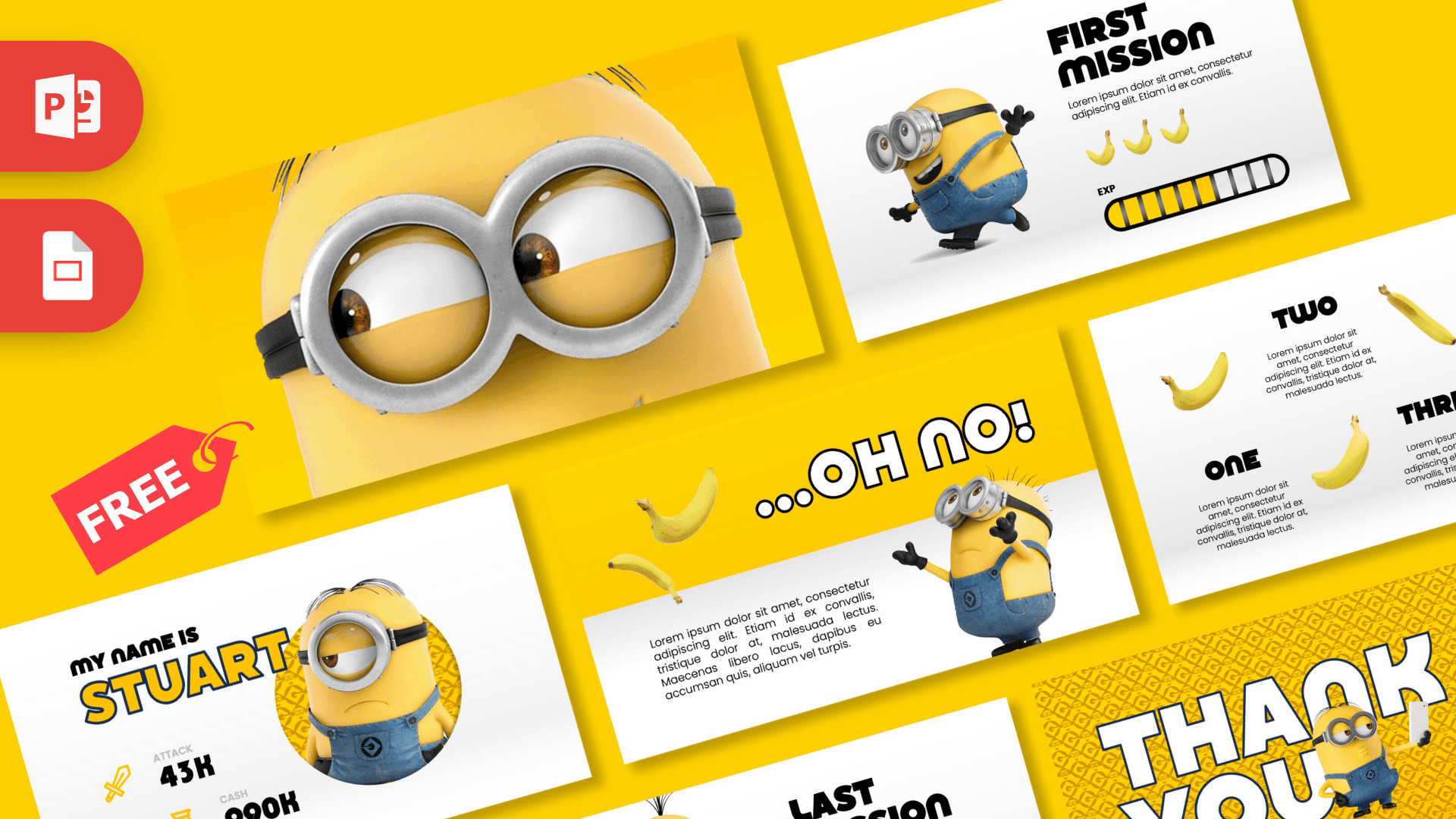
The Minions PowerPoint Template is a free, animated 10-slide deck in bright Minion yellow, clean white and denim blue. It opens on a giant close-up of a Minion goggle, then turns your talk into a little adventure game with missions, an EXP progress bar, character cards and plenty of bananas. It works in PowerPoint and Google Slides, and it is one of the most fun ways to present a school project or party plan.
What's Inside
All 10 slides are fully designed, and several are linked with smooth Morph transitions so characters and bananas glide from one slide to the next. Here is the walkthrough:
- Slide 1, Goggle intro: an extreme close-up of a Minion's eyes behind its silver goggles on a yellow background. A great attention grabber before you say a word.
- Slide 2, Opening text: a paragraph slide with a Minion and flying bananas, perfect for your introduction or the question you want to answer.
- Slides 3 and 4, "...Oh No!": a big headline with a surprised Minion, made for presenting a problem, a challenge or a plot twist.
- Slides 5 and 6, Missions: First, Second and Last Mission cards, each with a short text area, banana icons and a yellow EXP progress bar. Use them for goals, steps, chapters or milestones.
- Slide 7, One, Two, Three: a three-point list with a banana next to each item, ideal for tips, facts or a quick summary.
- Slide 8, "My name is Stuart": a character profile card with Attack and Cash stats, styled like a game character screen.
- Slide 9, "My name is Bob": a second profile card in the same style, great for introducing team members or comparing two options.
- Slide 10, Thank You: a bold closing slide with huge outlined letters over a yellow patterned background and a Minion peeking through.
The slides are arranged like a story: an intro, a problem, a series of missions, a quick list, two characters and a big finish. You can follow that order or mix it up. For a short three-minute talk, the goggle intro, one mission slide and the Thank You slide are often enough.
Design and Style
The palette is pure Minion: sunny yellow backgrounds, white panels and the blue of their overalls. Headlines use a heavy, rounded display font that feels cartoony and friendly, while body text is set in a simple, light sans serif so paragraphs stay readable.
The slides mix full-yellow pages with white, angled panels, which gives the deck a sense of motion even before the animations kick in. 3D-style Minion characters, including Stuart and Bob, appear across the slides, along with bananas that float and tumble around the layout. The game elements, like mission titles, EXP bars and character stats, give the whole deck a playful video game feel.
This is a fan-made template inspired by the Minions characters. It is not official and is not endorsed by the film's studios.
Because the design is already so busy with color and characters, keep your own text short. One headline and two or three short sentences per slide is plenty. The mission cards are especially good for this: a title, one sentence and a progress bar tell the audience exactly where you are in the presentation.
Who Is This Template For?
- Kids and students presenting a project, a book report or an "about me" deck that should make the class smile.
- Teachers introducing class rules, weekly goals or a quiz as a series of missions.
- Parents and party planners making a Minions birthday slideshow or game night presentation.
- Team leads and HR who want a lighter way to present quarterly goals, onboarding steps or team intros.
- Youth clubs and camps explaining activities, challenges and team roles.
The deck is also a nice way to learn how Morph works. Open two neighboring slides side by side and you will see how the same Minion or banana sits in a different spot on each one. PowerPoint fills in the movement between them.
How to Customize It
In PowerPoint:
- Replace the text: click any text box and type over the sample text. The mission titles, names and stats are all editable.
- Change pictures: right-click a picture and choose Change Picture to swap in your own photo while keeping its size and position. On the profile slides, try a photo of yourself or a teammate.
- Adjust the EXP bars: the bars are made of shapes, so you can recolor or remove segments to show real progress.
- Keep the Morph effect working: Morph animates objects that appear on two neighboring slides. If you rename, delete or heavily move shared objects, the transition may change, so check it with Slide Show after editing.
- Reorder or duplicate slides: drag thumbnails in the left panel, or right-click and choose Duplicate Slide to add more missions.
- Recolor: select a shape and use Shape Fill to try a different accent, or use the Eyedropper to match the exact Minion yellow.
In Google Slides: upload the PPTX to Google Drive and open it with Google Slides. Text and images are editable there too. Google Slides does not have a Morph transition, so the motion between slides will look simpler than in PowerPoint.
Presentation Ideas
- My summer goals as three missions with progress bars
- Meet the team: profile cards with fun "stats" for each person
- Class rules for the new school year, presented as a game
- Minions birthday party plan: games, snacks and schedule
- The life cycle of a banana, a fun science mini-lesson
- Project kickoff: the problem ("Oh No!"), the plan and the first mission
A small tip for presenting: run the full slideshow once before your talk to see where the Morph transitions happen, so you can time your words with the movement. If you present from a computer without PowerPoint, export the deck as a video with File, then Export, then Create a Video, and the animations will be kept.
Related Templates
Love animated characters? Try the Toy Story PowerPoint Template, the Shrek PowerPoint Template, the Disney PowerPoint Template or the Cartoons PowerPoint Template. You can also browse all animated templates.
Frequently asked questions
- Is the Minions PowerPoint template really free?
- Yes, the full 10-slide animated deck is free to download on Prezentr. It is a fan-made template, not an official Minions product.
- How many slides are in the Minions template?
- There are 10 slides: a goggle intro, an opening text slide, two "Oh No!" slides, mission slides with EXP bars, a One, Two, Three list, Stuart and Bob profile cards and a Thank You slide.
- Does the Minions template work in Google Slides?
- Yes, you can open the PPTX in Google Slides and edit it. The Morph transitions only play in PowerPoint, so the slide changes will be simpler in Google Slides.
- Is the Minions template animated?
- Yes. It uses Morph transitions and animations so Minions and bananas move between slides when you present in PowerPoint.
- Can I replace the Minion pictures with my own photos?
- Yes. Right-click any picture and choose Change Picture to swap it while keeping the same size and position.
- Is it a good choice for a kids' class presentation?
- Yes, the bright yellow design, simple text areas and game-style missions make it easy for kids to fill in and fun for the class to watch.
This is a fan-made template inspired by Minions PowerPoint Template. Prezentr is not affiliated with, endorsed by, or selling assets from Minions PowerPoint Template. All brand names, logos, and trademarks belong to their respective owners.
Previous version
This is an updated version of the Minions PowerPoint Template, redesigned in October 2024. The original version is still available here: