The Tinder PowerPoint template is a free, minimal theme built on the app's signature pink-to-coral gradient, with a large white Tinder logo on the title slide and a small logo tucked into the corner of every content slide. It comes as a PowerPoint template file (.potx) with 3 sample slides and 9 ready layouts, so you can build a deck of any length in the same clean style. It also works in Google Slides.
What's Inside
This is a theme-style template rather than a long pre-built deck. Instead of ten fixed slides, you get a master design with layouts you can add as many times as you need from the New Slide menu. The download includes:
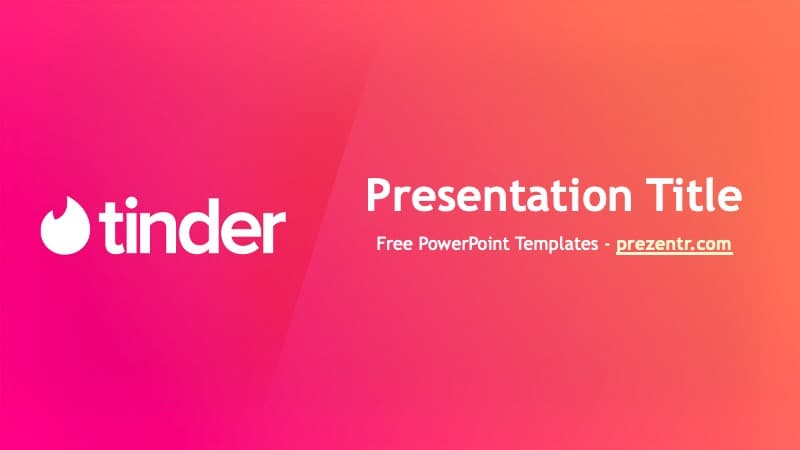
- Title slide: a bright magenta-to-coral gradient with the white flame logo and "tinder" wordmark on the left and your presentation title and subtitle on the right.
- Content slide: a "Slide Title" heading with a text area underneath on the same gradient, with a small white Tinder logo in the bottom-right corner.
- Section title slide: a large heading with a short line of text, for splitting your talk into parts.
Behind those 3 sample slides sit 9 master layouts you can pick from: Title Slide, Title and Content, Section Header, Two Content, Comparison, Title Only, Blank, Content with Caption, and Picture with Caption. That covers the basics most presentations need, from side-by-side comparisons to image slides with a caption.
The advantage of this Tinder PowerPoint template is flexibility. A short pitch might use only five slides, while a full case study could run to twenty, and every slide will match because the gradient, logo and font all live in the slide master. It also keeps file size small, which makes the deck easy to email or share.
Design and Style
The whole theme rests on one strong idea: the gradient. It runs from hot pink on the left to a warm coral-orange on the right, with a soft diagonal light streak across the background that adds depth without clutter. Text is white for maximum contrast, and the theme font is Trebuchet MS, a friendly sans-serif that is installed on most Windows and Mac computers, so the slides should look the same on any machine.
There are no illustrations, icons or stock photos in the file. That is deliberate: the bold color does the work, and your own screenshots, photos or charts become the focus. The mood is modern, upbeat and a little playful, which suits anything about apps, social life or dating.
Because the gradient is bright, it pays to keep text short and large. Big headings, a few bullet points and full-width screenshots read best. If you add charts, use white or very light colors for bars and lines so they stand out against the pink and coral background.
The logo on the content slides is small and placed in the bottom-right corner, so it brands every page without competing with your content. If you are presenting for a class and prefer a neutral look, you can remove it once in the slide master and it disappears from every slide.
Who Is This Template For?
Because it is a theme rather than a fixed deck, the Tinder PPT template adapts to almost any length or topic.
- Marketing and business students analyzing Tinder, dating apps or the swipe-based app model for a case study.
- App designers and product teams who want a pink-gradient look for a pitch or a UX review of a social app.
- Social media and digital marketing classes presenting on online dating trends or app growth.
- Event hosts running a speed-dating night, singles mixer or Valentine's event.
- Friends making a fun slideshow, such as a playful "dating profile" roast for a birthday or bachelor party.
How to Customize It
- Open the .potx file. Double-clicking it in PowerPoint creates a new, untitled presentation based on the template, so the original stays untouched.
- Add slides from layouts. On the Home tab, click the arrow under New Slide and choose any of the 9 layouts, such as Comparison or Picture with Caption.
- Replace the text. Click "Presentation Title," "Slide Title" or "Your Text Goes Here" and type your own content.
- Insert pictures. Use the Picture with Caption layout and click the picture icon, or insert an image and right-click it to use Change Picture later.
- Adjust the master. Go to View, then Slide Master, to change the logo, fonts or background for every slide at once.
To use the Tinder slides in Google Slides, upload the file to Google Drive and open it with Google Slides. If your Drive does not open .potx directly, open it in PowerPoint first and save it as a regular .pptx, then upload that file.
When your deck is ready, use File, then Export, to save a PDF for sharing. Text in Trebuchet MS stays sharp in the PDF, and the gradient background prints well on a color printer.
Presentation Ideas
- A case study on Tinder's business model and the swipe interface.
- A class presentation on how online dating has changed how people meet.
- A UX teardown comparing dating apps, using the Comparison layout.
- Rules and schedule for a speed-dating or singles night.
- A marketing plan for a new social or dating app in the same bright style.
- A lighthearted "swipe right on our team" recruitment or welcome deck.
Tip: when presenting on a real app, add your own screenshots on the Picture with Caption layout and keep one main message per slide. The bold gradient already grabs attention, so your content can stay simple.
Related Templates
If you like the Tinder PowerPoint template, try more social apps such as the Instagram PowerPoint Template, the Snapchat PowerPoint Template or the TikTok PowerPoint Template. If your topic is romance, the Valentine's Day PowerPoint Template is a good match. Browse more brand and company templates.
Frequently asked questions
- Is the Tinder PowerPoint template free?
- Yes, it is free to download from Prezentr. It is a fan-made, brand-inspired design and is not an official Tinder product.
- How many slides does the Tinder template include?
- The .potx file contains 3 sample slides (title, content and section title) and 9 master layouts. You can add as many slides as you need from those layouts.
- Can I use the Tinder template in Google Slides?
- Yes. Upload it to Google Drive and open it with Google Slides. If the .potx file does not open directly, save it as a .pptx in PowerPoint first.
- What is a .potx file?
- A .potx is a PowerPoint template. Opening it creates a new presentation based on the design, so you can reuse the original file as often as you like.
- What font does the Tinder template use?
- The theme uses Trebuchet MS, which comes preinstalled on most computers, so you do not need to download any extra fonts.
- Is this template good for a dating app case study?
- Yes. The Comparison and Two Content layouts work well for comparing apps or features, and the clean gradient keeps charts and screenshots easy to read.
This is a fan-made template inspired by Tinder PowerPoint Template. Prezentr is not affiliated with, endorsed by, or selling assets from Tinder PowerPoint Template. All brand names, logos, and trademarks belong to their respective owners.