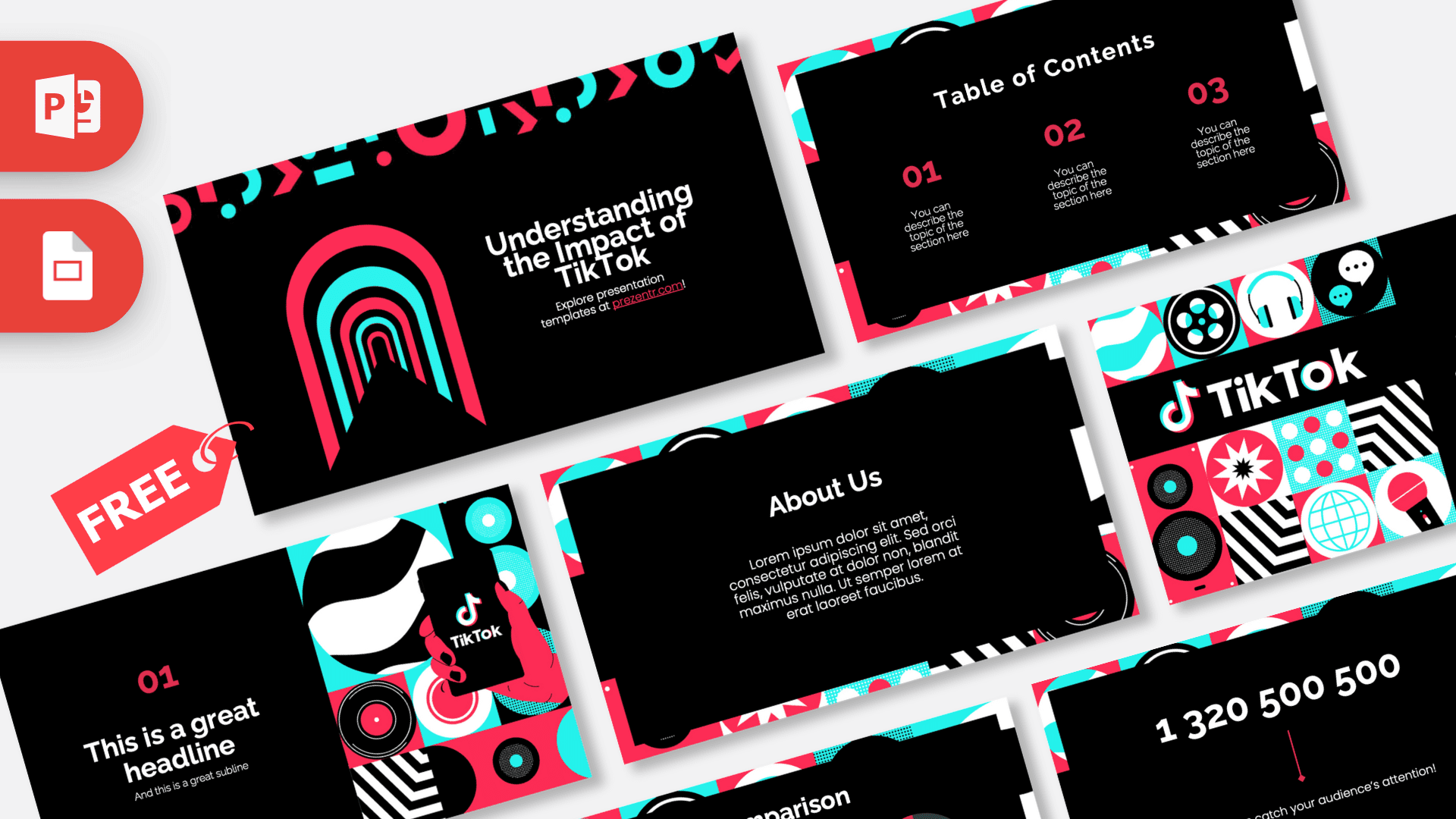
This free TikTok PowerPoint template turns the app's look into a bold, 10-slide presentation: deep black backgrounds framed by hot pink and bright cyan graphics, with plenty of retro patterns, icons and illustrations. It opens with a ready-made "Understanding the Impact of TikTok" title, so you can start talking about trends, creators or short video marketing in minutes. It works in PowerPoint and Google Slides and comes in widescreen 16:9.
What's Inside
Every slide follows the same recipe: a black content area surrounded by a collage border of pink, cyan, white and black shapes. Here is what you get, in order:
- Title slide: a neon arch "tunnel" in pink and cyan on the left, a row of playful geometric shapes along the top, and a big white headline on the right. A strong opener for any social media talk.
- Table of Contents: three numbered sections (01, 02, 03) in pink, each with a short description line. Use it to map out your agenda.
- Section title: the TikTok logo sits on top of a grid of icons, including a film reel, headphones, chat bubbles, a speaker, a globe, a microphone, polka dots and zebra stripes. Good for opening a new chapter.
- Headline slide: a large "01" number with a headline and subline, next to an illustration of a hand holding a phone with the TikTok logo, surrounded by vinyl records and patterns.
- About Us: a centered heading and a paragraph block for your story, team intro or project background.
- Four Bullet Points: a 2 x 2 grid of numbered points in pink, handy for features, steps or key findings.
- Five Bullet Points: a title block plus five labeled points (ONE to FIVE) for longer lists, such as content pillars or campaign phases.
- Quote slide: pink quotation marks framing a short statement. Use it for a creator quote, a user review or your main takeaway.
- Big number slide: one oversized figure with a small arrow and caption. Perfect for follower counts, views or engagement numbers.
- Comparison: two donut charts with percentages and a large "Vs" in the middle, made for side-by-side stats like two campaigns, two platforms or before and after.
Design and Style
The palette borrows the colors people connect with the app: black, a warm pink-red and an electric cyan, with white text for contrast. The borders mix bold flat illustrations with retro graphic patterns, so each slide feels energetic while the black center keeps your text easy to read. Headings use a clean, rounded sans serif with a confident, friendly feel, and numbers are set large in pink to guide the eye. The overall mood is fun and modern, but the layouts are tidy enough for a classroom report or a marketing meeting. The TikTok logo appears on the section slide and in the phone illustration, and the rest of the deck stays generic, so you can reuse it for related topics without changing much. If you need a few extra slides, duplicate the existing ones rather than starting from a blank layout, so the pink and cyan border stays consistent from start to finish.
Who Is This Template For?
- Students writing a report on social media, digital culture or the influence of short video apps.
- Teachers who want a lesson on online safety, media literacy or screen time to feel familiar to their class.
- Social media managers and marketers pitching a TikTok strategy, a content calendar or campaign results.
- Content creators putting together a media kit, a brand collaboration pitch or a channel update.
- Small businesses planning how to show their products in short videos.
- Event hosts running a trend-themed party, quiz night or school club presentation.
How to Customize It
You do not need design skills to make this TikTok PowerPoint template your own. All text sits in normal placeholders and text boxes, so editing is quick:
- Replace the text: click any headline or paragraph and type your own. The sample text is placeholder copy and can be deleted freely.
- Swap images: if you add your own screenshots or photos, right-click a picture and choose Change Picture to keep its size and position.
- Update the charts: change the percentages in the comparison donuts and the big number to match your data.
- Recolor elements: select a shape and use Shape Fill to switch pink and cyan accents to your own brand colors if needed.
- Reorder or duplicate slides: drag thumbnails in the slide panel, or right-click and choose Duplicate Slide when you need more bullet or quote slides.
- Add motion: use the Transitions and Animations tabs if you want your points to appear one by one.
In Google Slides: upload the PPTX to Google Drive and open it with Google Slides, or use File, then Import slides in an existing presentation. Edit text the same way, and use Replace image from the right-click menu to swap pictures.
Presentation Ideas
- How TikTok changed the way people discover music and trends.
- A TikTok marketing plan for a local business, with content ideas and goals.
- Screen time and well-being: a class discussion on healthy social media habits.
- A creator media kit showing audience numbers, content themes and past collaborations.
- Comparing short video platforms: reach, audience and content style.
- A monthly social media report with your best performing posts and key numbers.
Because the slides are clearly organized, this TikTok PowerPoint template also make a solid base for any talk about online trends, influencers or digital advertising.
Related Templates
Building a full social media series? Pair this TikTok PPT template with the Instagram PowerPoint Template, the YouTube PowerPoint Template and the Snapchat PowerPoint Template. For strategy-focused decks, try the Social Media Marketing PowerPoint Template, or browse more brand designs in our brands and companies collection.
Frequently asked questions
- Is the TikTok PowerPoint template really free?
- Yes. You can download it from Prezentr at no cost and use it for school, work or personal presentations. It is a fan-made design and is not affiliated with or endorsed by TikTok.
- How many slides are in the TikTok template?
- The design shown in the previews has 10 slides: a title, table of contents, section title, headline slide, About Us, two bullet point layouts, a quote, a big number slide and a comparison slide.
- Can I open this TikTok theme in Google Slides?
- Yes. Upload the PPTX file to Google Drive and open it with Google Slides. The layouts, colors and text stay editable there.
- Can I change the pink and cyan colors?
- Yes. Select any shape or text and pick a new fill or font color. The black backgrounds and accent shapes are regular PowerPoint elements.
- Is this a good template for a school project about social media?
- It works well for that. The table of contents, bullet slides and big number slide give you a clear structure for a report on social media, trends or online safety.
- How do I download the template?
- Click the download button on this page to get the file, unzip it if needed, and open the PPTX in PowerPoint or upload it to Google Slides.
This is a fan-made template inspired by TikTok PowerPoint Template. Prezentr is not affiliated with, endorsed by, or selling assets from TikTok PowerPoint Template. All brand names, logos, and trademarks belong to their respective owners.