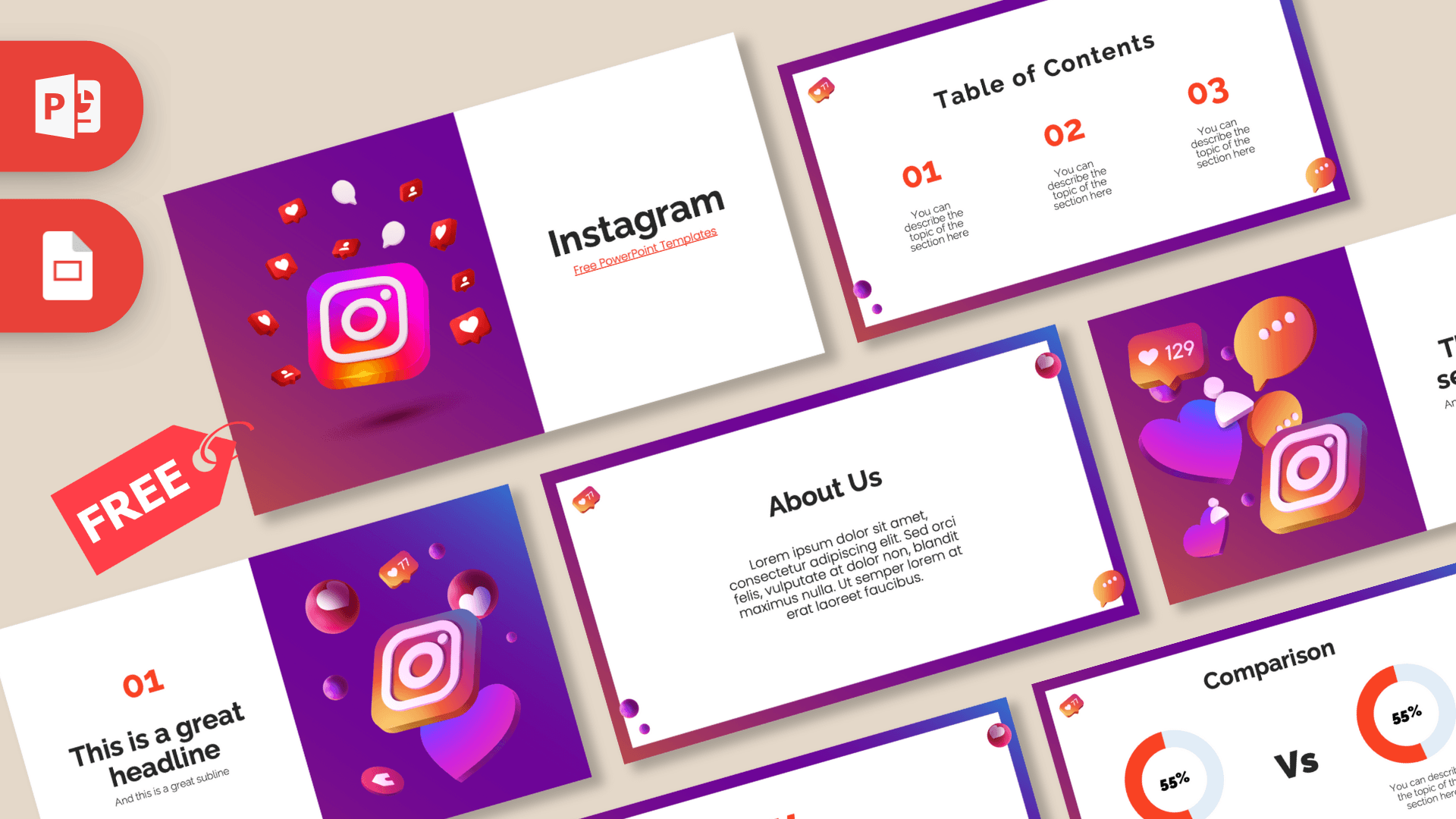
This free Instagram PowerPoint template is a 10-slide deck inspired by the app's famous purple, pink and orange gradient, with glossy 3D camera icons, hearts, like counters and chat bubbles floating across the cover and divider slides. Content slides use crisp white cards inside a gradient frame, so your ideas stay readable while the whole deck still feels unmistakably social. It works in PowerPoint and Google Slides and is a quick way to make any social media talk look current.
What's Inside
The download has 10 slides in 16:9 format, covering the layouts you need for a short pitch, a class talk or a monthly report.
- Title slide: a split layout with a 3D camera icon surrounded by red like, comment and follower bubbles on a purple gradient, and the title on a clean white panel.
- Table of contents: three numbered sections in red-orange, each with a short description.
- Section title: a big 3D heart, speech bubbles, a "129" like counter and the camera icon on the left, with a heading on the right.
- Headline slide: a red "01" and headline on white, with a tilted camera icon, floating hearts and a balloon-style heart on the gradient side.
- About Us: a centered text card for introducing your brand, team or topic.
- Five bullet points: ONE to FIVE in red-orange capitals with short descriptions, good for tips, features or steps.
- Quote slide: bold quotation marks around a short statement or customer review.
- Big number: one huge figure with an arrow down to a caption, ideal for follower counts or reach.
- Comparison: two donut charts showing percentages side by side with a large "Vs" between them.
- Calendar: a full month grid with three highlighted dates and notes, made for a content calendar or campaign schedule.
Design and Style
The look is built around a smooth gradient that moves from deep purple through magenta to warm orange, the color story most people connect with Instagram. On the content slides that gradient becomes a thin frame around a white card, and small glossy accents sit in the corners: a heart bubble, a chat bubble and a few purple spheres. These little touches keep the theme going without getting in the way of your text.
The 3D illustrations are shiny and rounded, with soft shadows that make them look like app icons floating in space. Red-orange is the accent color for numbers, labels, quote marks and the donut charts. Headings use a bold, modern sans serif, and body text is light and easy to scan. The mood is bright, upbeat and modern, closer to a creator's media kit than a corporate report.
Because the decorations stay at the edges, the white cards give you plenty of room for screenshots, charts and short captions. A good rule is to keep one idea per slide, the way a strong Instagram post focuses on a single message, and let the gradient frame do the branding work for you.
This is a free, brand-inspired design made by Prezentr. It is not an official Instagram or Meta template and is not endorsed by either company.
Who Is This Template For?
- Social media managers presenting monthly results, content plans or campaign ideas.
- Content creators and influencers building a simple media kit or a pitch for brand partners.
- Marketing students preparing a case study or class presentation on social platforms.
- Small business owners planning how to promote a shop, cafe or service online.
- Teachers running a lesson on digital literacy or online safety for teens.
- Agencies that need a quick, recognizable deck for a client kickoff.
How to Customize It
Open the Instagram PPT template in PowerPoint and click any placeholder to replace the text. To change a 3D illustration, right-click it and choose Change Picture, or delete it and insert a screenshot of your own profile or posts. The donut charts are made of shapes, so you can adjust the colored arc and type in your own percentages.
For the calendar, retype the dates to match your month, then move or recolor the three highlight squares and edit the notes beside them. To change the accent color, select a text box or shape and use Font Color or Shape Fill; a purple or pink accent also looks good with the gradient. Duplicate slides you use often by right-clicking them in the thumbnail panel, and drag slides to set your order. The theme fonts in the file are Calibri and Calibri Light, so the text will look the same on almost any computer.
If you plan to present on a phone or share the file as a PDF, keep your Instagram slides short and visual. Export from PowerPoint with File, then Save As, and choose PDF to get a version you can send to clients who do not use PowerPoint.
To use the deck as an Instagram Google Slides theme, open Google Slides, choose File, then Import slides or Open, and upload the PowerPoint file. Text and images stay editable, and you can share a link with your team to review the content plan together.
Presentation Ideas
- A monthly social media report with follower growth on the big number slide and engagement compared on the donut charts.
- A content calendar for a product launch, with key posting dates highlighted on the calendar slide.
- A creator media kit covering who you are, your audience and the kinds of collaborations you offer.
- A class presentation on how social media changed marketing, split into three sections.
- An online safety workshop for students, with five simple tips on the bullet points slide.
- A pitch for a small business explaining why it should start posting regularly.
Related Templates
Looking for more social media designs? Try the TikTok PowerPoint Template, the Facebook PowerPoint Template, the Snapchat PowerPoint Template and the Social Media Marketing PowerPoint Template. You can also browse all brands and companies templates.
Frequently asked questions
- Is the Instagram PowerPoint template free?
- Yes, it is free to download from Prezentr. It is brand-inspired and not an official Instagram or Meta product.
- How many slides are in the Instagram template?
- The current version has 10 slides: title, table of contents, section title, headline, About Us, five bullet points, quote, big number, comparison and calendar.
- Does the Instagram template work in Google Slides?
- Yes. Import the PowerPoint file into Google Slides through File, then Import slides or Open, and everything stays editable.
- Can I use it as a social media content calendar?
- Yes. The calendar slide has a full month grid with three highlighted dates and notes that you can change to match your posting plan.
- Can I add my own Instagram screenshots?
- Yes. Right-click any illustration and choose Change Picture, or insert your screenshots on any white content card.
- Are there animations in the Instagram slides?
- No, the slides are static, which keeps them light. You can add animations yourself from the Animations tab in PowerPoint.
This is a fan-made template inspired by Instagram PowerPoint Template. Prezentr is not affiliated with, endorsed by, or selling assets from Instagram PowerPoint Template. All brand names, logos, and trademarks belong to their respective owners.
Previous version
This is an updated version of the Instagram PowerPoint Template, redesigned in April 2024. The original version is still available here: