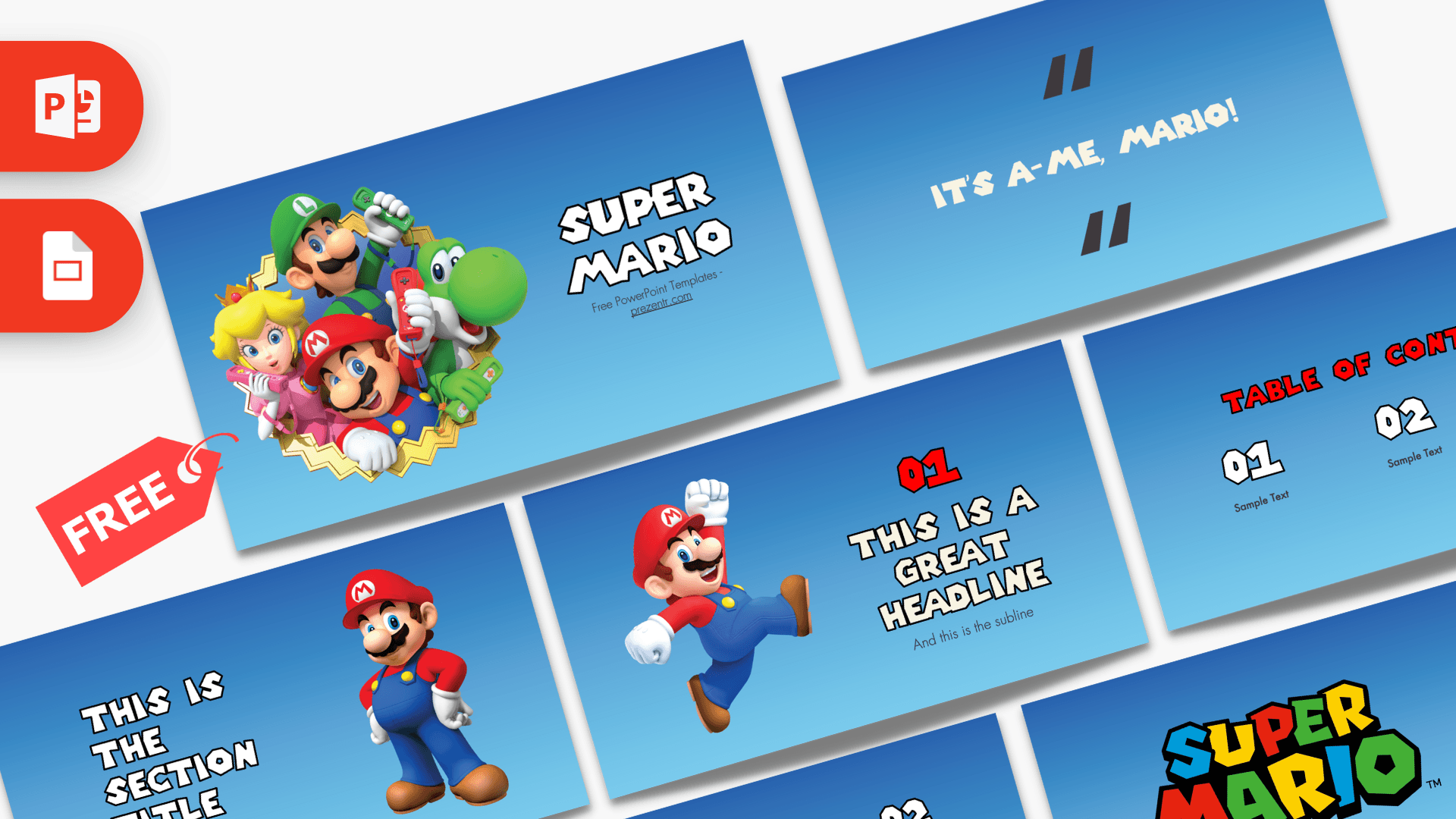
The Super Mario PowerPoint Template is a free, fan-made 10-slide deck with a bright sky-blue background, chunky game-style headlines and big character art of Mario, Luigi, Princess Peach and Yoshi. It covers everything a typical presentation needs, from a table of contents and section titles to bullet points and a big-number slide. It works in PowerPoint and as a Google Slides theme, so you can jump right in.
What's Inside
All 10 slides share the same blue gradient, so the deck looks consistent no matter how you rearrange it:
- Slide 1, Title: Mario, Luigi, Princess Peach and Yoshi burst out of a gold star frame on the left, with a big "Super Mario" title on the right.
- Slide 2, Table of contents: three numbered sections (01, 02, 03) with a short label under each.
- Slide 3, Section title: a large section heading and subtitle next to Mario standing with his hands on his hips.
- Slide 4, Quote: oversized quotation marks around Mario's famous catchphrase. Swap in a quote of your own.
- Slide 5, Headline: a numbered "great headline" slide with a subline and Mario mid-jump with his fist in the air.
- Slide 6, Text slide: a title on the left with bullet points on the right. The sample text notes which fonts the template uses.
- Slide 7, Four bullet points: a 2 by 2 grid of numbered points under a red heading.
- Slide 8, Five bullet points: a heading on the left and five numbered points in two rows.
- Slide 9, Big numbers: one huge figure with an arrow and a caption, perfect for a key stat.
- Slide 10, Closing logo: the colorful Super Mario logo centered on blue for a strong ending.
With ten different layouts, the Super Mario slides can carry a full presentation. A typical flow is title, table of contents, then one section title per chapter followed by headline, bullet and big-number slides. Duplicate the layouts you use most so every chapter looks the same.
Design and Style
The background is a smooth vertical gradient from deep blue at the top to light sky blue at the bottom, which feels like a sunny level in the game. Headings use a blocky, outlined display font that mimics the Super Mario logo, set in white or bright red. Body text uses Futura, a clean geometric sans serif.
The character art is bright, glossy 3D-style illustration rather than pixel art. Mario appears in several poses, and the title slide shows the whole gang together. The bold red accents in the headings echo Mario's cap and shirt, and the multicolored logo on the last slide brings in red, yellow, green and blue.
The deck tells you which fonts it uses: Futura and a Super Mario style display font. For the best results, install them before editing; otherwise PowerPoint will substitute a default font. This is a fan-made template inspired by the games and is not official or endorsed by Nintendo.
Contrast tip: white text reads best on the darker top half of each slide, while dark text works better near the lighter bottom. The red headings stand out well, so save red for titles and key words rather than long paragraphs.
Who Is This Template For?
- Students presenting a school project, a hobby report or a class talk about video games.
- Teachers who want to grab attention for a lesson on game design, storytelling or the history of video games.
- Parents planning a Super Mario themed birthday party slideshow or invitation.
- Gaming clubs and streamers announcing a tournament, a stream schedule or a game night.
- Nintendo fans making a fun ranking, a character guide or a quiz.
- Office teams looking for a playful theme for a team-building quiz or a celebration.
Because the slides cover the basics of any talk, the deck works well beyond gaming topics too. A science report or book summary feels a lot more fun when Mario jumps in to introduce each section.
How to Customize It
In PowerPoint:
- Install the fonts first: slide 6 names the two fonts used. Install them so the headlines keep their game look.
- Replace the text: click any placeholder, such as "Sample Text" or "This is a great headline", and type your content.
- Change pictures: right-click a character image and choose Change Picture to swap in your own image.
- Recolor headings: select a heading and use Font Color. The Eyedropper lets you pick the exact red or blue already in the deck.
- Reorder and duplicate: drag thumbnails in the left panel, or right-click a slide and choose Duplicate Slide to add more sections or bullet slides.
- Add motion: the template is not animated, so add your own transitions, for example a Push transition between sections.
In Google Slides: upload the PPTX file to Google Drive and open it with Google Slides. If the custom fonts are not available there, pick a bold display font from the font menu for the headings.
Presentation Ideas
- The history of Super Mario games, level by level
- Meet the characters: Mario, Luigi, Peach and Yoshi
- How video game levels are designed
- Super Mario birthday party plan and game schedule
- Gaming club tournament rules and brackets
- A class quiz with numbered questions and a big-number reveal
For a quiz or game night, use the table of contents as a "world map" of rounds, the section title slides as level intros and the big-number slide to reveal scores. Kids especially love it when the presentation itself feels like a game, and the familiar characters do half the work of keeping everyone's attention.
Related Templates
More game themes to try: the Nintendo Switch PowerPoint Template, the Pokemon PowerPoint Template, the Sonic PowerPoint Template and the Roblox PowerPoint Template. Or browse all Games templates.
Frequently asked questions
- Is the Super Mario PowerPoint template free?
- Yes, you can download all 10 slides for free on Prezentr. It is a fan-made template and not an official Nintendo product.
- How many slides are in the Super Mario template?
- There are 10 slides: a title slide, table of contents, section title, quote slide, headline slide, text slide, two bullet point layouts, a big-number slide and a closing logo slide.
- Can I use the Super Mario template in Google Slides?
- Yes. Upload the PPTX to Google Drive and open it with Google Slides. The headline font may be replaced if it is not available in Google Slides.
- Which fonts does the Super Mario template use?
- The deck uses Futura and a Super Mario style display font, as noted on slide 6. Install both before editing for the best look.
- Is the Super Mario template animated?
- No, the slides are static. You can add your own transitions and animations in PowerPoint.
- Which Mario characters appear on the slides?
- Mario, Luigi, Princess Peach and Yoshi appear on the title slide, and Mario appears in several poses on other slides.