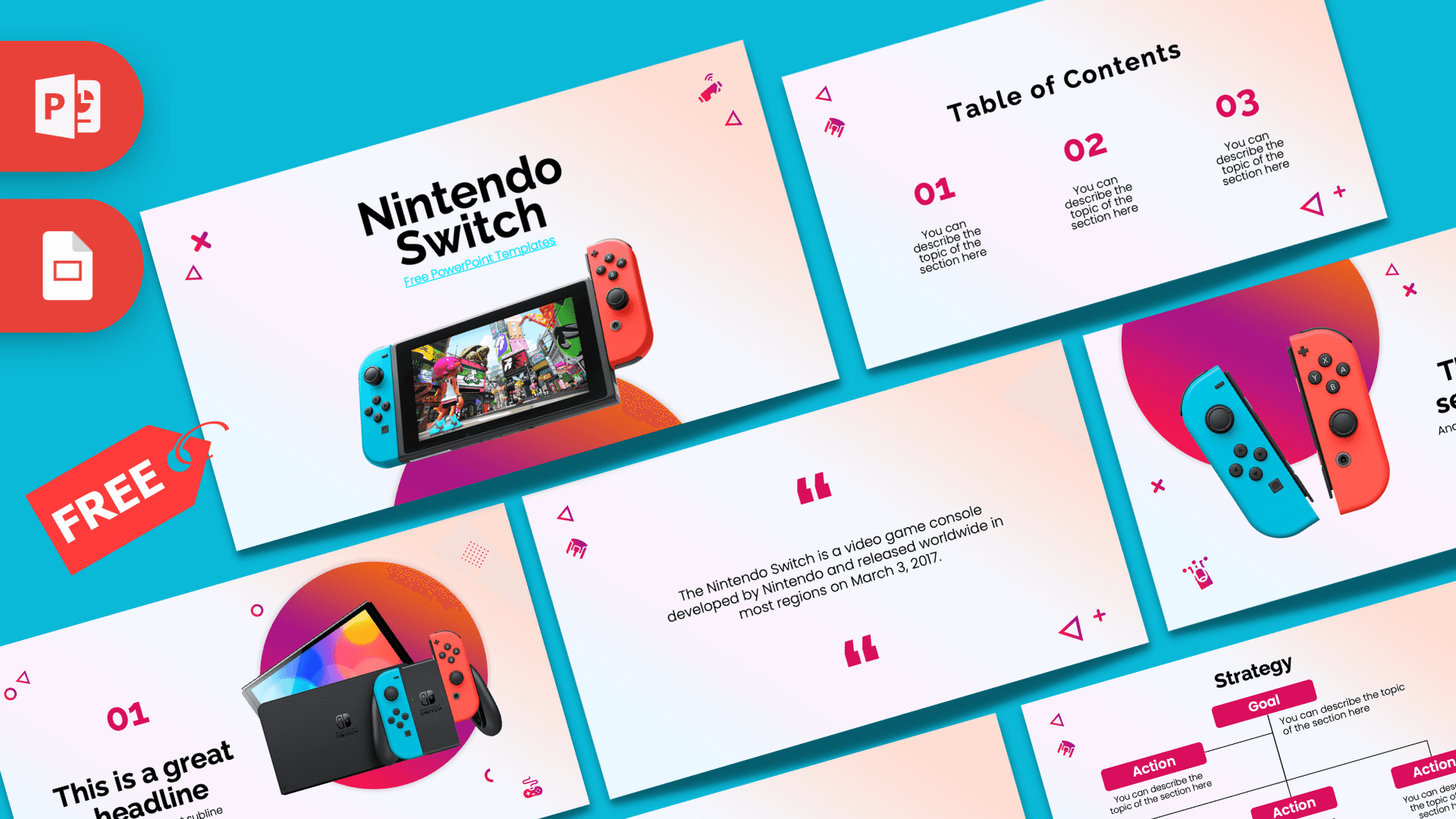
The Nintendo Switch PowerPoint template is a free 10-slide deck built around the console's famous neon blue and neon red Joy-Con colors. Bright product photos of the Switch sit on soft white-to-peach backgrounds with magenta-to-orange gradient circles, and small game-themed icons like controllers, triangles and crosses add a playful touch. It works in PowerPoint and Google Slides.
What's Inside
The Nintendo Switch PowerPoint template gives you a complete set of layouts for a gaming talk, from the cover to the numbers:
- Title slide: a bold "Nintendo Switch" heading with a cyan link line, above a photo of the console with blue and red Joy-Cons attached and a colorful game on screen.
- Table of Contents: three numbered sections (01, 02, 03) in magenta with short descriptions.
- Section title: a large photo of two Joy-Con controllers, one blue and one red, over a gradient circle, beside your heading and subtitle.
- Headline slide: a magenta "01," a big headline and a subline next to a photo of the console standing in its dock.
- About Us: a centered heading and paragraph, ideal for an introduction or summary.
- Numbered bullet points: five items labeled 01 to 05 in a grid with a heading.
- Quote slide: big magenta quotation marks around a short line of text. The sample text is a one-sentence description of the console, which you can replace.
- Word bullet points: five items labeled ONE to FIVE in magenta, for a slightly more playful list.
- Strategy: a tree diagram with a magenta Goal box and four Action boxes, useful for plans, roadmaps or project steps.
- Big numbers: one large figure with a caption and a thin arrow, for a key stat such as players, scores or sales.
All placeholder text is either lorem ipsum or short instructions like "You can describe the topic of the section here," so you know exactly what to replace. The photo-heavy slides work best as openers and section breaks, while the text slides carry your main points.
Design and Style
The backgrounds are bright and airy, fading from white and pale lilac into soft peach. Against that, the deck uses hot magenta for numbers, labels and diagram boxes, while large gradient circles in purple, pink and orange sit behind the product photos. The cyan and red Joy-Cons tie it all back to the console.
Typography is a modern, geometric sans-serif with heavy headings and light body text, which feels clean and easy to read. Small line icons of game controllers and outlined shapes (triangles, crosses, circles and plus signs) are scattered in the corners, giving the slides an arcade feel without getting busy. The overall style is playful but still tidy enough for a professional pitch.
Because the backgrounds are light, this Nintendo Switch PPT template is easy to read on a projector and in a bright classroom, and it prints without wasting ink. The bright accents keep the energy high, so you do not need extra clip art or stickers to make it feel like a gaming deck.
The same small set of colors repeats on every slide, which keeps the whole presentation consistent even when you add your own screenshots.
Who Is This Template For?
The Nintendo Switch slides are flexible enough for a fun school talk and polished enough for a client or team pitch.
- Students presenting on video games, game design or the history of consoles.
- Gaming clubs and esports groups planning a tournament or club meeting.
- Game developers and indie studios pitching a game idea or showing a project roadmap.
- Marketers and retail teams preparing a product launch or tech review.
- Parents and party planners hosting a gaming birthday party or game night.
- Tech reviewers and bloggers who want a bright, product-focused layout for a hardware or accessory review.
How to Customize It
- Edit the text. Click any heading, number or description and type your own content.
- Change the photos. Right-click the console or controller images and choose Change Picture to show your own game screenshots or products.
- Recolor accents. Select a magenta box or number and change the fill or font color to match your brand or favorite game.
- Edit the Strategy diagram. Rename the Goal and Action boxes, or copy a box and its connector line to add another step.
- Reorder slides. Drag slides in the left panel or duplicate the ones you use most.
In Google Slides, upload the PPTX file to Google Drive and choose Open with Google Slides. The layouts, photos and shapes carry over, and you can swap fonts from the toolbar if needed.
When you finish, export a PDF from the File menu if you need to share the deck online or print handouts. The light backgrounds keep printing costs low, and the bright magenta accents still look sharp on paper.
Presentation Ideas
- A review of your favorite Nintendo Switch games, one per bullet point.
- A class talk on how handheld and home consoles have changed over time.
- A pitch for an indie game, with the Strategy slide as your development plan.
- Rules and bracket for a school or club gaming tournament.
- A family game night or gaming birthday party schedule.
- A school project on screen time and healthy gaming habits.
- A product comparison of handheld consoles, using the five-point layouts for features.
Tip: if you are reviewing games, put a screenshot on each section slide using Change Picture, and use the five-point layouts for pros and cons. The big numbers slide is perfect for a single standout figure, such as hours played or a high score.
For a longer talk, duplicate the section and headline slides to introduce each game or topic with its own image.
Related Templates
If you like this Nintendo Switch PowerPoint template, see more consoles and games in the Super Mario PowerPoint Template, the Animated Pokemon GO PowerPoint Template, the PlayStation 5 PowerPoint Template and the Game Development PowerPoint Template. Or browse every games template.
Frequently asked questions
- Is the Nintendo Switch PowerPoint template free?
- Yes, it is free to download from Prezentr. It is a fan-made design and is not an official Nintendo product.
- How many slides are in the Nintendo Switch template?
- There are 10 slides, including a title, table of contents, section and headline slides with console photos, two bullet layouts, a quote, a Strategy diagram and a big numbers slide.
- Can I use the Nintendo Switch template in Google Slides?
- Yes. Upload the file to Google Drive and open it with Google Slides. The photos, shapes and layouts carry over.
- Can I replace the console photos with game screenshots?
- Yes. Right-click any photo, choose Change Picture and pick your own image. It keeps the same size and position on the slide.
- Is the template animated?
- No, the slides are static. You can add animations and transitions in PowerPoint if you want movement.
- Is this template good for a game pitch?
- Yes. The Strategy diagram, bullet layouts and big numbers slide work well for a game concept, roadmap and key figures.