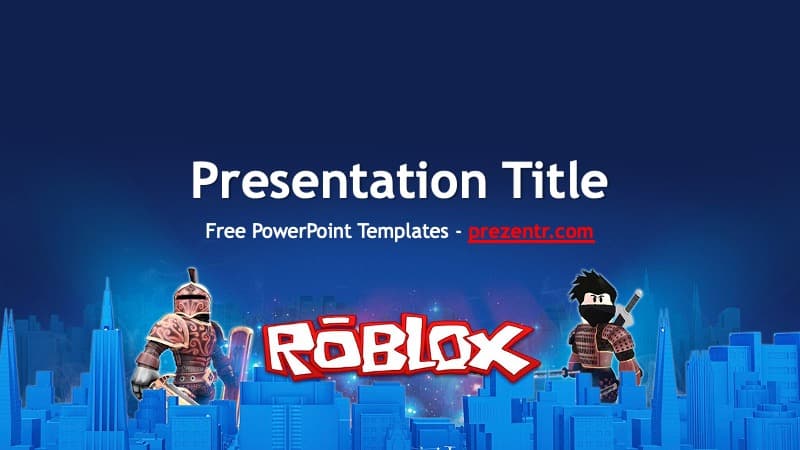
The Roblox PowerPoint Template is a free, fan-made 2-slide design with a dark blue background, a glowing blue cityscape and a crowd of blocky Roblox avatars. The title slide puts the red and white Roblox logo front and center between two armored characters, while the content slide lines up eight avatars along the bottom edge. It works in PowerPoint and as a Google Slides theme, so it is a quick pick for school projects, game nights and fan presentations.
What's Inside
This is a background-style template: two well-designed slides you can duplicate as often as you need, plus the standard PowerPoint layouts. Here is what you get:
- Title slide: a large white "Presentation Title" with a subtitle line, sitting above a bright blue skyline. The Roblox logo sits in the middle of the city, with an armored warrior character on the left and a ninja-style character on the right.
- Content slide: the same dark navy sky fading into a blue city, with eight different avatars standing in a row at the bottom. The top two thirds of the slide stay clear for your heading, bullet points, screenshots or charts.
- Standard layouts: the slide master includes Title Slide, Title and Content, Section Header, Two Content, Comparison, Title Only, Blank, Content with Caption and Picture with Caption, so new slides keep the Roblox background.
Two slide designs might sound minimal, but for most game-themed presentations it is all you need: one strong opener and one clean content page you can repeat.
A simple structure for a kid-friendly deck: start with the title slide, add an "about me" or agenda slide, then use one content slide per idea with a short heading and a screenshot. End with a fun closing slide, for example a question for the class or a screenshot of your favorite game. Because the avatars sit at the bottom, place pictures and text in the upper part of each slide so nothing overlaps the characters.
Design and Style
The look is playful but tidy. A deep navy sky at the top gradually turns into an electric blue city with tall towers and blocky buildings, which nods to the build-anything world of the game. The avatars on the content slide are a mix of styles: a little robot, a pink-haired avatar, a pirate, a classic yellow avatar and a golden knight, among others. Together they make the deck feel lively without crowding your text.
Titles are set in Trebuchet MS in white, which reads clearly on the dark background. The red Roblox logo on the title slide adds a strong accent color, so a touch of red in your headings or charts will tie everything together.
This is a fan-made template inspired by the game. It is not an official Roblox product and is not endorsed by Roblox Corporation.
Tip for screenshots: take them at full screen and crop them in PowerPoint with Picture Format, then Crop. A thin white or red outline around each screenshot helps it stand out from the dark blue background and matches the colors of the logo.
Who Is This Template For?
- Kids and students presenting a school project, an "about me" deck or a favorite hobby.
- Teachers who want a familiar theme to make a lesson on coding, game design or digital safety more engaging.
- Coding clubs and camps introducing Roblox Studio, building challenges or team projects.
- Parents putting together a Roblox birthday party slideshow or invitation.
- YouTubers and streamers planning content, pitching a series or recapping a gaming event.
- Game creators showing off an experience they built and explaining how it works.
Because the template only has two designs, it is also easy for younger students to use on their own. There are no complex layouts to break, and every new slide automatically keeps the Roblox look.
How to Customize It
In PowerPoint:
- Change the text: click the title or subtitle placeholder and type your own words. Keep text white or light for contrast.
- Add slides: right-click the content slide in the left panel and choose Duplicate Slide, or use Home, then New Slide, and pick a layout.
- Insert screenshots: use Insert, then Pictures. To replace a picture later without losing its size, right-click it and select Change Picture.
- Recolor accents: use the Eyedropper to grab the red from the logo or the bright blue from the city for shapes, icons and chart bars.
- Reorder: drag slides in the thumbnail panel or open Slide Sorter.
- Add motion: the template is not animated, but you can add simple transitions or a Fly In effect on bullet points from the Animations tab.
In Google Slides: upload the PPTX to Google Drive, open it with Google Slides, then edit the text boxes as usual. Use Insert, then Image, to add screenshots, and right-click an image and choose Replace image to swap it.
Presentation Ideas
- My favorite Roblox games and why I love them
- Intro to Roblox Studio: how to build your first game
- Staying safe online: tips for young gamers
- How game creators earn and what it takes to build a popular experience
- Roblox birthday party slideshow with photos and games
- Coding club showcase: what each team built this term
Teachers can also turn the Roblox PowerPoint template into a quiz: put one question on each content slide, add the answer on the next slide, and let students vote before you reveal it. Kids who already know the game will recognize the avatar style right away, which makes it easier to keep them focused for the whole lesson.
Related Templates
Looking for more game themes? Try the Minecraft PowerPoint Template for another block-building world, the Fortnite PowerPoint Template, the Among Us PowerPoint Template or the Super Mario PowerPoint Template. Or browse all Games templates.
Frequently asked questions
- Is this Roblox PowerPoint template free?
- Yes, it is free to download from Prezentr. It is a fan-made design for school, personal and fan use and is not an official Roblox product.
- How many slides are in the Roblox template?
- There are 2 designed slides: a title slide with the Roblox logo and two characters, and a content slide with eight avatars along the bottom. You can duplicate the content slide as many times as you like.
- Can I use the Roblox template in Google Slides?
- Yes. Upload the PPTX file to Google Drive and open it with Google Slides to edit it there.
- Can I change the characters on the slides?
- The characters are part of the slide backgrounds, so they are not separate objects you can drag around. You can add your own avatar screenshots on top with Insert, then Pictures.
- Is the Roblox template good for a kids' school project?
- Yes, the bright blue theme and familiar avatars make it a fun choice for school presentations, coding lessons and class showcases.
This is a fan-made template inspired by Roblox PowerPoint Template. Prezentr is not affiliated with, endorsed by, or selling assets from Roblox PowerPoint Template. All brand names, logos, and trademarks belong to their respective owners.