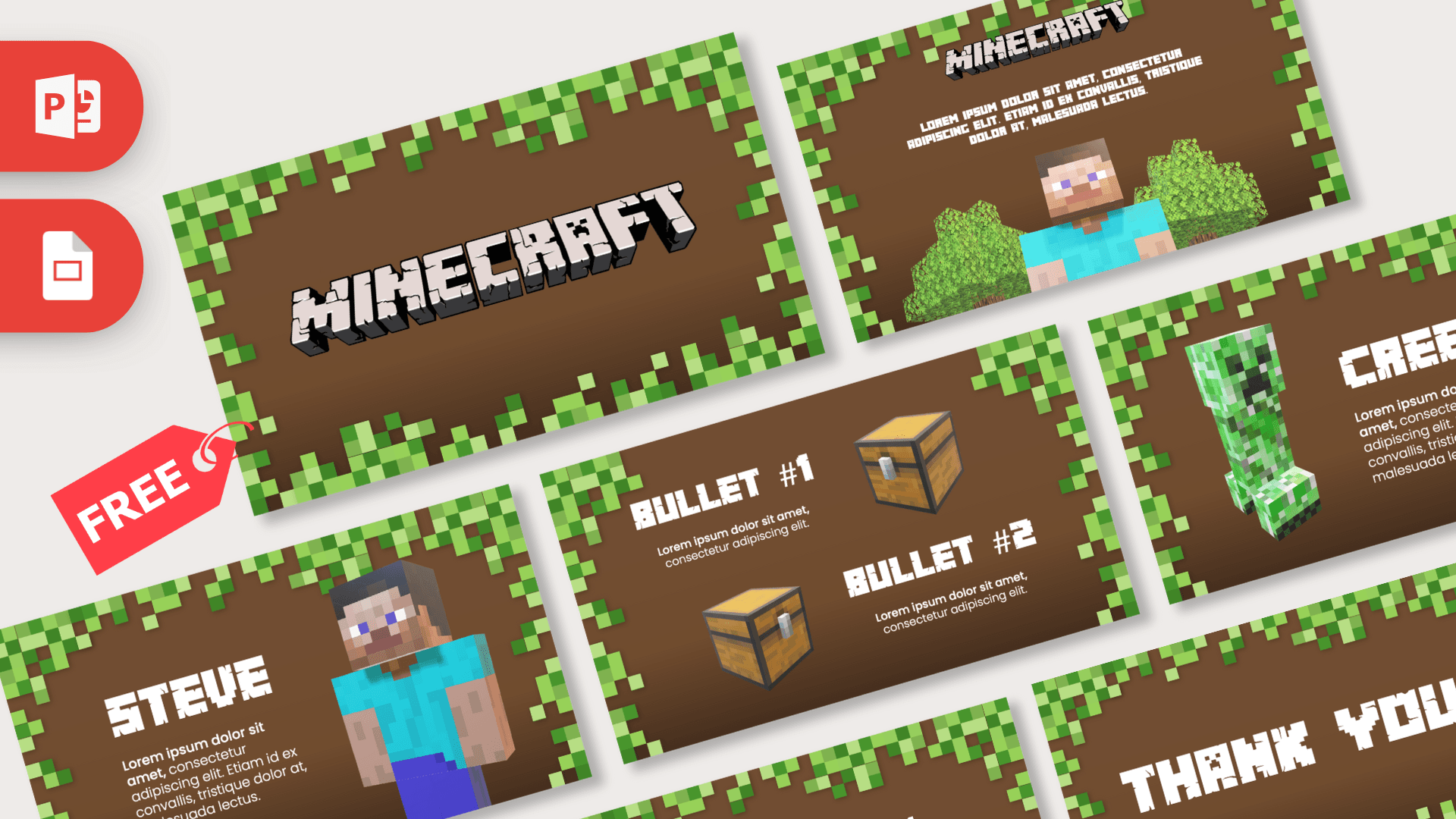
The Minecraft PowerPoint template is a free, animated 9-slide deck with a warm brown, dirt-colored background framed by blocky green grass pixels. It features 3D models of Steve, a Creeper, leafy trees and treasure chests that glide between slides with Morph transitions, so the deck feels like you are walking through the game. Use it in PowerPoint for the full animated effect, or open the Google Slides version for a simpler take.
What's Inside
The nine slides tell a short story from the opening logo to a closing thank you, and each one has a clear job:
- Title slide: the Minecraft logo in chunky cracked-stone letters, centered on brown with a pixel grass border.
- Logo and Steve: the logo at the top with a 3D Steve standing between two blocky oak trees, a good "welcome" slide.
- Intro text: a short paragraph set in the pixel-style Minecrafter font above Steve, who moves closer to the viewer. Great for a one-line summary of your topic.
- Intro: a 3D tree on the left and an "Intro" heading with a paragraph on the right, perfect for background information.
- Steve: a character slide with Steve and a text block, ready for a profile, a fact file or a "meet the presenter" moment.
- Creeper: the green Creeper with its own heading and paragraph, ideal for describing a mob, a challenge or a problem to solve.
- Tasks: two 3D wooden chests next to a "Tasks" heading, useful for goals, homework or a to-do list.
- Bullet #1 and Bullet #2: two short points, each paired with a chest, for comparisons or two key takeaways.
- Thank You: a closing slide with large pixel lettering.
Design and Style
The background is a rich chocolate brown that fades slightly darker toward the bottom, like the dirt under a grass block. Around the edges, square pixels in several shades of green form a frame, so every slide instantly reads as Minecraft even before the characters appear.
Headings use Minecrafter, a blocky display font that mimics the game's lettering, and body text uses Poppins for clean, readable paragraphs. The text is white, which stands out well against the dark brown.
The stars of the show are the 3D models. Steve, the Creeper, the trees and the chests are real 3D objects in the PowerPoint file, not flat pictures. Combined with Morph transitions, they slide, turn and resize as you move from one slide to the next, giving the deck a playful, game-like feel. You can see the motion in the preview video on this page.
The layouts are deliberately simple: one character or object on one side, one heading and one short paragraph on the other. That makes the Minecraft PowerPoint template easy for younger presenters, because there is never too much to fill in, and it keeps the focus on the moving 3D models instead of on dense text.
These Minecraft slides are built for anyone who wants a familiar, game-inspired look that kids recognize in a second. Some of the best fits:
Who Is This Template For?
- Kids and students presenting a school project, a show-and-tell or a "my favorite game" talk.
- Teachers using Minecraft as a hook for lessons on building, coding, geography or teamwork.
- Gaming content creators making top lists, update recaps or build showcases for a stream or video.
- Parents planning a birthday party who want a Minecraft-themed slideshow, schedule or game screen.
- Coding and robotics clubs introducing projects, rules or weekly challenges.
- Fan communities and server owners sharing server rules, events or seasonal tasks with players.
How to Customize It
Editing these Minecraft slides in PowerPoint takes just a few minutes:
- Replace the text. Click on the Lorem ipsum placeholders and headings such as "Intro", "Steve" or "Tasks" and type your own words.
- Keep the animation working. Morph matches objects with the same name on neighboring slides. If you duplicate a slide to make a new one, the models will animate between them automatically, so duplicate instead of deleting and rebuilding.
- Rotate or resize the 3D models. Click a model and drag the rotation handle in the middle to turn it, or drag the corners to resize it. Use the 3D Model tab for preset views.
- Add pictures. Insert your own screenshots or build photos with Insert, then Pictures. For an existing image, right-click and choose Change Picture.
- Reorder slides. Drag thumbnails in the left panel. Morph will animate between whatever slides end up next to each other.
- Install the fonts. Install Minecrafter and Poppins so the titles keep their blocky look.
Morph transitions and 3D models need a recent version of PowerPoint, such as Microsoft 365. In Google Slides, open the Google Slides version, choose File, then Make a copy, and edit the text the same way. Google Slides does not offer Morph, so expect simpler transitions there.
Presentation Ideas
- My favorite Minecraft builds, with one build per slide and a screenshot on each.
- A guide to the most common mobs, starting with the Creeper slide.
- Survival tips for your first night in the game.
- A class lesson on teamwork or problem solving, using the Tasks slide for the challenge.
- Server rules and weekly events for a community or club.
- A top 5 list of game updates, mods or creators you follow.
Tip for any of these topics: plan your talk so each slide introduces one character, object or idea. Because the 3D models move with Morph, every click feels like a small reveal, which helps keep a young audience watching. If you need more than nine slides, duplicate the Steve, Creeper or Tasks slide and change the heading, and the Minecraft PPT template will keep animating smoothly.
Related Templates
Looking for more blocky and gaming designs? Try the Roblox PowerPoint Template, the Fortnite PowerPoint Template, the Among Us PowerPoint Template or the Super Mario PowerPoint Template. For more moving slides, browse all animated templates.
Frequently asked questions
- Is the Minecraft PowerPoint template really free?
- Yes, it is free to download from Prezentr for school, personal and fan projects. It is a fan-made design and is not affiliated with or endorsed by Minecraft or Mojang.
- How many slides does the Minecraft template have?
- The current PowerPoint file has 9 slides: a title, two logo and Steve slides, Intro, Steve, Creeper, Tasks, a two-bullet slide and a Thank You slide.
- Is the Minecraft template animated?
- Yes. It uses Morph transitions and 3D models of Steve, a Creeper, trees and chests, so objects move smoothly from slide to slide in PowerPoint.
- Does the animated Minecraft deck work in Google Slides?
- A Google Slides version is available, so you can edit the slides there. Google Slides does not support Morph transitions, so the full animated effect is a PowerPoint feature.
- Can I change the 3D characters?
- You can rotate, resize, move or delete the 3D models in PowerPoint, and insert other 3D models or pictures in their place from the Insert tab.
- What fonts does the template use?
- Headings use Minecrafter and body text uses Poppins. Install both before editing so the blocky titles display correctly.
Previous version
This is an updated version of the Minecraft PowerPoint Template, redesigned in January 2025. The original version is still available here: