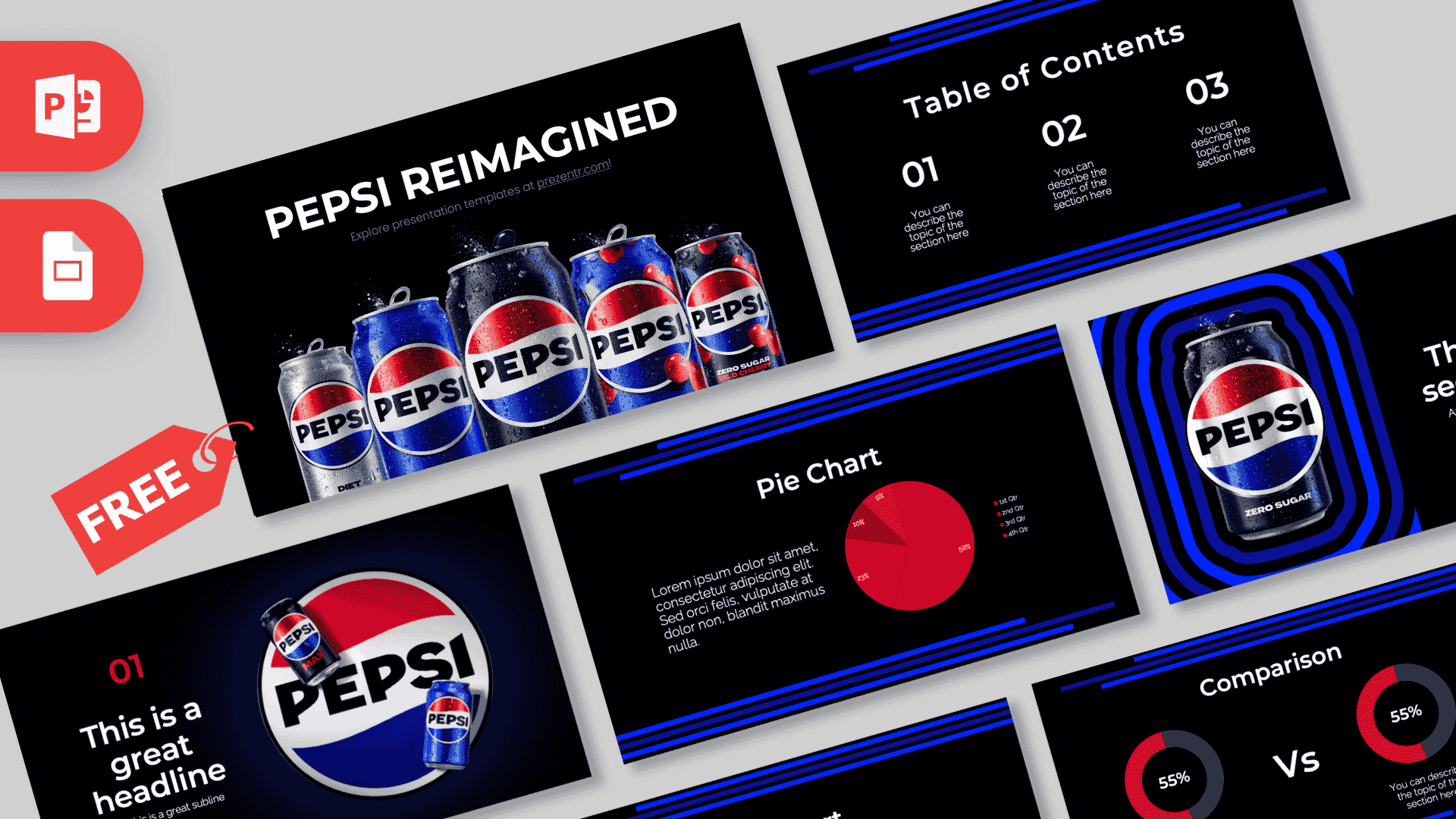
The Pepsi Cola PowerPoint template is a free, fan-made deck of 10 slides with a bold, modern look: deep black backgrounds, stripes of electric blue and bright red accents taken straight from the red, white and blue Pepsi globe. It opens with a Pepsi can glowing against a deep blue background and includes chart slides for real data. It works in PowerPoint and Google Slides, so it is a strong fit for marketing projects, brand case studies and business classes.
What's Inside
The deck balances eye-catching product slides with practical layouts for text and numbers. Here is each slide and how you might use it:
- Title slide: "PEPSI REIMAGINED" in large white capitals above a row of five cans in silver, blue and black, all covered in drops of condensation. Replace the headline with your own title.
- Table of Contents: three large italic numbers with a short description under each, framed by thin blue stripes at the top and bottom.
- Section title: a can of Pepsi Zero Sugar inside glowing concentric blue frames on the left, with a section title and subtitle on the right.
- Numbered headline slide: a red "01", a big italic headline and a subline next to a large Pepsi globe with two cans, set on a dark blue glow. Great for your key message.
- Introduction: a heading and a short paragraph for background, a summary or your main question.
- Five Bullet Points: a heading plus five numbered points in a grid, ideal for lists, steps or findings.
- Quote slide: a centered line of text between big red quotation marks.
- Big number slide: one oversized italic figure with an arrow pointing to a caption, for market share, sales or survey results.
- Pie Chart: a paragraph on the left and a red pie chart with four segments and a small legend on the right.
- Comparison: two donut charts showing percentages, separated by a large "Vs", each with a description underneath. Perfect for brand versus brand or this year versus last year.
A simple flow for a full talk: open with the title, share your agenda on the Table of Contents, and use the section and headline slides to introduce each part. Put your research on the bullet, pie chart and comparison slides, and land your strongest number on the big number slide before you wrap up.
Design and Style
Most slides use a solid black background, which makes the blue and red feel even brighter. Sets of horizontal blue bars run across the top and bottom edges like speed lines, giving the deck a sporty, energetic feel. Red is saved for highlights: numbers, quotation marks and the chart segments.
The typography is a bold, geometric sans serif, often in italics for titles and numbers, which adds a sense of movement. Product photos appear on the title, section and headline slides, showing shiny cans with water droplets and the round Pepsi globe. The rest of the deck stays clean and minimal, so your charts and text are easy to follow. The overall mood is modern, confident and very on brand.
Who Is This Template For?
- Marketing and business students writing a brand case study, a SWOT analysis or a rebranding report.
- Teachers covering advertising, logo design or how companies build a brand identity.
- Market researchers and analysts sharing survey results or competitor comparisons with the chart slides.
- Design students presenting a study of packaging, color and logo changes over time.
- Event and party planners who want a cool, drink-themed look for a sponsor pitch or event recap.
- Office teams who need a sharp, high-contrast style for a sales update or kickoff meeting.
How to Customize It
Here is how to make the deck your own in PowerPoint:
- Replace the text: click the headline, numbers or placeholder text and type. "PEPSI REIMAGINED" can become your project title.
- Change the pictures: right-click a can or logo image and choose Change Picture to use your own product photo or screenshot.
- Update the charts: if the pie and donut charts are native PowerPoint charts, right-click them and choose Edit Data to enter your numbers. If they are shapes, edit the labels and resize the segments by hand.
- Recolor accents: select the blue stripes, red numbers or chart parts and pick new colors from the Home or Format tab. Keep to red, white, blue and black for the classic Pepsi feel.
- Reorder and duplicate slides: drag slides in the thumbnail panel, or right-click and choose Duplicate Slide when you need more sections or comparisons.
- Add motion: there are no built-in animations, so add a Wipe or Fade from the Animations tab if you want the charts or bullet points to appear one by one.
In Google Slides, upload the file to Google Drive and open it with Google Slides. Right-click images and choose Replace image to swap them, and edit text and colors just as you would in PowerPoint.
Presentation Ideas
- Brand case study: the history, products and marketing of a global soft drink brand.
- Cola wars comparison: use the Comparison slide to put two drink brands side by side on taste tests, ads or market share.
- Logo and packaging evolution: a design class talk on how a brand's look changes over the years.
- Sugar and health lesson: compare regular, diet and zero sugar drinks with the chart slides.
- Advertising analysis: what makes a famous ad campaign work, one idea per bullet.
- New flavor pitch: a mock product launch for a business or marketing class.
Related Templates
For more drink brands, try the Coca-Cola PowerPoint Template, the Animated Coca-Cola PowerPoint Template or the Red Bull PowerPoint Template. If your topic is fast food and drinks together, the McDonald's PowerPoint Template is a good match. You can also explore all brand and company templates.
Frequently asked questions
- Is the Pepsi Cola PowerPoint template free?
- Yes, it is free to download from Prezentr. It is a fan-made, brand-inspired design and is not affiliated with or endorsed by PepsiCo.
- How many slides are in the Pepsi template?
- The current design has 10 slides: title, table of contents, section title, headline, introduction, five bullet points, quote, big number, pie chart and comparison.
- Does the Pepsi template work with Google Slides?
- Yes. Upload the file to Google Drive and open it with Google Slides to edit the text, images and colors.
- Can I put my own data into the charts?
- Yes. Replace the percentages and labels on the pie chart and comparison slides with your own numbers before presenting.
- Is the Pepsi template good for a marketing class?
- Yes. The comparison, pie chart and big number slides make it easy to present brand research, survey results or a competitor analysis.
This is a fan-made template inspired by Pepsi Cola PowerPoint Template. Prezentr is not affiliated with, endorsed by, or selling assets from Pepsi Cola PowerPoint Template. All brand names, logos, and trademarks belong to their respective owners.