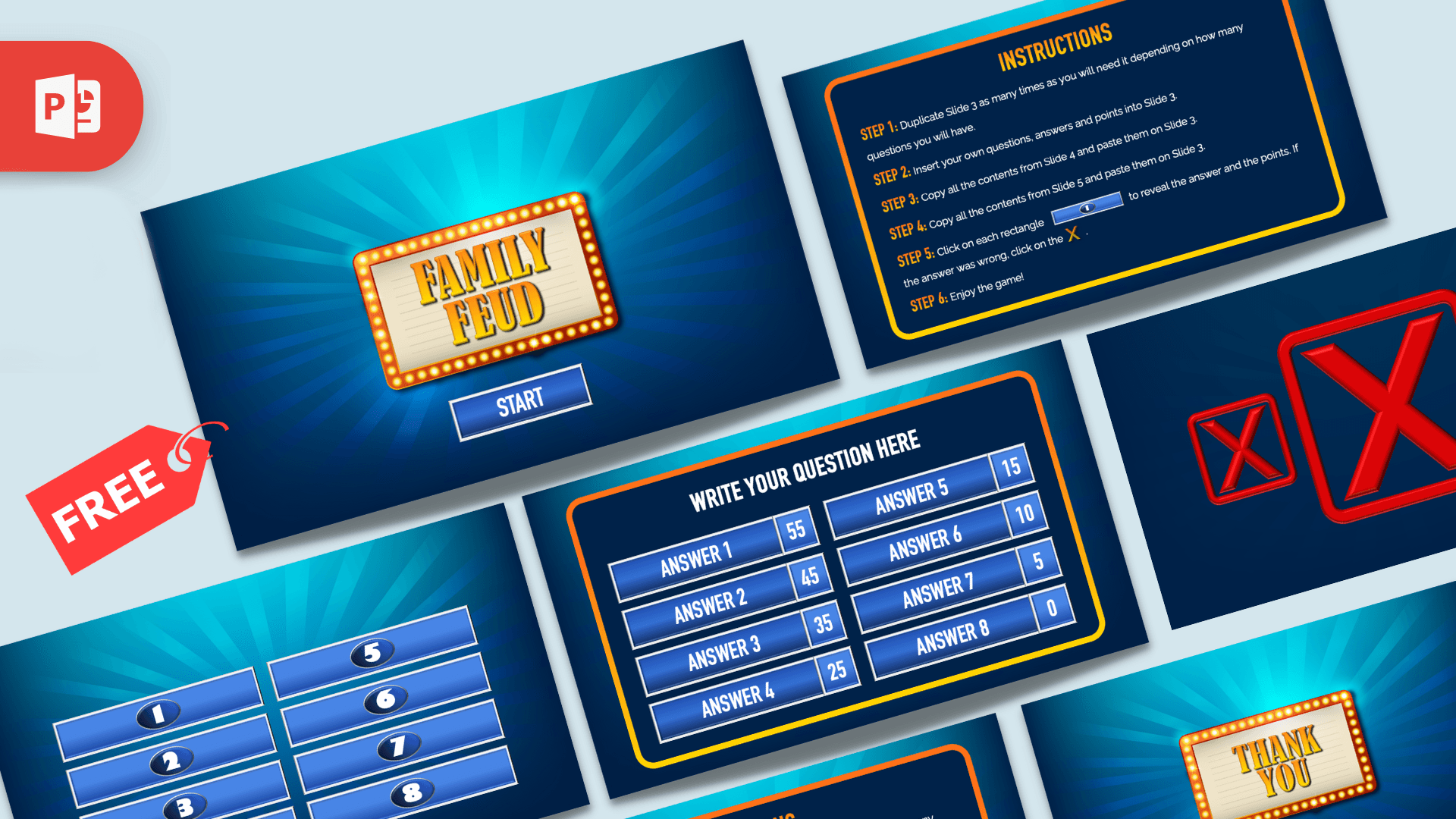
This free Family Feud PPT template is a small game kit with 6 slides. You get a cover with a START button, an instruction slide, one survey board with eight answers and point values, plus the number covers and red X marks you need to hide answers and mark wrong guesses. You build as many rounds as you like by duplicating the board slide.
What's Inside
- Slide 1, cover: a light bulb marquee sign with FAMILY FEUD in gold letters on a blue starburst, and a START button that jumps to the question board.
- Slide 2, instructions: six short steps that explain how to set up and play.
- Slide 3, question board: a line for your question and eight answer bars, each with a points box. The sample points are 55, 45, 35, 25, 15, 10, 5 and 0.
- Slide 4, number covers: eight blue bars numbered 1 to 8, made to sit on top of the answers until someone guesses them.
- Slide 5, wrong answer marks: three red X boxes and three small gold X buttons.
- Slide 6, closing: the same marquee sign with THANK YOU.
Slides 4 and 5 are parts, not rounds. The file has one question board and no scoreboard, team name slide or fast money round, so keep score on paper or a whiteboard.
Design and Style
This Family Feud PowerPoint template looks like a classic TV game show. The backgrounds are deep blue with light rays, the board and the instructions sit inside a rounded frame with an orange to yellow border, and the answer bars are glossy blue with silver edges and bold white letters. Gold is used for the cover sign and the step labels, and bright red is saved for the X marks. All slides are 16:9.
How to Play
The setup steps come from the instruction slide in the file:
- Duplicate slide 3 once for every question you plan to ask.
- Type your question, answers and points on each copy. Put the most popular answer first, with the highest points.
- Copy everything on slide 4 and paste it onto each board. The numbered bars cover the answers.
- Copy everything on slide 5 and paste it onto each board to add the X marks.
- Start the slideshow and click START. Read the question out loud. When a team names an answer that is on the board, click its numbered bar to reveal the answer and the points. If the answer was wrong, click an X.
- Use the right arrow key to move to the next question, and add up the points for each team as you go.
Tip: before you present, hide slides 2, 4 and 5 (right-click the slide, then Hide Slide) so the game runs from your last question straight to the thank you slide.
Who Is This Template For?
- Teachers who want a review game or an icebreaker with survey style questions.
- Families and friends who need a Family Feud game template for a party or a holiday get-together.
- Team leads and youth group leaders planning a team building game.
If you searched for a Family Feud template for Google Slides, you can upload the PPTX to Google Drive and open it with Google Slides. The click to reveal steps were built for PowerPoint, so play a test round first. PowerPoint is the safer choice on game day.
Related Templates
You can find more games in our interactive templates. For themed decks, take a look at the Pokemon PowerPoint Template, the Inside Out PowerPoint Template and the Bluey PowerPoint Template. This is an unofficial, fan-made design and is not affiliated with or endorsed by the owners of Family Feud.
Frequently asked questions
- Is the Family Feud PPT template free?
- Yes. You can download it from Prezentr at no cost, with no payment needed.
- How many slides does the Family Feud template have?
- Six: a cover with a START button, an instruction slide, one question board, a slide with eight number covers, a slide with red X marks and a thank you slide.
- How many answers fit on one question board?
- Eight. Each answer bar has its own points box, and the sample points run from 55 down to 0. Delete the bars you do not need, along with their number covers.
- How do I add more questions?
- Duplicate slide 3 once for each question, type your question, answers and points, then paste the contents of slide 4 and slide 5 onto each copy, as the instruction slide explains.
- Does the template have a scoreboard or a fast money round?
- No. The file has one question board that you duplicate for more rounds. Keep score on paper or a whiteboard.
- Can I use it in Google Slides?
- You can upload the PPTX to Google Drive and open it with Google Slides. The click to reveal steps were built for PowerPoint, so test a round before you play with a group.