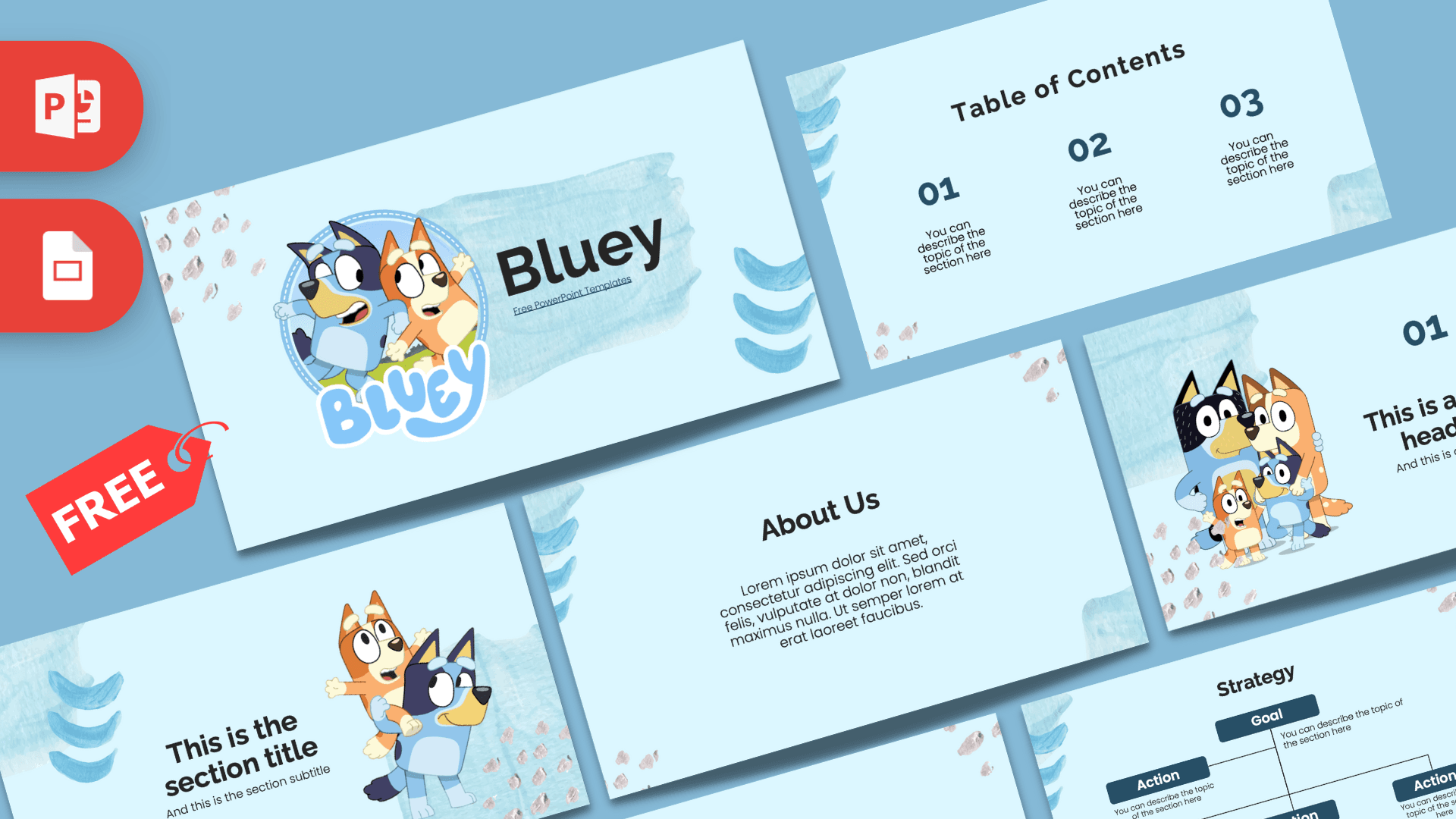
The Bluey PowerPoint template is a free, fan-made deck in soft sky blue, decorated with watercolor brush strokes and cheerful illustrations of Bluey, her little sister Bingo and the rest of the Heeler family. The previews show 10 slides with clear, simple layouts, from a title slide and table of contents to bullet points, a strategy chart and a big number slide. It works in PowerPoint and Google Slides, so it is ready for the classroom, a birthday party or a fan project.
What's Inside
Here are the 10 slides of the Bluey PowerPoint template shown in the previews, and what you can use each one for:
- Title slide: a round badge with Bluey and Bingo and the Bluey logo, next to a big title. Your cover slide.
- Table of Contents: three numbered columns for the main parts of your talk.
- Section title: Bingo riding on Bluey's back beside a large section heading. Great for starting a new topic.
- Numbered headline: a big "01" with a headline and subline, next to the whole family together.
- About Us: a centered heading and paragraph for an introduction, a story or a short explanation.
- Bullet points with numbers: a heading plus five numbered points (01 to 05) for facts, rules or steps.
- Quote slide: a line of text between two large quotation marks, nice for a favorite saying or a key message.
- Bullet points with words: the same five-point grid labeled ONE to FIVE, for a slightly more playful feel.
- Strategy chart: one Goal box connected to four Action boxes, handy for plans, goals or a simple family tree.
- Big number slide: one large figure with an arrow and caption for a fun fact or an important number.
The layouts follow a simple order, so you can tell a full story: introduce your topic on the title slide, list the parts on the table of contents, then use the section and numbered headline slides each time you start a new part. The bullet, quote, chart and big number slides fill the middle. Delete the ones you do not need, or duplicate your favorites.
Design and Style
The background is a pale, airy blue with loose watercolor strokes in deeper blue, chevron-like brush marks in the corners and small pink and gray dabs, a bit like paint on paper. Headings are dark navy and charcoal in a friendly, rounded sans serif, and the numbers and chart boxes use the same navy, so text is easy to read for young audiences.
The characters appear on the title slide, the section slide and the numbered headline slide, and they are drawn in the bright, flat cartoon style fans know from the show. The content slides keep the decorations to the edges, leaving plenty of space in the middle for your words. The overall mood is gentle, happy and tidy, more storybook than loud cartoon.
The light background also helps in practice. Dark text on pale blue is easy to see on a classroom projector or a TV screen, and the slides print cleanly if you want handouts or a poster for a party. The big numbers and short text areas encourage you to keep each slide to one idea, which is just right for young listeners with short attention spans.
Who Is This Template For?
This Bluey PPT template is made for anyone talking to children, or to grown-ups who love the show as much as their kids do:
- Preschool and primary teachers making lessons, class rules or reading activities feel friendly.
- Parents planning a Bluey birthday party, an invitation slideshow or a family game.
- Kids and students giving a show-and-tell or a presentation about their favorite show.
- Librarians and childcare workers running story time, schedules or announcements.
- Fan clubs and content creators sharing episode rankings or character profiles.
How to Customize It
- Edit the text: click any placeholder, like "This is a great headline", and type your own. Keep text short so it stays readable for kids.
- Move or swap characters: click an illustration to move or resize it. To replace one with your own picture, right-click it and choose Change Picture.
- Add photos: use Insert, Pictures to drop in class photos or birthday pictures, then place them on the empty side of a slide.
- Change colors: select a heading, number or chart box and change its color with Font Color or Shape Fill. Orange works nicely as a second accent with the blue.
- Reorder slides: drag slides in the thumbnail panel or duplicate a layout with Ctrl+D, for example to add more bullet slides.
- Use Google Slides: open the Google Slides version, make a copy to your Drive and edit there. Click an image and use Replace image to change pictures.
A quick tip for teachers: build one slide per activity, then switch to Slide Show and click through the deck during the lesson. Kids love seeing the characters pop up between activities, and it keeps transitions in class smooth and predictable.
Presentation Ideas
- A "Meet the Heeler family" character presentation for a class or fan club.
- Bluey birthday party plans: games, food and the schedule for the day.
- Classroom rules or a weekly timetable for young students.
- Lessons about family, sharing and playing together, inspired by the show.
- A show-and-tell about pets, especially dogs.
- Top five favorite episodes, using the bullet points slides.
- A "What I did this summer" slideshow with photos on the empty side of each slide.
Related Templates
If your audience loves cartoons, try the Peppa Pig PowerPoint Template, the Paw Patrol PowerPoint Template or the CoComelon PowerPoint Template. For a general kid-friendly design, the Kids PowerPoint Template is a good pick. You can find many more shows and characters in our TV shows and movies templates.
Frequently asked questions
- Is the Bluey PowerPoint template free?
- Yes, it is free on Prezentr. It is a fan-made design and is not official or endorsed by the makers of Bluey.
- How many slides does the Bluey template have?
- The previews show 10 slides, including a title slide, table of contents, section title, two bullet point slides, a quote, a strategy chart and a big number slide.
- Does it work as a Bluey Google Slides theme?
- Yes. It is available for both PowerPoint and Google Slides, so you can edit it in your browser too.
- Can I use it for a kids' birthday party?
- Yes. It works well for party plans, invitations or a fun slideshow, and you can add your own photos to any slide.
- Can I move or remove the characters?
- Yes. The character illustrations are separate pictures you can move, resize, delete or replace with Change Picture.
- Is the Bluey template good for preschool lessons?
- Yes. The layouts are simple with large, clear text, which suits class rules, schedules and short lessons for young children.