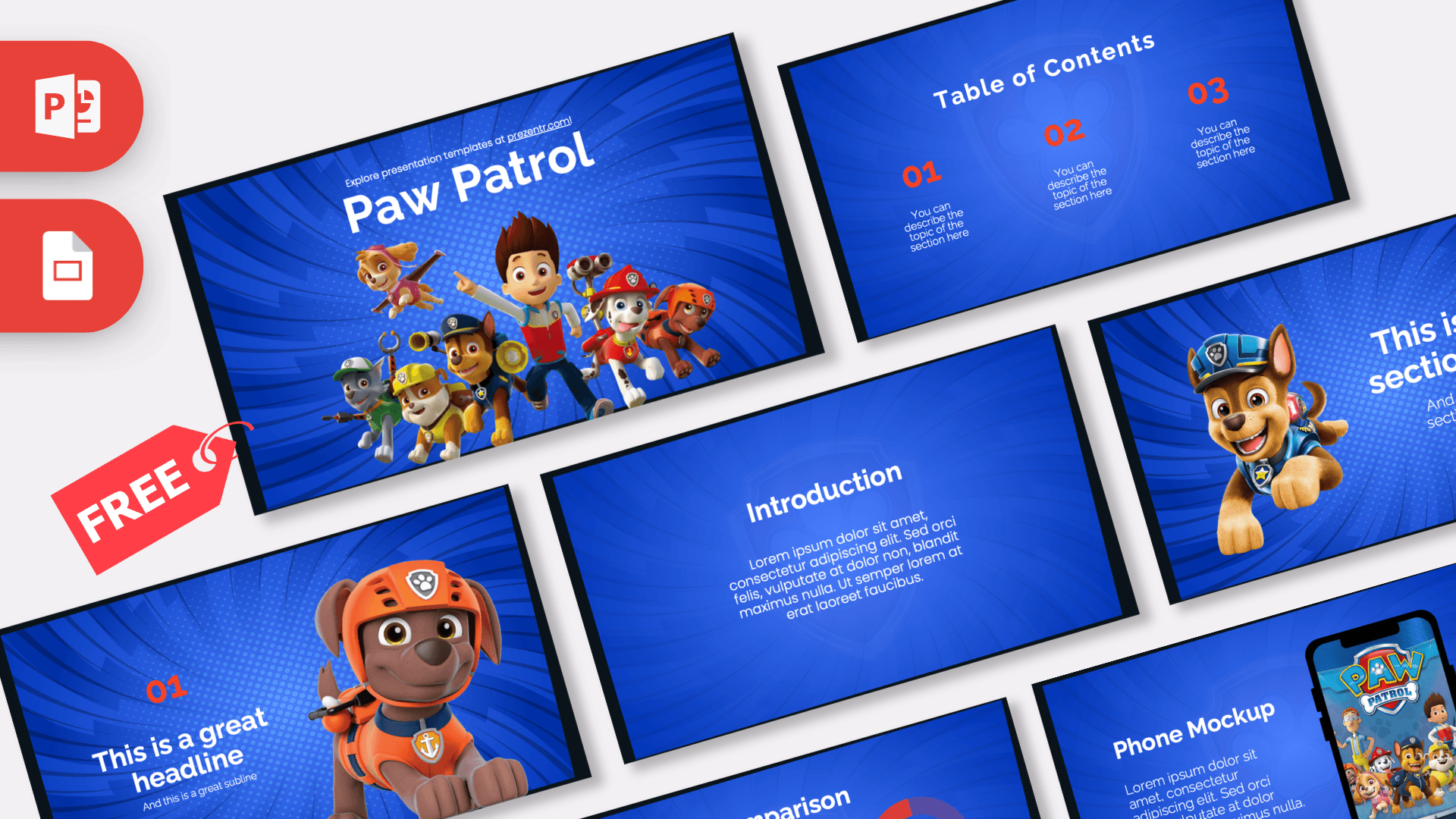
This free Paw Patrol PowerPoint template brings Ryder and the rescue pups to your slides on a bright royal blue background with a radiating burst pattern and red highlights. It has 10 widescreen slides, including a comparison slide featuring Chase and Marshall and a phone mockup with Paw Patrol artwork. Open it in PowerPoint or Google Slides and make a cheerful presentation for kids, classrooms or a pup-themed birthday party.
What's Inside
The 10 slides give you everything you need for a short, kid-friendly presentation, from a big character opener to practical layouts for lists, numbers and photos:
- Title slide: Ryder and the pup team, including Chase, Marshall and their friends, line up under a big white "Paw Patrol" heading. An instant hit with young fans.
- Table of Contents: three red numbers with short descriptions, perfect for a simple agenda.
- Section title: Chase in his blue police cap leaps toward the viewer next to a large section heading and subtitle.
- Headline slide: a red "01" with a headline and subline, beside a pup in orange rescue gear and a helmet, ready for your first main point.
- Introduction: a centered heading and paragraph block for a welcome message, background or story summary.
- Five Bullet Points: a title block and five red numbered points for steps, facts or rules.
- Quote slide: red quote marks around a short sentence. Use it for a lesson takeaway, a motto or a favorite line.
- Big number slide: one large white number with a red arrow and caption, great for a fun fact.
- Comparison: two red donut charts with percentages and a big "VS" in the middle, labeled Chase and Marshall. Use it for side-by-side facts or a playful "who would you choose" vote.
- Phone Mockup: a smartphone showing Paw Patrol artwork next to a heading and text block. Ideal for showing an app, a video or a photo.
Design and Style
The Paw Patrol PPT template is built around a saturated royal blue background with a sunburst of light rays radiating from the center and a faint shield badge watermark, which gives every slide an energetic, heroic feel. Red is the accent color, used for numbers, quote marks, arrows and chart rings, and all text is white for clear contrast. Headings use a clean, rounded sans serif that is friendly and easy for young readers. The characters appear as bright, glossy 3D-style renders, similar to the look of the animated show, and they are placed on the side of the slides so there is still room for text. The overall mood is upbeat, bold and playful, exactly what you want for a room full of preschoolers or a family party. This is a free fan-made design and is not affiliated with or endorsed by the show's creators.
Who Is This Template For?
This deck works best for young audiences and the adults who teach, care for and entertain them every day:
- Preschool and kindergarten teachers creating lessons on helpers in the community, safety rules or teamwork.
- Elementary students presenting a favorite TV show, a pet project or a short book report.
- Parents planning a Paw Patrol birthday party who want an invitation, a party schedule or a photo slideshow.
- Daycare staff and childminders sharing a weekly plan or activity schedule with parents.
- Librarians and youth leaders hosting a story time, quiz or kids' club activity.
- Fire safety and community educators who want a theme kids already know for a school visit.
How to Customize It
Editing the Paw Patrol PowerPoint template is quick and simple, even for first-time PowerPoint users:
- Replace the text: click any heading or "You can describe the topic of the section here" line and type your own words. Keep sentences short for young readers.
- Swap images: right-click a pup or the phone screen image and choose Change Picture to use your own photo. This is great for adding pictures of the birthday child or your class.
- Update the comparison: change the names under the donut charts and edit the percentages to match your own facts or class vote.
- Change colors: select red numbers or chart rings and pick a new color, for example yellow or green, to match a different pup.
- Arrange the slides: drag slides in the thumbnail panel, duplicate the layouts you use most and delete the rest.
- Add fun motion: the slides are static, so use the Animations tab to make pups bounce in or bullet points appear one at a time.
Google Slides: upload the PPTX to Google Drive and choose Open with Google Slides. Everything remains editable, and you can swap pictures with Replace image from the right-click menu.
Presentation Ideas
- Community helpers: police officers, firefighters and rescuers, introduced with the help of the pups.
- Safety rules for kids: crossing the street, fire safety and what to do in an emergency.
- Teamwork and kindness: how working together solves problems, for a preschool or first grade lesson.
- All about dogs: breeds, how to care for a puppy and why dogs make great helpers.
- A Paw Patrol birthday party slideshow with the schedule, games, photos and a thank you slide.
- A class vote on favorite characters using the comparison slide.
With the Paw Patrol PowerPoint template, simple is better. For the best result with little ones, use big pictures, very few words and plenty of interaction. Ask questions on the quote slide and reveal answers on the big number slide to keep everyone happily involved.
Related Templates
For more preschool favorites, try the Bluey PowerPoint Template, the Peppa Pig PowerPoint Template and the Dora PowerPoint Template. The Kids PowerPoint Template is a great general choice for young audiences. Find more classroom-ready designs in our education templates.
Frequently asked questions
- Is the Paw Patrol template free to use?
- Yes, it is free to download for school, home and party presentations. It is a fan-made design and not an official Paw Patrol product.
- How many slides does the Paw Patrol PowerPoint template include?
- It includes 10 slides: title, table of contents, section title, headline, introduction, five bullet points, quote, big number, comparison and a phone mockup.
- Does the Paw Patrol template work with Google Slides?
- Yes. Upload the PPTX file to Google Drive and open it with Google Slides. All text and images stay editable.
- Which characters are in the template?
- The title slide shows Ryder with the pup team, Chase has his own section slide, and the comparison slide is labeled Chase and Marshall.
- Can I use it for a preschool or kindergarten lesson?
- Yes. The bright colors, big numbers and simple layouts work well for young children. Keep the text short and add your own pictures.
- Can I put my child's photos in the template for a party?
- Yes. Right-click any picture and choose Change Picture in PowerPoint, or Replace image in Google Slides.