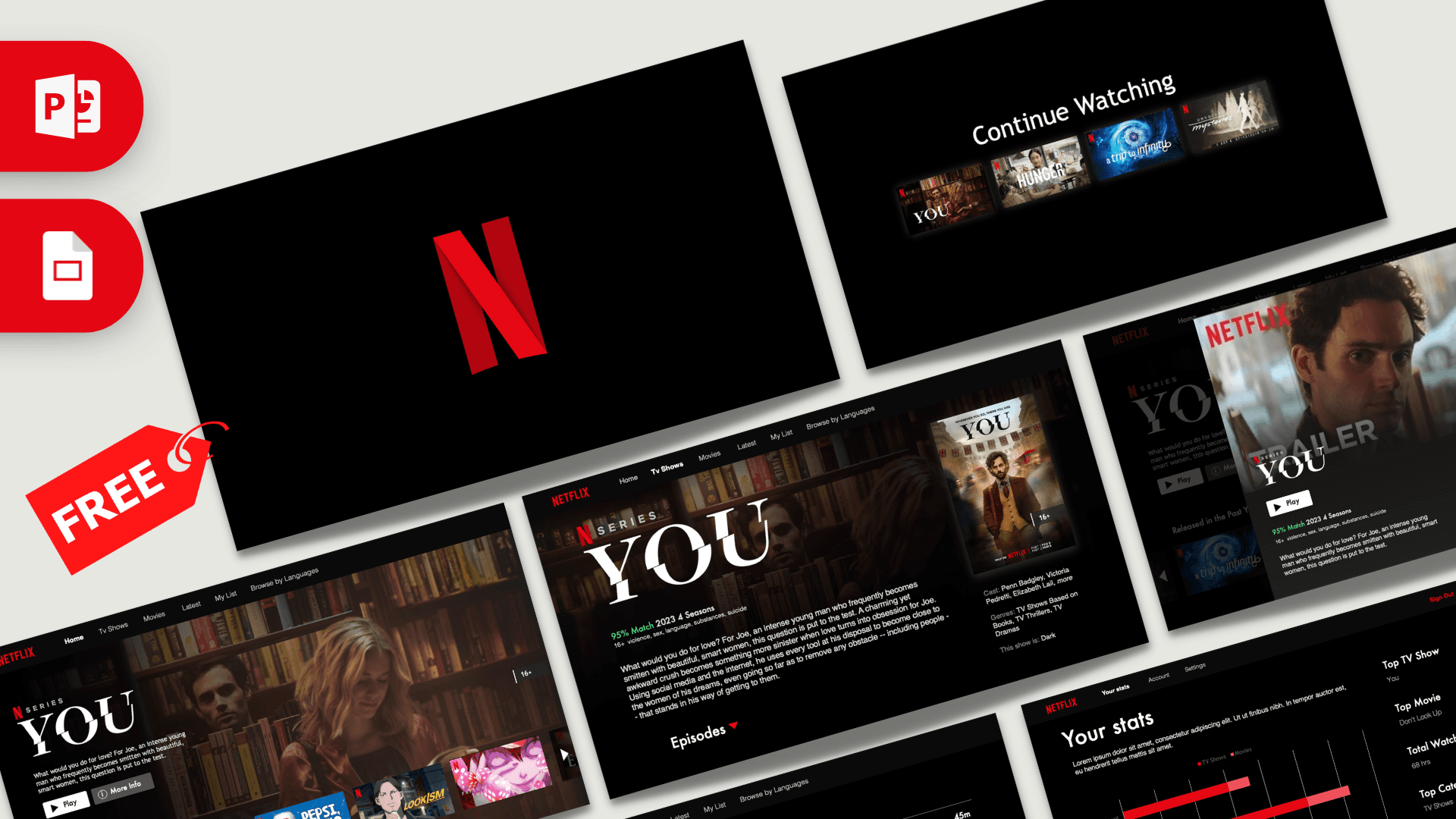
This free Netflix template page gives you three designs in one download. The star is an animated 10-slide PowerPoint deck that recreates a streaming app, from the red N intro on black to a Continue Watching row, show pages, episodes and a Your Stats screen, all linked with Morph transitions. Alongside it you get a dark film-strip deck that also opens in Canva and a classic red and white Netflix design for quick, simple slides.
What's Inside
1. Animated Netflix PowerPoint template (10 slides)
This is the newest version and the one shown in the video preview. Every slide is designed to look like a screen in a streaming app, and Morph transitions move posters, menus and panels smoothly from one slide to the next:
- Intro: the red N logo on black, with a short audio clip on the opening slide for a cinema-style start.
- Continue Watching: a top menu (Home, TV Shows, Movies, Latest, My List) above a row of show thumbnails.
- Show page: a large hero image with title, description, Play and More Info buttons and a "Released in the Past Year" row.
- Scrolling row: the same page with the thumbnail row shifted, so Morph makes it look like you are browsing.
- Trailer pop-up: a detail window with match score, age rating, season count and cast.
- More Like This: a grid of six suggestion cards, each with a short description.
- Show detail: a full title page with description, poster and cast list, leading into the episodes.
- Episodes: a list of four episodes with thumbnails, runtimes and descriptions.
- Your Stats: a bar chart with total watch time, top category, top show and top movie.
- Thank you for watching: four colorful smiley profile icons with names, like a "Who's watching?" screen.
Placeholder content uses real show artwork, such as the series You, which you can replace with your own topic.
2. Film-strip design (10 slides, PPTX and Canva)
A dark, textured background with white corner brackets and film-strip graphics. It includes a Netflix title slide with a Play button, a table of contents, a numbered headline on a red banner, a section slide with a laptop mockup, an About slide, a big number slide, a "Watched" slide with two series images, a quote slide, a stats slide with three donut charts and a six-point bullet slide. This design is also available as an editable Canva template.
3. Classic red and white design (4 slides, POTX)
A clean light design with a white N pattern background and a red Netflix banner. It includes a title slide, a content slide, a section title and a blank slide. Its fonts are Open Sans and Bebas Neue, with download links on the second slide.
Design and Style
All three designs use the familiar Netflix palette of black, white and red, but each has its own personality. The animated deck is the most realistic: it borrows the layout of a streaming app with dark backgrounds, small gray menus, cinematic hero images and bold red accents, set in Helvetica and Futura. The film-strip deck is more of a classic presentation, with red slanted banners, playful film icons in the background texture and rounded white type. The classic design flips the colors to a white base with a red curved banner, which is easier to print and works well in bright rooms. Together they cover three moods: immersive, bold and simple.
Who Is This Template For?
A Netflix template is a crowd-pleaser, so it fits many situations:
- Students presenting a favorite series, a film analysis, a book report or an "about me" deck styled like a profile page.
- Teachers building a "binge-worthy" class review where each topic is an episode.
- Marketers pitching streaming, entertainment or content campaigns to clients.
- Event hosts running a movie night, birthday or end-of-year party slideshow.
- Team leads sharing a yearly recap with a Your Stats style summary.
- Content creators introducing a new series, podcast season or YouTube channel lineup.
How to Customize It
- Replace text: click any title, description or menu label and type your own words.
- Change pictures: right-click a poster, hero image or thumbnail, choose Change Picture and insert your own photo.
- Keep Morph smooth: on the animated deck, objects that move between slides must keep the same name and image. If you replace a poster, replace it on every slide where it appears.
- Turn audio on or off: select the audio icon on the first slide and use the Playback tab to change volume or delete it.
- Edit the stats chart: right-click the chart on the Your Stats slide and choose Edit Data to enter your own numbers.
- Reorder slides: drag thumbnails to change the order. On the animated deck, preview the transitions after moving slides.
To use the Netflix Google Slides theme, upload any of the three files to Google Drive and open it with Google Slides. Text and images stay editable, but Morph transitions and audio behave differently there, so use the animated deck in PowerPoint when you present live. For the film-strip design, you can also open the Canva version from the download page and edit it in your browser.
Presentation Ideas
- A book report where each chapter is an "episode" on the Episodes slide.
- An "about me" presentation with your hobbies as shows in a Continue Watching row.
- A year-in-review for a team or class using the Your Stats slide.
- A movie night or birthday party slideshow with a lineup of films.
- A pitch for a new TV show idea, with poster, plot, cast and episodes.
- A media studies lesson on how streaming platforms recommend content.
Related Templates
More TV and streaming designs: the Squid Game PowerPoint Templates, the Stranger Things PowerPoint Template, the Wednesday Addams PowerPoint Template and the Disney PowerPoint Template. Browse all Movies and Netflix templates or see every animated template.
Frequently asked questions
- Is the Netflix template free to download?
- Yes. All three Netflix designs on this page, the animated deck, the film-strip deck and the classic red and white template, are free.
- How many slides does each Netflix design have?
- The animated version has 10 slides, the film-strip design has 10 slides and the classic red and white POTX has 4 slides, all in 16:9.
- Are the Netflix slides animated?
- The main deck is. It uses Morph transitions on almost every slide, and the opening slide includes a short audio clip. The film-strip and classic designs are static.
- Can I use the Netflix template in Google Slides or Canva?
- All three open in Google Slides, but Morph transitions only play in PowerPoint, so the animated version becomes a static deck there. The film-strip design also comes as an editable Canva design.
- How do I replace the show posters and screenshots?
- Right-click any poster or screenshot in PowerPoint, choose Change Picture and pick your own image. On Morph slides, change the same picture on every slide where it appears so the animation stays smooth.
- Is this an official Netflix template?
- No. It is a free fan-made template inspired by the streaming interface and is not affiliated with or endorsed by Netflix.
Also available: ·
This is a fan-made template inspired by Netflix PowerPoint Template (Animated). Prezentr is not affiliated with, endorsed by, or selling assets from Netflix PowerPoint Template (Animated). All brand names, logos, and trademarks belong to their respective owners.