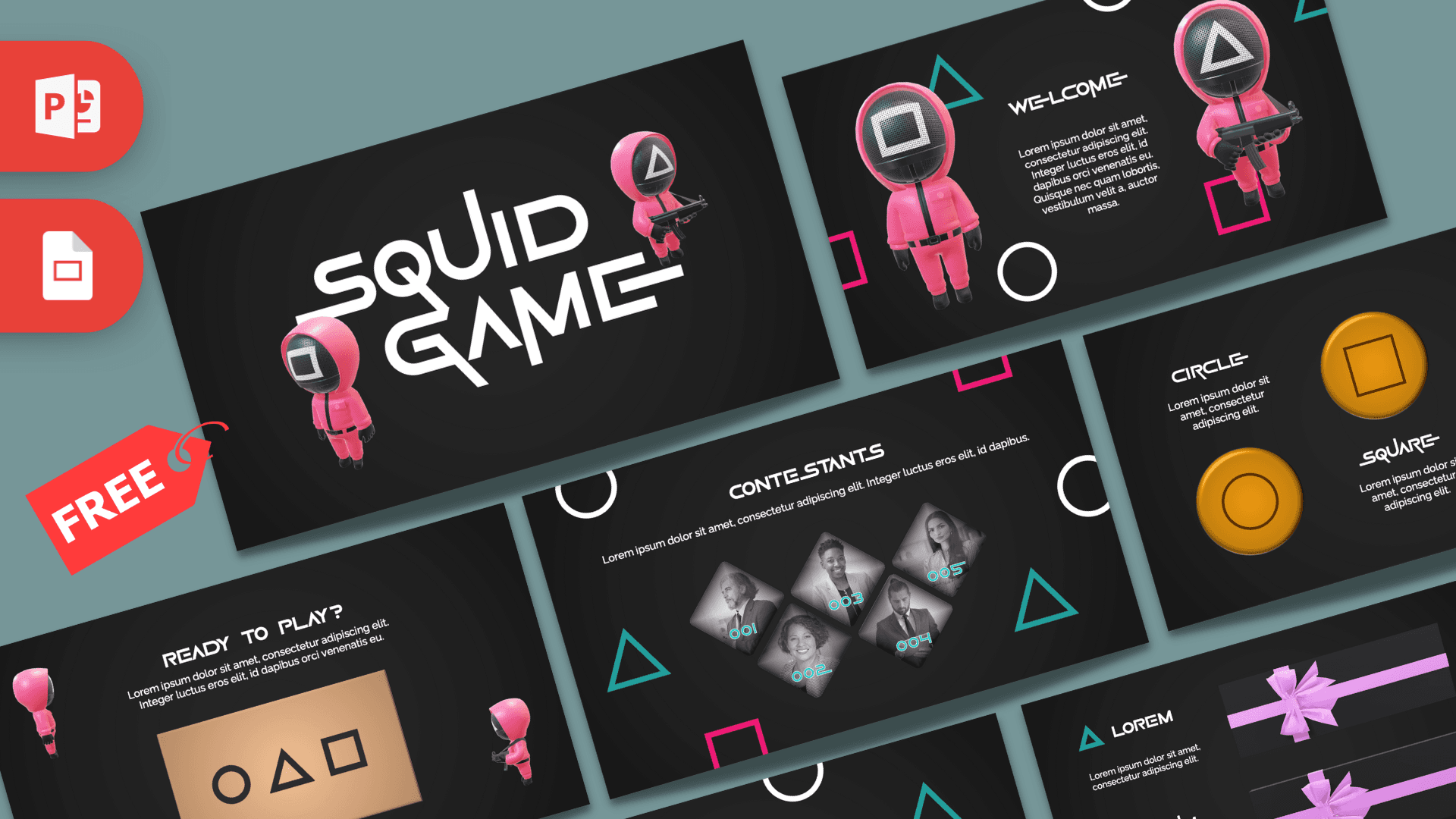
This free Squid Game PowerPoint template is a fan-made, animated deck with 10 slides inspired by the hit Netflix series. It pairs a dark charcoal background with hot pink and teal circle, triangle and square shapes, pink-suited guard figures and a bold game-style font. Morph transitions and entrance animations make each slide feel like the next round of a game, which is perfect for quizzes, team challenges and themed events.
What's Inside
The newest download includes 10 animated slides in 16:9, written like a game from start to finish:
- Title slide: the large SQUID GAME title in a custom display font, with two pink guard figures wearing square and triangle masks.
- Welcome slide: two guards on either side of a short welcome text, surrounded by floating outline shapes.
- "Ready to play?": a tan card printed with a circle, triangle and square, with a heading and short intro text.
- "Your journey begins now": the flip side of the card showing a phone-number style code, great for revealing a secret, a date or a key number.
- Contestants: five diamond-shaped photo frames numbered 001 to 005, ideal for introducing a team or a list of players.
- Player profile: one large diamond photo with a number, a name, a paragraph and two skill bars. Duplicate it for each person.
- "The game starts now": a four-step staircase in pink and teal, each step with a label and short text. Use it for a process, rules or a timeline.
- Circle, square, triangle: three orange candy-style tokens stamped with each shape, with a short text block for each. Good for comparing three options.
- Two-point slide: two headings marked with a triangle and a square, each next to a dark gift box with a pink ribbon.
- Thank You slide: a big THANK YOU with gift boxes and floating shapes to close the game.
The product page also offers a legacy version, a simpler, non-animated template file with three basic slides, if you only need the theme without motion.
Design and Style
The look is dark, high-contrast and playful with a tense edge. Every slide uses a deep charcoal background, so the hot pink, teal and white elements really pop. Outline circles, triangles and squares float around the edges of the slides, echoing the shape symbols from the show.
Headings use Game Of Squids, a display font with a futuristic, game-like style, and the download includes the font files so you can install it. Body text is set in Raleway, which stays clean and readable. The guard figures are 3D-style illustrations in pink suits, while the contestant photos are black-and-white in diamond frames. Put together, this Squid Game PPT template feels like a game show intro rather than a standard business deck.
Who Is This Template For?
The game-style flow is the real strength of this deck, so it shines anywhere you want people to feel like players instead of an audience.
- Teachers running a class quiz, review game or challenge day with a theme students recognize.
- Team leaders and HR hosting team-building games, an onboarding challenge or an office competition.
- Event and party hosts planning a Squid Game-themed birthday, Halloween party or game night.
- Students presenting a TV series review, a project on Korean pop culture or a media studies topic.
- Youth leaders and camp counselors introducing teams and explaining the rules of group games.
- Fans and streamers making a fun recap, theory talk or ranking of favorite moments.
How to Customize It
- Install the font. Open the font folder in the download and install Game Of Squids before you open the deck, so the headings display correctly.
- Replace the text. Click on the placeholder text and type your own. Keep headings short so they fit the style.
- Add your own photos. Right-click a contestant photo and choose Change Picture. The diamond shape and black-and-white style stay in place.
- Keep Morph in sync. Morph moves objects that appear on two slides in a row. If you change a photo or heading that carries over to the next slide, update it there as well.
- Tweak animations. Use Animations > Animation Pane to change the order and timing, and the Transitions tab to adjust Morph or Fade.
- Recolor and reorder. Change the color of shapes from the Shape Fill menu, drag slides to change the order, or duplicate the profile slide for more players.
You can also use it as a Squid Game Google Slides theme. Upload the file to Google Drive and open it with Google Slides to edit text and pictures. Morph is a PowerPoint feature, though, so the animated movement will not play the same in Google Slides. Present from PowerPoint for the full effect.
Presentation Ideas
- A themed classroom review game where each slide is a new "round".
- A team-building challenge with player profiles for each team member.
- A game night or birthday party program with rules and prizes.
- A TV series review or season recap for a media class.
- A presentation on Korean pop culture and its worldwide popularity.
- A company onboarding "quest" that walks new hires through four steps.
Tip: run through the deck in Slide Show mode before your event. The animations reveal content in stages, so it helps to know when each click brings in the next element.
Related Templates
If you like this theme, explore the Netflix PowerPoint Template (Animated), the Money Heist PowerPoint Template and the Stranger Things PowerPoint Template. For a broader Korean theme, try the South Korea PowerPoint Template. You can find more show-inspired decks in our TV Shows and Movies templates. This is an unofficial, fan-made design and is not affiliated with or endorsed by Netflix or the creators of Squid Game.
Frequently asked questions
- Is the Squid Game PowerPoint template free?
- Yes. Both the animated version and the legacy version can be downloaded from Prezentr for free.
- How many slides are in the Squid Game template?
- The animated version has 10 slides, including a title, welcome, card reveal, contestants, player profile, four-step process, three-shape comparison and Thank You slide. The legacy version is a simpler template file with three basic slides.
- Is the Squid Game template animated?
- Yes. The newest version uses Morph and Fade transitions plus entrance and exit animations, so shapes, cards and figures move as you click through.
- Does it work in Google Slides?
- You can open and edit it in Google Slides, but Morph only works in PowerPoint, so the motion between slides will not look the same. Use PowerPoint to present the animated version.
- Which font does the Squid Game template use?
- Headings use the Game Of Squids display font, which is included in the download, and body text uses Raleway. Install the fonts before editing.
- Can I use the Squid Game template for a classroom game?
- Yes. The contestants, profile and step slides work well for introducing teams, explaining rules and running a themed quiz.
Previous version
This is an updated version of the Squid Game PowerPoint Templates, redesigned in October 2023. The original version is still available here: