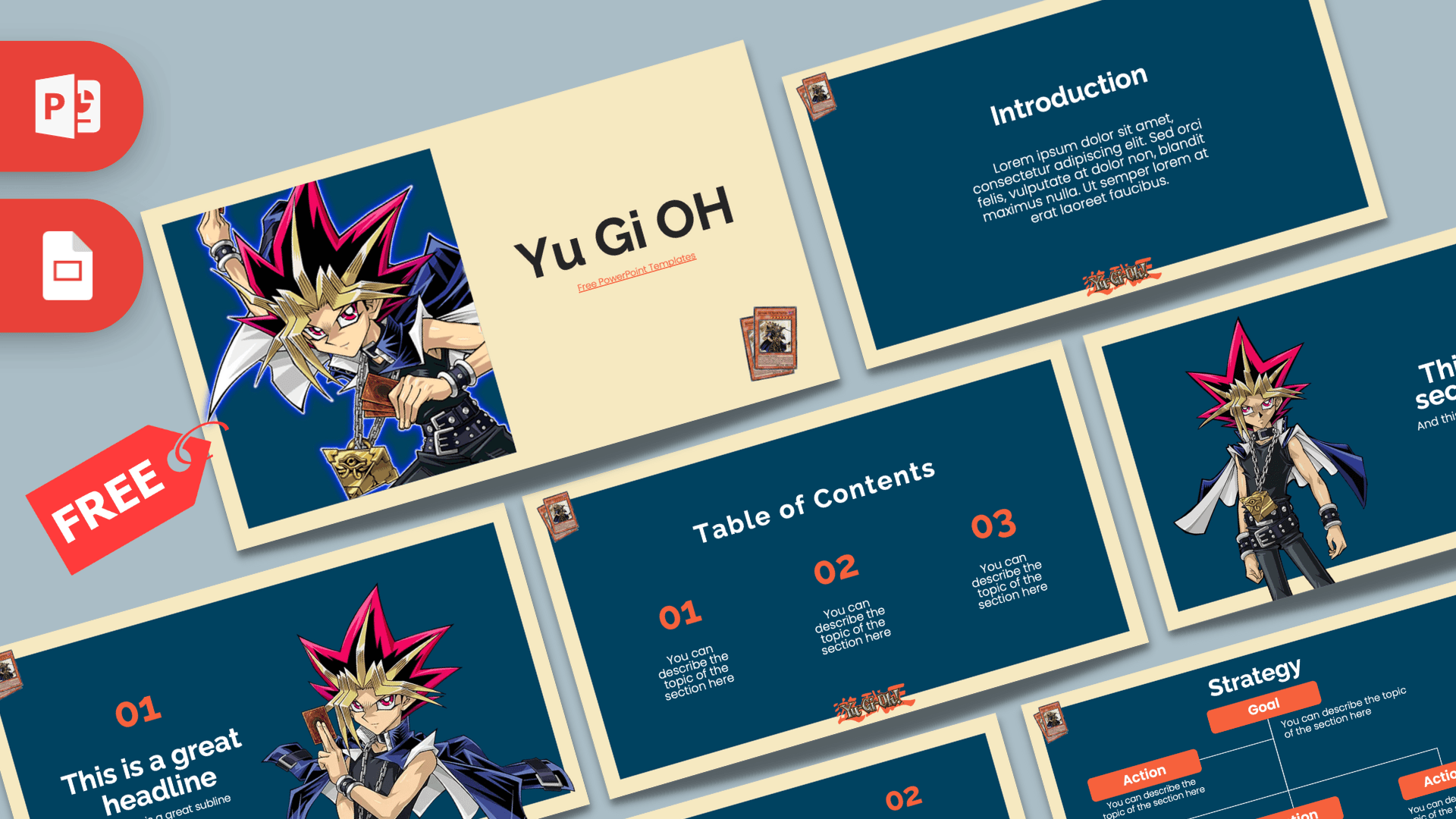
The Yu Gi Oh PowerPoint template is a free, fan-made deck built around Yugi, the spiky-haired hero of the Yu-Gi-Oh! trading card anime and manga. It has 10 editable slides in 16:9 with deep navy panels inside a cream frame, orange-red accents and a small stack of cards in the corner of each slide. It also works as a Google Slides theme, so it is easy to use at school or at home.
What's Inside
This Yu-Gi-Oh PPT template gives you a complete structure with character art on the key slides:
- Title slide: a large image of Yugi holding his cards with the golden puzzle pendant, next to a big "Yu Gi OH" title on cream.
- Table of Contents: three numbered sections in orange, with the Yu-Gi-Oh logo at the bottom.
- Section Header: Yugi standing tall on the left, with room for a section title and subtitle.
- Introduction: a centered heading and paragraph for your opening text.
- Headline Divider: a big orange "01" and a headline, with Yugi holding up a card on the right.
- Quote: orange quotation marks around a paragraph, for a favorite line or a key message.
- Five Bullet Points (numbers): five numbered points from 01 to 05 with a label block.
- Five Bullet Points (words): the same grid labeled ONE to FIVE.
- Strategy: a goal box with action boxes branching below it, great for explaining a plan or a deck-building approach.
- Big Numbers: one large figure with an arrow pointing to a caption.
Design and Style
The design uses a strong frame effect: every content slide is a deep navy-teal panel sitting inside a light cream border, which looks a bit like a card on a table. Orange-red numbers, buttons and quote marks pick up the colors of the classic card backs, and the Yu-Gi-Oh logo sits at the bottom of most slides. A small stack of trading cards in the corner adds a fun detail that fans will spot right away.
The character art is bright and true to the anime style: Yugi's red, black and blond hair, dark outfit, belts and golden pendant stand out against the navy background. Headings are set in a bold, rounded sans-serif in white, and descriptions use a smaller, light font, so the text stays clean and readable.
The layouts are simple on purpose, which means you can focus on cards, strategy and story without fighting the design. The cream frame also gives every slide a bit of breathing room, so even text-heavy slides like the introduction never feel cramped. Because the character only appears on the title, section and headline slides, the rest of the deck stays neutral enough for serious topics, like a club budget or tournament rules, while still looking like it belongs to the same set.
Who Is This Template For?
- Fans and duelists who want to present their favorite cards, decks or characters.
- Students doing a report on anime, manga, trading card games or Japanese pop culture.
- Game clubs and card shops announcing a tournament, rules or a weekly meetup.
- Teachers using a familiar theme to make a strategy or math lesson more engaging.
- Party hosts making a birthday slideshow or quiz for a Yu-Gi-Oh fan.
How to Customize It
- Edit the text: click any placeholder and type. Section titles, numbers and descriptions are all regular text boxes.
- Swap character images: right-click Yugi and choose Change Picture to show another character or your own card scans. A transparent PNG looks best on the navy panel.
- Recolor accents: change the orange with Shape Fill or Font Color if you want a different card color, such as purple or green.
- Use the Strategy slide: type your main goal in the top box and your steps in the action boxes. Duplicate boxes with Ctrl+D if you need more.
- Add or reorder slides: duplicate any slide from the thumbnail panel and drag it into place.
- Google Slides: open Google Slides, choose File, Import slides, upload the PPTX and pick all slides. Edit text and images as usual.
Presentation Ideas
- My favorite deck: the cards I use and why, with one card per bullet point.
- A beginner's guide to the trading card game, using the Strategy slide for turn steps.
- A school report on the history of trading card games.
- Tournament rules and schedule for a school or shop event.
- A character profile talk about Yugi and his rivals.
- A fan quiz for a birthday party, with answers revealed on the Big Numbers slide.
A good order for a deck talk is: title, introduction, table of contents, then a section header and a bullet point slide for each part, such as monsters, spells and traps. Use the Strategy slide to show how your combo or game plan works, the quote slide for a favorite line, and finish with a big number, like the size of your collection.
Tips for Fans
Card images are small and detailed, so show only one to three cards per slide and make them large enough to read. Scan or photograph your own cards on a plain background, then remove the background in PowerPoint with Picture Format, Remove Background. Keep text short on the navy panels and use the orange for card names or key numbers, such as attack points. If you are presenting to people who do not play, add one slide that explains the basics before you go into strategy, so everyone can follow along.
Related Templates
If you like card games and anime, try the Pokemon PowerPoint Template and the Animated Pokemon GO PowerPoint Template. For more classic anime heroes, see the Dragon Ball PowerPoint Template and the Naruto PowerPoint Template. You can browse more gaming designs in our games templates.
Frequently asked questions
- Is the Yu Gi Oh PowerPoint template free?
- Yes, it is free on Prezentr. It is a fan-made design and is not affiliated with or endorsed by the official Yu-Gi-Oh! rights holders.
- How many slides does the Yu-Gi-Oh template include?
- It has 10 slides in 16:9, including a title, table of contents, section header, introduction, headline divider, quote, two bullet point grids, strategy and big numbers.
- Can I use this Yu-Gi-Oh theme in Google Slides?
- Yes. Import the PPTX in Google Slides with File, Import slides and all slides stay editable.
- Can I replace Yugi with other characters or my own cards?
- Yes. Right-click a character image and choose Change Picture. Transparent PNG images fit the navy panels best.
- Is the template animated?
- No, the slides are static, which makes them quick to edit. You can add transitions yourself from the Transitions tab.
- Is it okay to use for a school project?
- Yes. The clear layouts work well for class reports on anime, card games or pop culture.