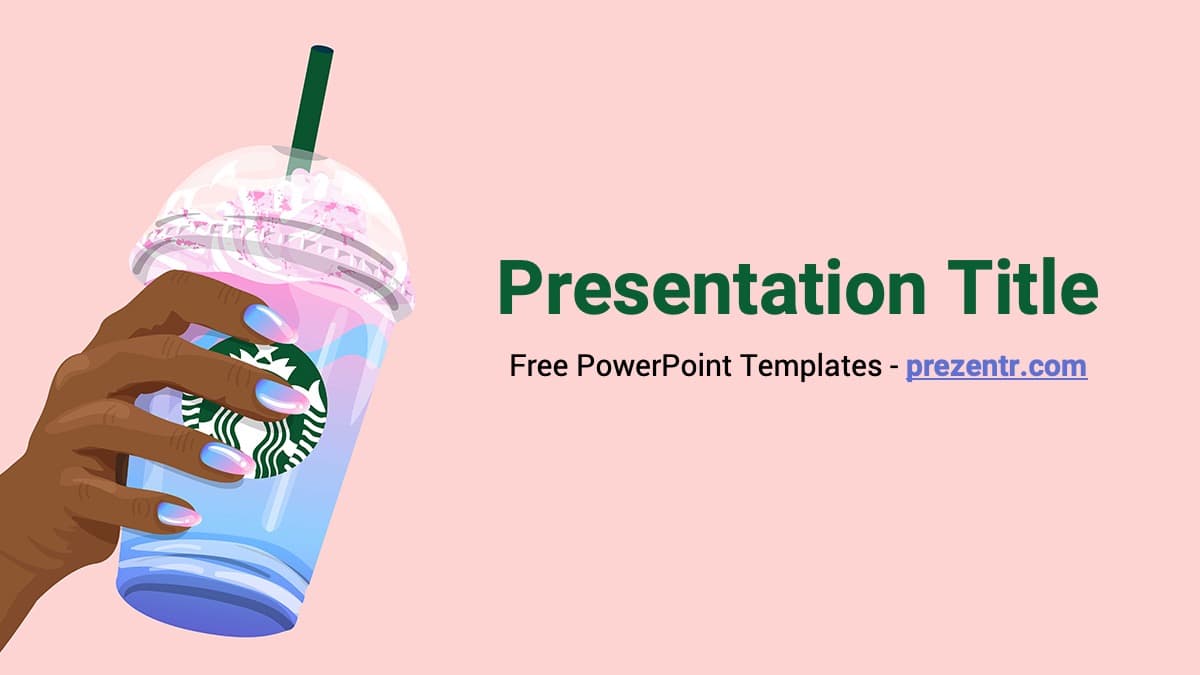
This free Starbucks PowerPoint template brings coffee shop charm to your slides with a soft pink background, deep green headings and an illustrated hand holding a pink and blue iced drink with a green straw. The newest version has 4 slides in 16:9, and the download page also includes a classic green design built around the famous siren logo. It is a quick, friendly option for coffee-themed talks, brand projects and cafe pitches.
What's Inside
The 2022 version is a compact POTX template with 4 slides, built on slide layouts so you can add as many slides as you like:
- Title slide: a large green "Presentation Title" with a subtitle line, set on blush pink with the illustrated iced drink on the left. This is the slide people will remember, so put your main message here.
- Content slide: a slide title with bullet text on a white background. A curved pink panel with a thin green line sweeps in from the right, and the drink illustration sits in the lower corner. It comes with a note that the font is Roboto and a link to download it.
- Section title: a pink slide with the drink on the right and space for a section heading and a short line of text. Use it to start each part of your talk.
- Clean content slide: the white background with the pink curve and drink, left empty for photos, charts, tables or any custom layout.
Four slides may sound small, but these are the building blocks most talks need. Duplicate the content and section slides as often as you like, and the deck grows without losing its look.
The legacy version is a 2-slide design in the older 4:3 format. Its title slide uses a deep green background with a large, faded siren pattern, a white curve on the right and the round green logo in the corner, plus a simple text slide. Pick it if you prefer a classic, logo-led look or still present on a 4:3 screen. Note that the legacy file still carries an old website credit on the title slide, so simply type over the subtitle with your own name or date.
Design and Style
The 2022 design moves away from the usual all-green brand look and goes for something lighter and more playful. The palette combines blush pink, white and the brand's dark green, with pastel blue and pink inside the cup illustration. The drawing style is flat and clean, with soft highlights on the clear lid and whipped topping, and the hand has painted nails in pastel tones, which gives the deck a lifestyle, social-media feel. Text is set in Roboto, a neutral sans serif that stays readable at any size. Green titles on pink and black text on white keep the contrast strong, so the slides are easy to read on a projector.
The legacy design is the opposite: bold, dark green and very recognizable, with the siren logo watermark covering the background. Having both on one page means you can choose between a fresh, cute style and a classic corporate one.
Who Is This Template For?
The Starbucks PPT template fits anyone who wants a coffee mood on screen. For example:
- Business and marketing students preparing a case study on a coffee chain, its branding or its customer experience.
- Cafe owners and baristas presenting a new drink menu, a seasonal special or a staff training session.
- Teachers who want a cheerful, low-key design for a class talk or a parent meeting.
- Social media managers pitching a drink-focused campaign or content calendar.
- Friends and coworkers organizing a coffee meetup, office coffee club or "coffee chat" session.
How to Customize It
- Install Roboto: download it from the link on slide 2 so headings and bullets look as designed.
- Open the POTX: double-click the file and PowerPoint creates a new presentation from it. Save that as a PPTX for your own work.
- Edit text: click into the title, subtitle and bullet placeholders and type your content.
- Add slides: on the Home tab, click New Slide and pick one of the template layouts, so new slides get the right background automatically.
- Change colors: select a title and change the font color, or use Design, Variants to try other theme colors. The backgrounds are images on the slide layouts, so edit them in View, Slide Master if you want to swap them.
- Add photos: place product shots or cafe photos on the clean content slide. Rounded corner crops match the soft style.
To use the Starbucks slides in Google Slides, upload the file to Google Drive and open it with Google Slides. If Roboto does not show, select the text and choose Roboto from the font list, since it is available there by default.
Presentation Ideas
- A brand case study on how a coffee chain builds loyalty, with one section per idea.
- A new seasonal drink pitch with recipe, price and target customers.
- Barista training notes covering drink steps, hygiene rules and customer service tips.
- A school project on coffee: where it grows, how it is roasted and how it reaches the cup.
- An "about me" slideshow for a new job or class, built around your favorite drink order.
- A team meeting deck for a relaxed Friday catch-up, with agenda and wins.
- A coffee tasting session comparing beans, roasts and brewing methods, one per content slide.
- A pop-up cafe or school bake sale plan with menu, prices and staffing on the content slides.
Related Templates
More coffee and food brand designs: the Dunkin' PowerPoint Template, the Coffee Shop PowerPoint Template, the Coffee PowerPoint Template and the McDonald's PowerPoint Template. See all company-inspired designs in Brands and Companies templates.
Frequently asked questions
- Is the Starbucks PowerPoint template free?
- Yes. Both versions, the 2022 illustrated design and the classic green design, are free to download from Prezentr.
- How many slides does the Starbucks template include?
- The newest version has 4 slides in 16:9: a title slide, a content slide, a section title and a clean content slide you can duplicate. The legacy version has 2 slides in 4:3.
- Can I use the Starbucks template in Google Slides?
- Yes. Upload the file to Google Drive and open it with Google Slides. The backgrounds and text stay in place and remain editable.
- What font does the Starbucks template use?
- The 2022 version uses Roboto, a free Google font. A link to download it is on the second slide.
- Why is it a POTX file?
- POTX is a PowerPoint template file. Double-click it and PowerPoint opens a new, untitled presentation based on the design, so the original template stays untouched.
- Is this template made by Starbucks?
- No. It is a free brand-inspired template created by Prezentr and is not affiliated with or endorsed by Starbucks.
This is a fan-made template inspired by Starbucks PowerPoint Template. Prezentr is not affiliated with, endorsed by, or selling assets from Starbucks PowerPoint Template. All brand names, logos, and trademarks belong to their respective owners.
Previous version
This is an updated version of the Starbucks PowerPoint Template, redesigned in March 2022. The original version is still available here: