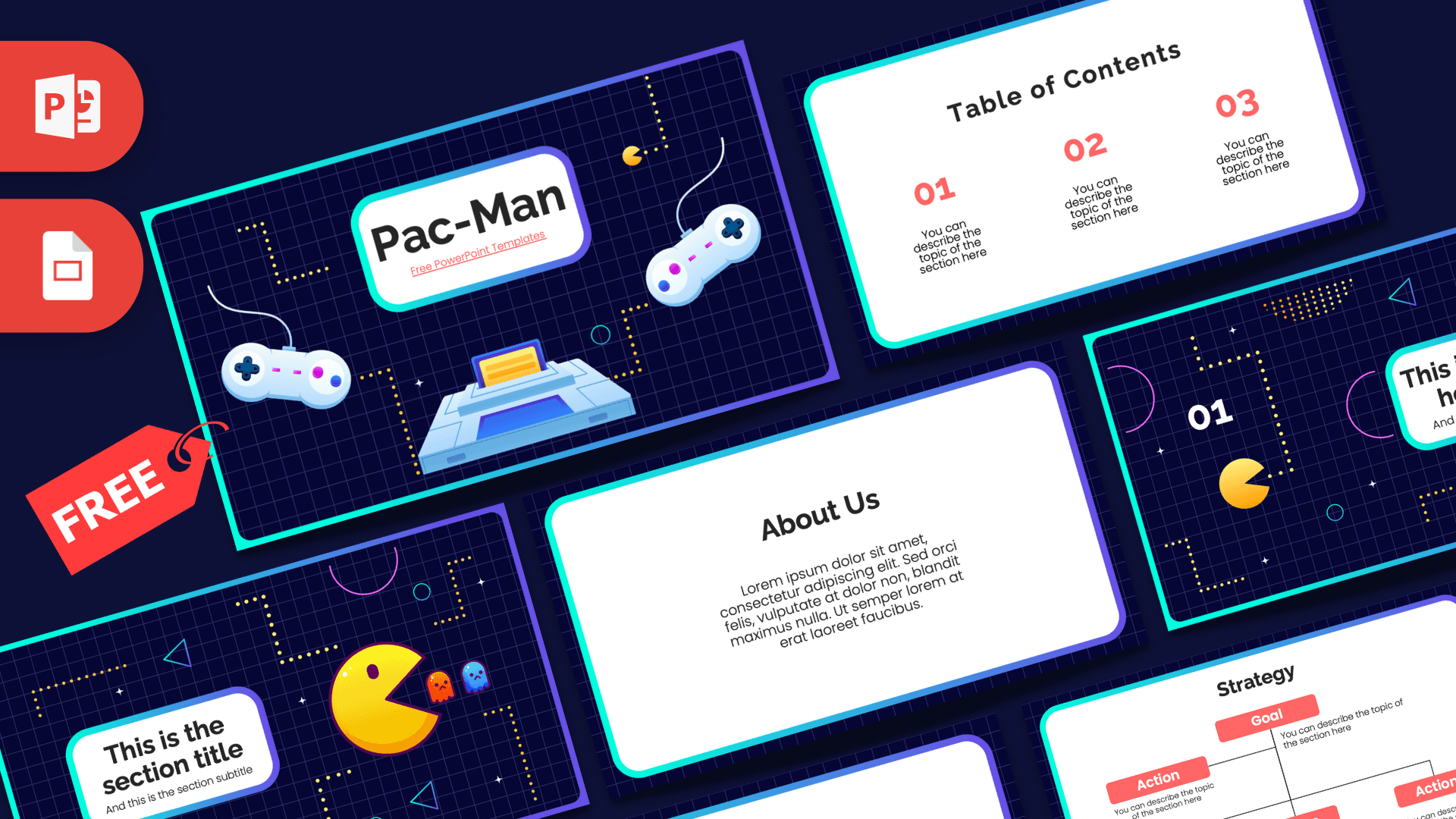
The Pac-Man PowerPoint template is a free 10-slide deck with a retro arcade look: a dark navy grid background, dotted maze paths, neon teal and purple frames, and of course a big yellow Pac-Man chasing two little ghosts. Coral red numbers and clean white content cards keep everything readable. It works in PowerPoint and Google Slides and is a fun choice for gaming topics, school projects or any talk that needs a playful, nostalgic touch.
What's Inside
The deck opens with three illustrated arcade-style slides and then switches to clean white cards for your content:
- Slide 1, Title: "Pac-Man" in a white rounded box with a neon border, flanked by two retro game controllers and a cartridge-style console, with dotted maze lines and a small Pac-Man eating pellets.
- Slide 2, Table of Contents: three coral red numbers (01, 02, 03) with short descriptions on a white card.
- Slide 3, Section title: a headline box beside a large glossy Pac-Man and two ghosts, one orange and one blue, surrounded by dotted paths, circles and triangles.
- Slide 4, Numbered headline: "01" with a smaller Pac-Man and a headline box framed by pink half circles and maze dots.
- Slide 5, About Us: a centered heading and paragraph, good for an introduction or overview.
- Slide 6, Bullet Points (numbered): a title block and five points labeled 01 to 05.
- Slide 7, Quote: large coral quotation marks around a short statement or key message.
- Slide 8, Bullet Points (words): five points labeled One to Five, a second style for lists.
- Slide 9, Strategy: a Goal box connected to four Action boxes in coral red, ideal for plans, steps or game strategies.
- Slide 10, Big number: one large figure with an arrow and caption, perfect for a high score, a statistic or a key result.
The mix of illustrated and plain slides makes the deck easy to pace. Use the arcade-style title, section and headline slides to mark the start of each part of your talk, and keep the white card slides for the actual information. The two bullet layouts let you vary lists so slides do not look repetitive, the strategy slide works well for a plan or step-by-step process, and the big number slide makes a fun high score ending.
Design and Style
The template feels like an arcade screen. A deep navy background is covered in a fine blue grid, and yellow dotted lines wind across the slides like the maze in the classic game. Small neon shapes (teal circles, blue triangles and pink arcs) add movement, while a gradient border from teal to purple frames each slide.
Content slides use bright white rounded cards inside that border, so text stays easy to read. Headings are bold and dark, numbers are coral red, and the body text uses a friendly rounded sans serif. The illustrations are glossy and cartoon-like rather than pixel art, giving the deck a modern take on a retro theme. This is a fan-made template, not an official Pac-Man product.
This split between dark illustrated slides and bright white content slides is practical, too. The arcade slides grab attention at key moments, while the white cards keep longer text, lists and diagrams easy to read on a projector, so the theme never gets in the way of your message.
Who Is This Template For?
If your audience enjoys games, puzzles or a bit of nostalgia, this deck will feel right at home.
- Students presenting a project on video game history, coding or game design.
- Teachers who want a playful deck for a review game, quiz or classroom challenge.
- Gaming clubs and esports groups planning tournaments, schedules or rules.
- Game developers and studios pitching a retro-inspired idea or sharing a devlog update.
- Party planners organizing an arcade or 80s-themed birthday.
- Office teams running a fun team-building session or a gamified goals meeting.
How to Customize It
Every element in this Pac-Man PPT template can be edited in PowerPoint.
- Replace the text: click on headings and "You can describe the topic" lines and type your own content.
- Move the characters: drag Pac-Man and the ghosts to a new spot, or copy them onto other slides to keep the theme going.
- Change pictures: right-click an illustration and choose Change Picture to swap it for a screenshot or photo.
- Edit the strategy diagram: rename Goal and Action boxes, and duplicate a box with Ctrl+D if you need more steps.
- Recolor: change the coral numbers or action boxes with Font Color and Shape Fill to match your own colors.
- Add motion: the slides are static, but you can make Pac-Man glide across a slide with a Motion Path animation from the Animations tab.
To use these Pac-Man slides in Google Slides, upload the file to Google Drive and open it with Google Slides.
Before presenting, run the slideshow once from the start (F5) to check that your text fits inside the white cards and that any characters you moved still look balanced on each slide.
Presentation Ideas
- The history of arcade games and how they shaped modern gaming.
- How classic game AI works: the ghost behaviors in Pac-Man explained simply.
- Designing your first simple game in Scratch or Python.
- A class quiz night with rounds, rules and a high score table.
- Our team's quarterly goals, presented as levels to clear.
- Retro versus modern games: what has changed and what still works.
Want to make it more interactive? Turn each bullet point slide into a quiz round and reveal the answers on the big number slide as the final score.
Related Templates
Looking for more gaming decks? Try the Super Mario PowerPoint Template, the Sonic PowerPoint Template, the Among Us PowerPoint Template or the Minecraft PowerPoint Template. You can also browse the full games template collection.
Frequently asked questions
- Is the Pac-Man PowerPoint template free?
- Yes, the 10-slide Pac-Man deck is free to download. It is a fan-made design and is not affiliated with the owners of Pac-Man.
- How many slides are in the Pac-Man template?
- There are 10 slides: a title, table of contents, section title, numbered headline, About Us, two bullet point layouts, a quote, a strategy diagram and a big number slide.
- Does the Pac-Man template work in Google Slides?
- Yes. Upload the file to Google Drive and open it with Google Slides to edit it online.
- Is the Pac-Man template animated?
- No, the slides are static. You can add your own effects, such as a Motion Path that moves Pac-Man across the slide, in the Animations tab.
- Can I use the Pac-Man slides for a classroom game?
- Yes. The bullet layouts, quote slide and big number slide work well for quiz questions, rules and scores.