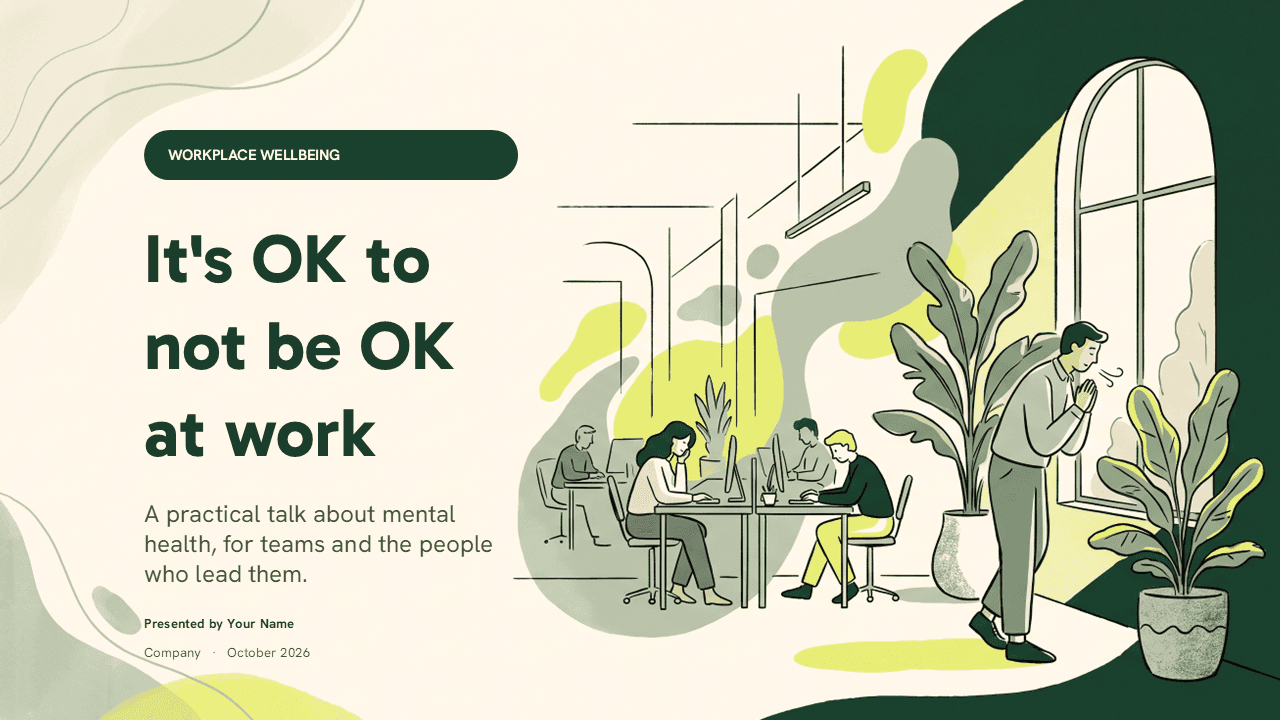
The mental health at work PowerPoint template is a free deck for teams, managers and HR people who want to talk about wellbeing in a practical, human way. It has 24 widescreen slides in soft cream, forest green, sage and fresh lime, with hand-drawn office illustrations of people at desks, plants and tall windows. The hook is the content: the slides already cover a two-minute check-in, early warning signs, what to say and what to avoid, stress versus burnout and small daily habits, so you start from a working talk rather than a blank file. It also opens in Canva through the Canva button on this page.
What's Inside
The file holds ten designed content slides, ten blank themed layouts and four design resource slides.
- Title slide: "It's OK to not be OK at work" with a workplace wellbeing label, a subtitle, presenter name and company, next to a large illustration of an open office.
- Start here: a slide on the two-minute check-in, with an illustration of two colleagues talking and a short note on listening first.
- Early signals: five numbered cards with icons for common signs that someone is running low, such as poor sleep and foggy focus.
- Say this, not that: a two-column comparison of supportive phrases and phrases to avoid.
- Section divider: "The elephant in the open office" with an illustration of an overwhelmed employee at a cluttered desk.
- Quote slide: a large quote attributed to the World Health Organization.
- Agenda: six numbered topics, from why the talk matters to where to get support and your commitments.
- Stress or burnout: a side-by-side comparison of the two, in a white card and a lime card.
- Manager toolkit: four conversation types with icons, including a regular check-in and a planned return after time off.
- Small habits: six everyday habits with icons, like real breaks, a short walk and clear after-hours boundaries.
- Ten blank layouts: empty themed backgrounds with plants, soft shapes and card areas for your own slides.
- Design resources: a fonts slide, an elements slide, an icon pack slide and a closing slide with a link to more templates.
Design and Style
The style is calm and warm, which suits a subject people can find hard to talk about. Cream backgrounds keep the slides light, deep forest green carries the headlines, and sage and lime appear in organic blob shapes and highlight cards. Potted plants and trailing leaves sit in the corners, and the line-drawn illustrations of office life give the deck a friendly, editorial feel instead of a clinical one.
Headings are set in Gabarito and body text in Hanken Grotesk, both named on the fonts slide in the file. Text is kept short, with lots of white space, so the slides support the speaker instead of replacing them. The content slides use transitions and entrance animations, so cards and lists appear one by one while you talk.
Who Is This Template For?
- HR and people teams running a wellbeing session or an awareness week.
- Team leads and managers who want to open an honest conversation with their team.
- Internal communications teams preparing a mental health campaign for staff.
- Trainers and coaches delivering workshops on stress, burnout and healthy work habits.
- Employee resource groups and wellbeing champions sharing practical tips with colleagues.
- Students presenting on workplace wellbeing in business, management or psychology classes.
How to Customize It
Open the .pptx file in PowerPoint and click any text box to edit it. Replace the presenter name, company and date on the title slide, then adjust the agenda so it matches the parts of the talk you plan to give. On the "where to get support" part of your talk, add the resources your organization actually offers, such as an employee assistance program, an HR contact, a wellbeing lead or local helplines, and remind people that talking to a doctor or a qualified mental health professional is always a good step. The template gives practical workplace guidance only and is not a substitute for professional advice.
To add slides, duplicate one of the ten blank layouts and fill the empty areas with text, icons or photos. The elements and icon pack slides hold extra shapes and icons that match the style; copy them onto any slide and recolor them through the Shape Format tab. The transitions and animations are ready to use, and you can change their order or remove them in the Animations pane. Install Gabarito and Hanken Grotesk first if they are not on your computer, so headings keep their spacing.
Before you present, read the talk through with someone from HR or your wellbeing lead so the support details are correct and up to date. Keep the tone of the slides as it is: short, kind and practical. Leave time at the end for questions, and let people know they can also follow up privately after the session.
Prefer Canva? Use the Canva button on this page to open the template in Canva, then edit, present or share it from your own account.
Presentation Ideas
- A company talk for a mental health awareness day or week.
- A manager training session on check-ins and supportive conversations.
- A team meeting about workload, boundaries and taking leave.
- An onboarding module introducing the wellbeing support your company offers.
- A lunch-and-learn on spotting early signs of stress and burnout.
- A leadership update sharing new wellbeing commitments and next steps.
Related Templates
Explore more templates on wellbeing and work:
Frequently asked questions
- Is the Mental Health at Work PowerPoint template free?
- Yes. The .pptx file is free to download and use for internal talks, workshops, training sessions and class presentations.
- How many slides does it have?
- It has 24 slides: ten designed content slides, ten blank themed layouts and four slides with fonts, elements, icons and closing information.
- Can I edit it in Canva?
- Yes. Click the Canva button on this page to open the template in Canva and edit it in your own account.
- Does the template give medical advice?
- No. The slides offer practical workplace guidance, such as how to check in with a colleague. Add your organization's support options and encourage anyone who is struggling to speak with a doctor or a qualified mental health professional.
- Is it animated?
- Yes. The content slides include transitions and entrance animations, which you can edit or remove in PowerPoint's Animations pane.
- Which fonts are used?
- Headings use Gabarito and body text uses Hanken Grotesk. Install both free fonts before editing for the best result.
Unlock the full version
Premium template, part of Prezentr Pass
.PNG)
.PNG)
.PNG)
.PNG) +40 slides
+40 slides- 44 slides, 20 more than the free version
- Same style, fonts and colors, fully editable
- Use it as a style in Prezentr Slides
Pass from €19. Pay once, no automatic renewal. The free version stays free.