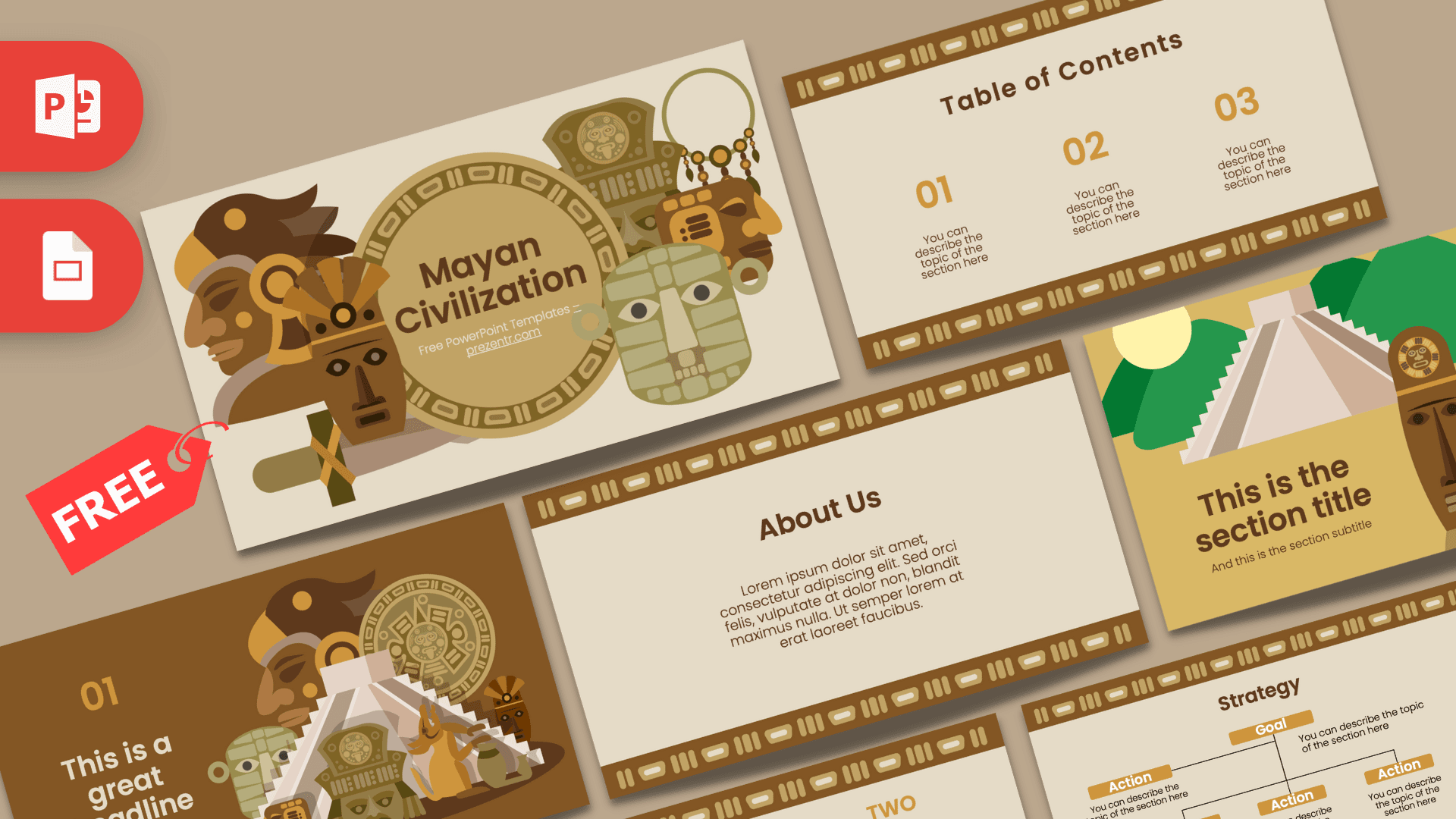
This free Maya Civilization PowerPoint template is a 10-slide deck in warm earth tones, with flat illustrations of carved masks, a feathered headdress, a stone calendar disc and a stepped pyramid. Beige backgrounds, chocolate brown and ochre accents, and patterned borders inspired by ancient carvings give it a museum-like feel that still looks clean and modern. It works in PowerPoint and Google Slides and is an easy choice for history lessons and school projects about Mesoamerica.
What's Inside
The download includes 10 slides in 16:9 format. Illustrated slides open and divide your talk, while content slides use a simple beige layout framed by a brown patterned band.
- Title slide: "Mayan Civilization" set inside a large golden calendar-style disc, surrounded by masks, a profile in a feathered headdress and jade-green carved faces.
- Table of contents: three large ochre numbers with short descriptions.
- Section title: a stepped pyramid in front of green hills and a pale sun, with three tall carved masks on the right and your heading on a golden background.
- Headline slide: an ochre "01" and headline on dark brown, next to a pyramid surrounded by masks, the calendar disc and small figures.
- About Us: a centered text block for an introduction or background.
- Bullet points (numbered): five numbered points from 01 to 05 with a heading block.
- Quote slide: bold ochre quote marks around a short paragraph describing the Maya as a Mesoamerican civilization known for its temples, glyphs and writing system. Keep it or add your own text.
- Bullet points (spelled out): ONE to FIVE in ochre capitals, for a second list style.
- Strategy: a Goal box with Action boxes branching out below, useful for timelines, causes and effects, or project steps.
- Big number: one large brown figure with an arrow pointing to a caption, good for a key date or statistic.
Design and Style
The palette is warm and earthy: a soft sand beige background, deep chocolate brown, golden ochre and muted olive and jade greens. A repeating band of rounded rectangles and vertical bars runs along the top and bottom of the content slides, echoing the patterns carved into stone monuments. It adds texture and a sense of place without distracting from the text.
The illustrations are flat and geometric, with simple shapes and soft shading. You will see a stern carved mask, a figure in a bird-shaped headdress, a round calendar-style stone, jade-colored masks and a stepped pyramid set against green hills. Headings use a bold, rounded sans serif (the included fonts note points to Poppins) in dark brown, with numbers and labels in ochre, so everything stays easy to read. The mood is educational and adventurous, like an exhibit at a history museum.
Because the content slides are calm and uncluttered, they leave plenty of space for maps, photos of ruins or charts. Brown and ochre bars or a beige table with brown lines will blend in naturally.
The illustrated slides carry most of the decoration, so a good approach is to open each new chapter with the section or headline slide, then follow with two or three plain content slides. That rhythm keeps the presentation visual and lively without overwhelming your audience, which matters when the topic is full of new names, places and dates.
Who Is This Template For?
- History teachers introducing ancient civilizations of the Americas.
- Middle and high school students preparing a report or group project on the Maya.
- University students presenting on archaeology, anthropology or Latin American history.
- Museum educators and tour guides creating talks for visitors or school groups.
- Travel bloggers and agencies showcasing trips to Mexico and Central America.
- Homeschooling families looking for a ready-made look for a history unit.
How to Customize It
Download the Maya Civilization PPT template and open it in PowerPoint. The zip also includes a short fonts info file that points to Poppins, a free Google Font; install it first so the headings look exactly like the previews. Click any placeholder to replace the sample text with your own.
To use a photo of a real temple or artifact, right-click an illustration and choose Change Picture, or insert your image on one of the beige content slides. You can recolor the ochre numbers with Font Color and adjust boxes with Shape Fill; a jade green accent also works well with this palette. The Strategy diagram uses separate boxes and lines, so you can copy an Action box to add more points.
Duplicate any slide from the thumbnail panel to build a longer presentation, drag slides into order and delete layouts you do not need. If you change the slide title "Mayan Civilization" to another culture, the template also works for related topics in ancient history.
To use it as a Maya Civilization Google Slides theme, open Google Slides, choose File, then Import slides or Open, and upload the PowerPoint file. Group members can then edit the same deck at the same time, which is handy for class projects.
Presentation Ideas
- An overview of the Maya: where they lived, how their cities worked and what they are remembered for.
- A lesson on Maya writing and glyphs, using the quote slide for a short definition.
- A presentation on Maya astronomy and calendars, with the big number slide for a key figure.
- A comparison of the Maya, Aztec and Inca civilizations across three sections.
- A virtual tour of famous ancient sites in Mexico and Central America.
- A group project on daily life, food and farming in ancient Mesoamerica.
- A debate-style lesson on what archaeologists still do not know about the Maya, using the bullet slides for open questions.
Related Templates
For more ancient history themes, try the Inca Empire PowerPoint Template, the Egyptian PowerPoint Template, the Ancient PowerPoint Template and the History PowerPoint Template. You can also browse all education templates.
Frequently asked questions
- Is the Maya Civilization PowerPoint template free?
- Yes, it is free to download from Prezentr for classroom, personal and educational use.
- How many slides come with the Maya Civilization template?
- It comes with 10 slides: title, table of contents, section title, headline, About Us, two bullet point layouts, quote, Strategy and big number.
- Can I use the Maya slides in Google Slides?
- Yes. Upload the PowerPoint file to Google Slides through File, then Import slides or Open, and edit it there.
- Can I replace the illustrations with photos of real ruins?
- Yes. Right-click any illustration and choose Change Picture, or add photos to the beige content slides.
- Is this template good for a middle school history project?
- Yes. The clear layouts, large numbers and simple diagrams make it easy for students to organize facts about the Maya.
- Does the template include animations?
- No, the slides are static. You can add your own animations or transitions in PowerPoint or Google Slides.