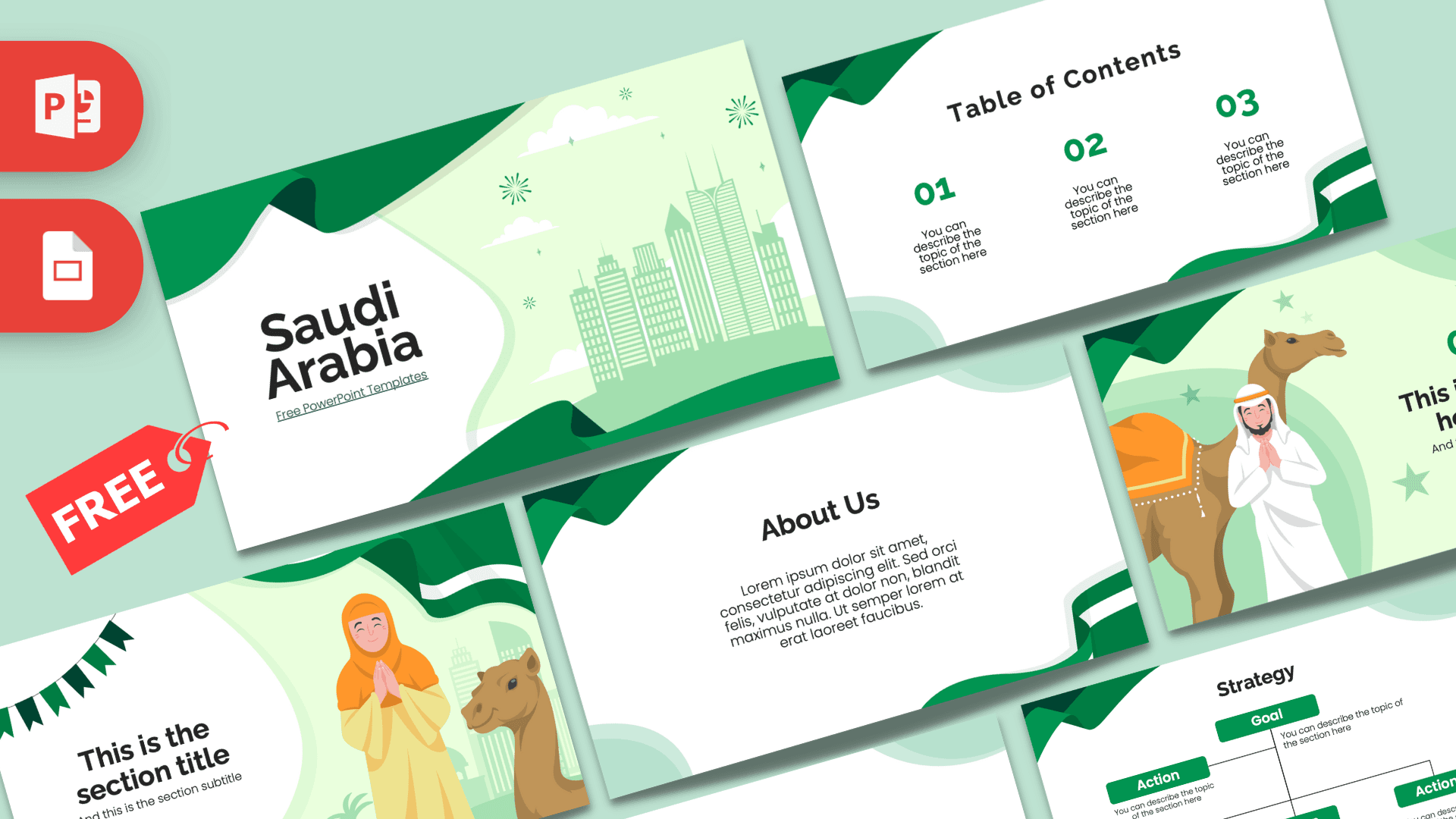
This free Saudi Arabia PowerPoint template is a 10-slide deck in fresh greens and white, with waving green ribbons that recall the national flag, a city skyline, festive bunting and friendly illustrated characters with camels. The soft mint backgrounds and clean white content areas keep it light and modern, while the illustrations give it a clear sense of place. It works in PowerPoint and Google Slides and suits school projects, travel talks and business presentations about the Kingdom.
What's Inside
You get 10 slides in 16:9 format, with a good mix of illustrated slides and practical content layouts.
- Title slide: a large "Saudi Arabia" heading on white, with a pale green skyline of modern towers, clouds and small firework bursts on the right, framed by deep green ribbons.
- Table of contents: three numbered sections in green, with a green and white ribbon curling along the bottom edge.
- Section title: a woman in an orange headscarf with her hands together in greeting, a camel and a palm tree beside her, plus green bunting at the top.
- Headline slide: a man in a white thobe and headdress greeting the viewer next to a camel with an orange saddle blanket, with stars and bunting around a green "01" headline.
- About Us: a centered text block for an introduction or background facts.
- Bullet points (numbered): five numbered points from 01 to 05 with a heading block.
- Quote slide: green quotation marks around a short line of text.
- Bullet points (spelled out): ONE to FIVE in green capitals, for a second style of list.
- Strategy: a Goal box with Action boxes branching below it, useful for plans, projects or steps.
- Big number: one large figure with a green arrow pointing to a caption.
Design and Style
The palette is built around a rich emerald green, paired with lighter mint and pale green tints and lots of white. Flowing ribbon shapes in dark green and white sweep across the corners of every slide, giving the deck a sense of movement and a festive, national-day feel. On the illustrated slides you also see a skyline of modern towers, little fireworks, stars and triangular bunting.
The characters are drawn in a warm, flat cartoon style with simple shapes and soft smiles. Orange shows up in the woman's headscarf and the camel's saddle blanket, which adds a welcome pop of warmth next to all the green. Headings use a bold, rounded sans serif in near-black, while numbers and labels pick up the green. The overall mood is modern, friendly and respectful, suitable for classrooms as well as professional settings.
Because the content slides are mostly white with green framing, you can add photos of landmarks, maps or charts without the design clashing. Green and white charts will look especially at home here. If you want a more formal deck for a boardroom, simply skip the character slides and build your presentation from the title, contents, list, Strategy and big number layouts. The ribbons alone are enough to keep the theme clear.
Who Is This Template For?
- Students preparing a country report on Saudi Arabia, its geography or its culture.
- Teachers introducing the Arabian Peninsula, Middle East studies or world cultures.
- Businesses and consultants presenting market overviews, partnerships or projects in the region.
- Travel and tourism professionals showcasing destinations, itineraries or travel tips.
- Schools and community groups organizing a national day celebration or cultural event.
- Expats and newcomers sharing what to expect when moving to the country.
How to Customize It
Open the Saudi Arabia PPT template in PowerPoint and click any placeholder to type your own text. To replace an illustration, right-click it and choose Change Picture, then pick your own image, such as a photo of a city or landmark. You can change the green accent on numbers and boxes with Font Color or Shape Fill if you need to match a company color, although the green ribbons are part of the character of the design.
The Strategy slide is built from separate boxes and connector lines, so you can copy an Action box to add more steps or delete one you do not need. To add slides, right-click a layout in the thumbnail panel and choose Duplicate Slide, then drag it into place. Delete any layouts you will not use to keep your file tidy.
To use it as a Saudi Arabia Google Slides theme, open Google Slides, choose File, then Import slides or Open, and upload the PowerPoint file. Text, shapes and illustrations stay editable, and you can collaborate with classmates or colleagues in real time.
If you are writing about religion or culture, keep the language simple and respectful, and check facts against reliable sources before presenting. The illustrated greeting gestures on the section and headline slides make a warm, welcoming opening for these topics, and they set a friendly tone for any audience.
Presentation Ideas
- A country profile covering geography, major cities, climate and traditional food.
- A presentation on modern architecture and fast-growing cities, using the skyline title slide.
- A cultural lesson on hospitality traditions, such as serving coffee and dates to guests.
- A market overview for a company considering expansion into the region, with a big number for key figures.
- A travel guide with an itinerary, tips and must-see places split into three sections.
- A school national day event plan, using the Strategy slide to organize tasks.
- A welcome presentation for new team members joining an office in Riyadh or Jeddah, covering practical tips and local customs.
Related Templates
For related themes, try the Islamic PowerPoint Template, the Islam PowerPoint Template, the Ramadan PowerPoint Template and the Five Pillars of Islam PowerPoint, Google Slides & Canva Template. You can also browse all Google Slides templates.
Frequently asked questions
- Is the Saudi Arabia PowerPoint template free?
- Yes, it is free to download from Prezentr and free to use for school, personal and business presentations.
- How many slides are included in the Saudi Arabia template?
- There are 10 slides: title, table of contents, section title, headline, About Us, two five-point bullet layouts, quote, Strategy and big number.
- Can I edit the Saudi Arabia template in Google Slides?
- Yes. Import the PowerPoint file into Google Slides through File, then Import slides or Open, and edit it like any other presentation.
- Can I change the illustrations of people and camels?
- Yes. Right-click any illustration and choose Change Picture to replace it, or delete it to make more room for text.
- Is it suitable for a business presentation?
- Yes. The white content slides, Strategy diagram and big number slide work well for market overviews and project updates, and you can remove the characters for a more formal look.
- Does the template include animations?
- No, the slides are static. You can add animations or transitions yourself in PowerPoint or Google Slides.