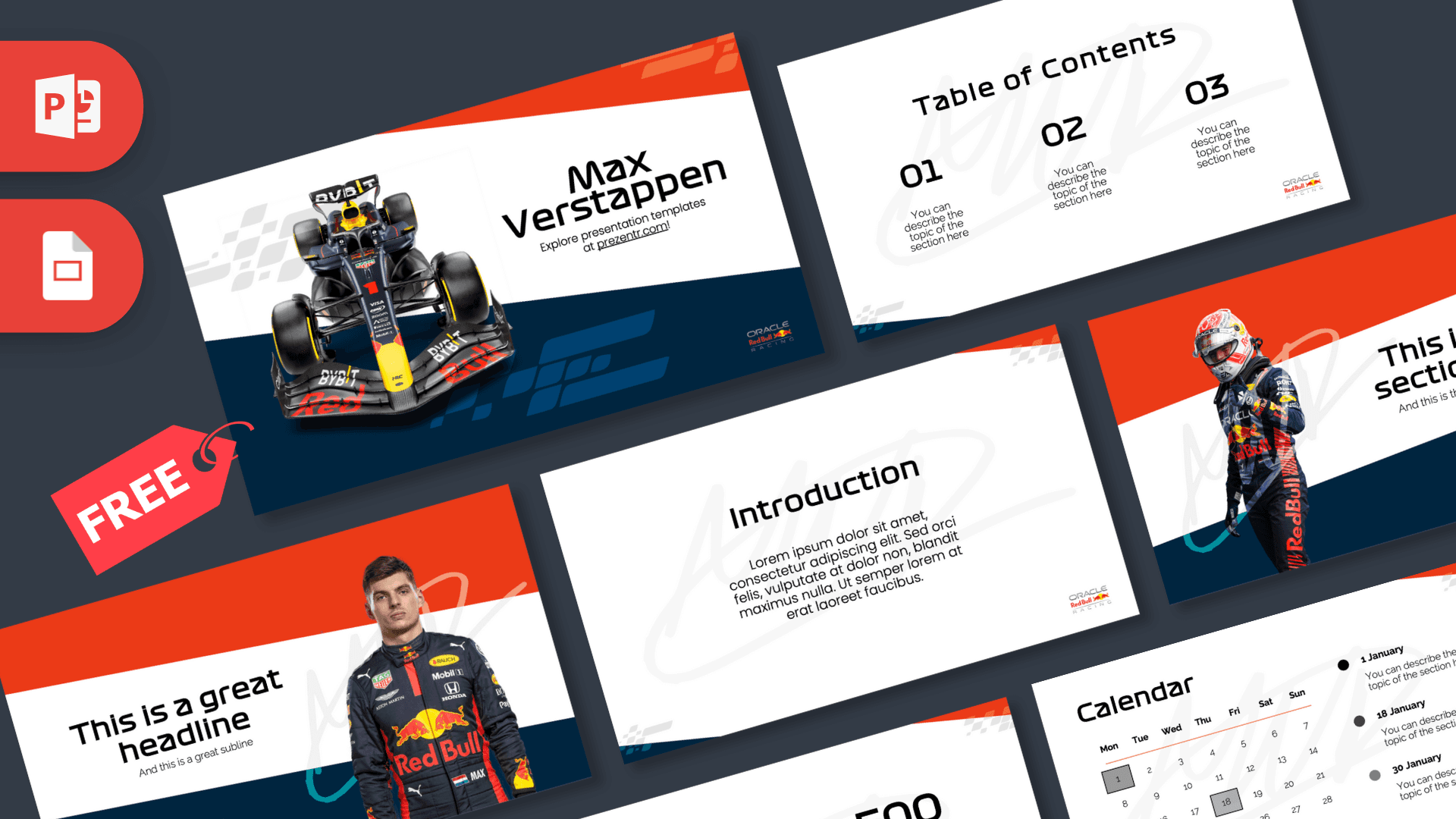
The Max Verstappen PowerPoint template is a free 10-slide deck for fans of the Dutch Formula 1 driver. It pairs a navy blue and bright red-orange color scheme with angled racing stripes, photos of the car, the driver in his race suit and a faint signature-style watermark on white backgrounds. A team logo sits in the corner of each slide, and the layouts include a calendar and a phone mockup. It works in PowerPoint and Google Slides.
What's Inside
The 10 slides in the Max Verstappen PowerPoint template cover both the basics and a few extra layouts that suit racing topics:
- Title slide: a front view of a dark blue F1 car with team livery, next to the "Max Verstappen" heading, on a navy and red-orange angled background.
- Table of Contents: three large numbers (01, 02, 03) with short descriptions on a white background.
- Section title: the driver in his race suit and helmet on the left, with your heading and subtitle on a red, white and navy split background.
- Headline slide: a portrait of the driver in his team race suit on the right, with a headline, subline and a large "01."
- Introduction: a heading and paragraph on white, ideal for a short overview.
- Five bullet points: five numbered items (01 to 05) with a heading and description.
- Quote slide: large black quotation marks around a centered quote.
- Big numbers: one large figure with a caption and a thin arrow, for a key stat you want to highlight.
- Calendar: a monthly grid with three highlighted dates and matching event notes, handy for a race schedule or study plan.
- Phone mockup: a smartphone showing a celebration photo of the driver next to a heading and paragraph.
Placeholder text is lorem ipsum or short instructions, so it is easy to see where your content goes. The calendar and phone mockup are less common in free templates and make this deck practical, not just decorative.
Design and Style
The deck uses a clean white base with bold diagonal bands of navy blue and red-orange cutting across the top and bottom corners, plus small checkered-flag style stripes. A large, light gray signature-style "MV" watermark sits behind the content on many slides, adding a personal touch without getting in the way.
Headings use a wide, futuristic sans-serif that feels close to motorsport graphics, and body text is a clean, simple sans-serif. Photos of the car and the driver appear on the title, section, headline and phone slides, while the rest stay minimal. The result is modern and sporty, with enough white space to stay readable in a classroom or meeting room.
The white background keeps text readable and makes the deck easy to print. The strong diagonal bands add movement, which suits a racing theme, while the corner logo gives every slide a consistent finish.
If you want to make the deck more neutral, you can remove the watermark and corner logo from the slides and keep the colors and stripes.
Who Is This Template For?
This Max Verstappen PPT template works for younger fans as well as adults planning a club or watch-party event.
- F1 fans who want to present a driver profile or season preview.
- Students working on a sports, engineering or "my hero" school project.
- Racing clubs and sim racing groups planning a league schedule with the calendar slide.
- Teachers using motorsport to make physics, speed or teamwork lessons more engaging.
- Party hosts organizing a race-day watch party or racing-themed birthday.
- Sports clubs and coaches looking for a sporty, high-energy style for a season plan or team meeting.
How to Customize It
- Replace the text. Click any heading or placeholder and type your own content.
- Swap the photos. Right-click the car, driver or phone screen images and choose Change Picture to use your own photos.
- Edit the calendar. Change the month dates, move the highlighted squares and rewrite the three event notes for your own schedule.
- Adjust the colors. Recolor the diagonal bands if you want to match a different team or theme.
- Reorder slides. Drag slides in the thumbnail panel and duplicate the layouts you need.
To open the Max Verstappen slides in Google Slides, upload the PPTX file to Google Drive and open it with Google Slides. Photos and shapes carry over, and you can swap the heading font from the toolbar if it changes.
When you are done, export the deck as a PDF from the File menu to share it with your class, club or friends. The white backgrounds print cleanly, and the colored bands keep the racing look on paper.
If you present on a projector, check the watermark is still subtle on your screen, and lighten it further if it competes with your text.
Presentation Ideas
- A driver profile for a sports or "my favorite athlete" class assignment.
- A season preview with the race calendar and key dates.
- How a Formula 1 car works: aerodynamics, tires and pit stops.
- A sim racing league plan with schedule, rules and points.
- A race-day watch party program for friends and family.
- A talk on teamwork in motorsport, from drivers to engineers.
- A comparison of race tracks around the world and what makes each one challenging.
Tip: keep facts current. Racing results change every season, so check any numbers you add against an official source before presenting, and use the big numbers slide for the one figure you want people to remember.
For a longer talk, duplicate the headline slide for each topic and swap in a new photo each time.
Related Templates
If you like the Max Verstappen PowerPoint template, stay on track with the Red Bull F1 Team PowerPoint Template, the Formula 1 PowerPoint Template, the Lando Norris PowerPoint Template and the Lewis Hamilton PowerPoint Template. Find more decks in the Google Slides templates collection.
Frequently asked questions
- Is the Max Verstappen PowerPoint template free?
- Yes, it is free to download from Prezentr. It is a fan-made design and is not endorsed by the driver, his team or Formula 1.
- How many slides are in the Max Verstappen template?
- There are 10 slides, including a title, table of contents, section and headline slides with photos, five bullet points, a quote, big numbers, a calendar and a phone mockup.
- Does the Max Verstappen template work in Google Slides?
- Yes. Upload the PPTX to Google Drive and open it with Google Slides.
- Can I use the calendar slide for a race schedule?
- Yes. The calendar has an editable monthly grid with three highlighted dates and notes, so you can mark races, deadlines or events.
- Can I replace the driver photos?
- Yes. Right-click any photo and choose Change Picture to use your own image.
- Is it suitable for a school sports project?
- Yes. The layouts work well for a driver profile, a season overview or a lesson on how racing cars work.
This is a fan-made template inspired by Max Verstappen PowerPoint Template. Prezentr is not affiliated with, endorsed by, or selling assets from Max Verstappen PowerPoint Template. All brand names, logos, and trademarks belong to their respective owners.