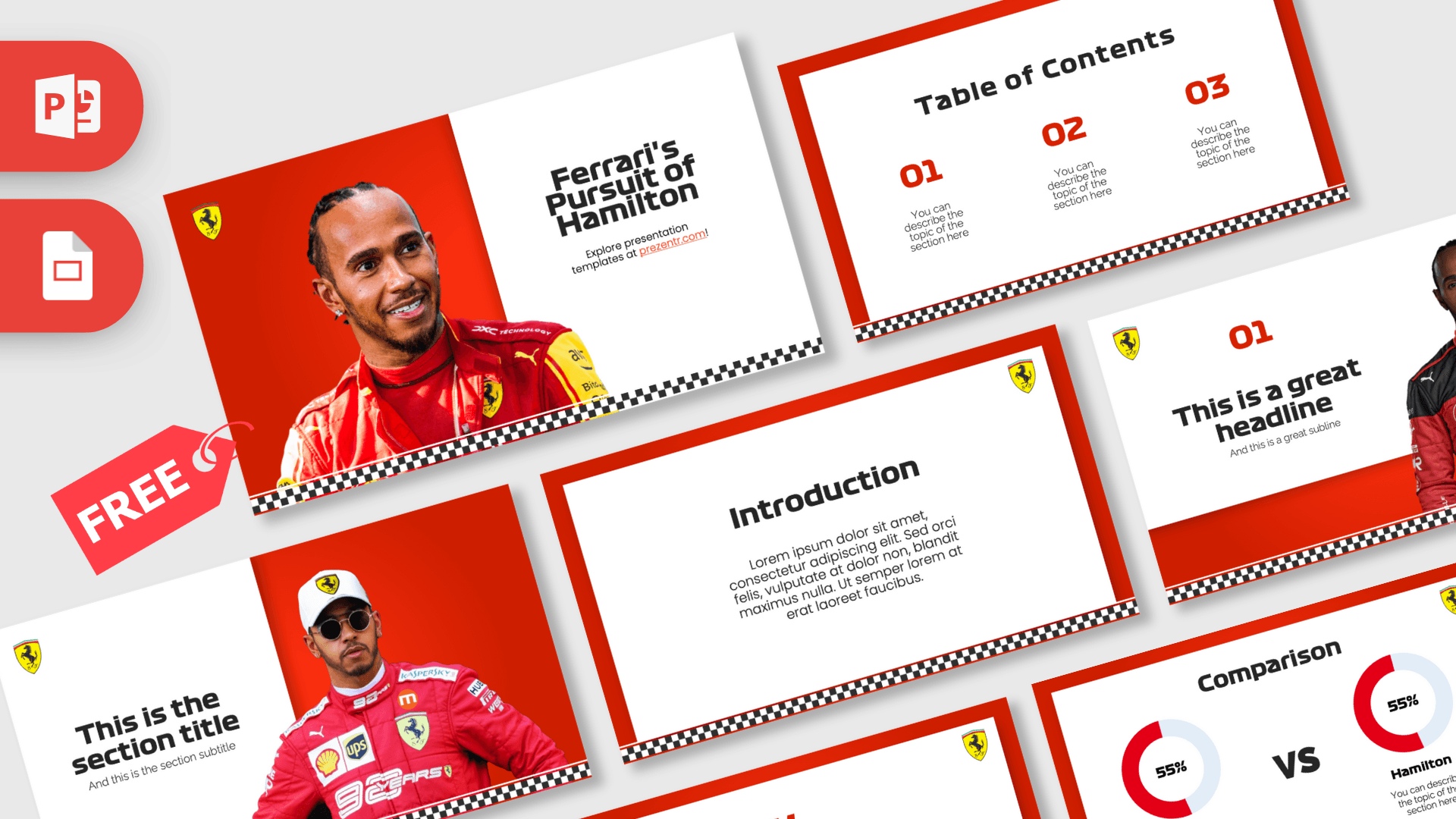
The Lewis Hamilton PowerPoint template is a free 10-slide deck in Ferrari red and white, with checkered flag strips, the yellow prancing horse shield and racing-style headings. Lewis Hamilton is a British Formula 1 driver, and this deck shows him in red race suits on its photo slides, opening with the headline "Ferrari's Pursuit of Hamilton". It works in PowerPoint and Google Slides and is made for F1 fans, school projects and motorsport talks.
What's Inside
The deck starts with three photo slides and moves into clean white panels for your content:
- Slide 1, Title: a smiling portrait of Hamilton in a red race suit on the left and the title "Ferrari's Pursuit of Hamilton" on a white panel, with a Ferrari shield and a checkered strip along the bottom.
- Slide 2, Table of Contents: three red numbers (01, 02, 03) with short descriptions on a white card framed in red.
- Slide 3, Section title: a headline and subtitle next to a photo of Hamilton in a cap and sunglasses wearing a red team suit.
- Slide 4, Numbered headline: "01" and a headline beside a full-length photo of Hamilton in a red and black race suit.
- Slide 5, Introduction: a heading and paragraph for your opening summary.
- Slide 6, Five Bullet Points: a title block and five points labeled 01 to 05 in red.
- Slide 7, Quote: red quotation marks around a short statement.
- Slide 8, Big number: a single large figure with a red arrow and caption, for a key statistic.
- Slide 9, Strategy: a Goal box connected to four Action boxes in red, useful for race strategy, project steps or plans.
- Slide 10, Comparison: two red donut charts with "VS" between them, labeled Verstappen and Hamilton in the sample, ready for a head-to-head comparison.
The layouts make it easy to build a driver profile or race analysis. Use the photo slides to open each section, the introduction slide for background, and the five bullet points for key facts or race highlights. The strategy diagram is perfect for explaining a race plan, such as tire choices or pit stops, and the comparison slide gives you a clear head-to-head finish. Add the big number slide whenever you want one statistic to stand out.
Design and Style
The design borrows from the race track. A bold red background frames white content cards, and a black and white checkered strip runs along the bottom of every slide like a finish line. The yellow Ferrari shield sits in the corner of each content slide as a recurring accent.
Headings use Formula1 Display, a wide racing-style typeface, while body text is set in Poppins Light for a clean, modern contrast. Numbers and chart arcs are bright red, so key information jumps out. The photo slides use cutout images of Hamilton against the red background, giving the deck the energy of a race weekend poster. This is a fan-made template and is not affiliated with Lewis Hamilton, Ferrari or Formula 1.
Even with the strong red, content stays readable because text always sits on white panels. The layouts are spacious, with short text areas that keep slides focused, and the checkered strip ties every slide together so the deck feels consistent from the title to the final comparison.
Who Is This Template For?
Whether you follow every race or are just discovering Formula 1, this deck makes a motorsport topic look exciting.
- F1 fans sharing a season preview, a race recap or a driver profile.
- Students presenting a sports project, a biography assignment or a talk on motorsport.
- Teachers using racing as a hook for lessons on physics, engineering or teamwork.
- Sports bloggers and podcasters who want slides for a video or live talk.
- Fan clubs and watch party hosts planning race-day events and prediction games.
- Office teams running a motorsport-themed team meeting or quiz.
How to Customize It
This Lewis Hamilton PPT template uses standard PowerPoint text boxes, shapes and pictures.
- Install the fonts: Poppins is free from Google Fonts. If Formula1 Display is not on your computer, pick a wide bold sans serif as a replacement for the headings.
- Replace the text: click the title, headings and description lines and type your own content.
- Change the photos: right-click a driver photo and choose Change Picture to use a different image you have the right to use.
- Edit the comparison: rename Verstappen and Hamilton to any two drivers, teams or options, and update the percentages and arcs.
- Recolor: swap the red for another team color with Shape Fill if you want a different look.
- Reorder slides: drag thumbnails in the left panel or duplicate layouts you need more often.
For Google Slides, upload the file to Google Drive and open it with Google Slides. Poppins is available there; the Formula1 heading font will likely need a substitute.
Before you present, run the slideshow from the start (F5) to check that long names fit the wide heading font and that every photo still lines up with the checkered strip.
Presentation Ideas
- A driver profile of Lewis Hamilton for a sports class.
- Driver versus driver: comparing two rivals with the comparison slide.
- How a Formula 1 race weekend works, from practice to the race.
- Pit stop strategy explained with the Goal and Action diagram.
- The science of speed: aerodynamics and tires in motorsport.
- A season preview with key teams, drivers and races to watch.
For a class presentation, keep facts short and check any statistics against a reliable source before you add them to the big number slide.
Related Templates
For more motorsport decks, check out the Ferrari PowerPoint Template, the Formula 1 PowerPoint Template, the Max Verstappen PowerPoint Template or the Mercedes F1 Team PowerPoint Template. You can also browse every deck in the Google Slides category.
Frequently asked questions
- Is the Lewis Hamilton PowerPoint template free?
- Yes, the 10-slide deck is free to download. It is a fan-made template and is not affiliated with Lewis Hamilton, Ferrari or Formula 1.
- How many slides are in the Lewis Hamilton template?
- The newest version has 10 slides: a title, table of contents, section title, numbered headline, introduction, five bullet points, quote, big number, strategy diagram and a comparison slide.
- Which fonts does the Lewis Hamilton template use?
- Headings use Formula1 Display and body text uses Poppins Light. If you do not have the Formula1 font, replace it with a wide bold sans serif.
- Can I edit the template in Google Slides?
- Yes. Upload the file to Google Drive and open it with Google Slides. The heading font may be swapped for a fallback, so check the titles.
- Can I compare other drivers on the comparison slide?
- Yes. The names Verstappen and Hamilton are regular text, so you can rename them and update the percentages for any two drivers or teams.
This is a fan-made template inspired by Lewis Hamilton PowerPoint Template. Prezentr is not affiliated with, endorsed by, or selling assets from Lewis Hamilton PowerPoint Template. All brand names, logos, and trademarks belong to their respective owners.
Previous version
This is an updated version of the Lewis Hamilton PowerPoint Template, redesigned in September 2024. The original version is still available here: