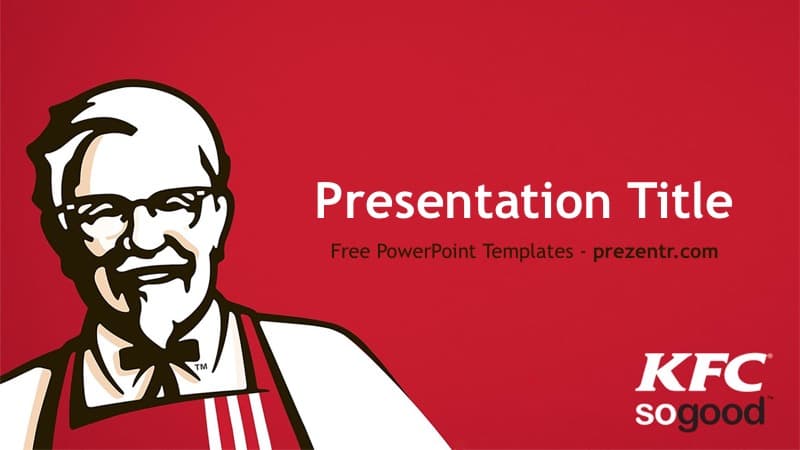
This free KFC PowerPoint template keeps things simple and instantly recognizable: a rich red title slide with the Colonel Sanders portrait and the KFC "so good" logo, followed by a clean white content slide. It is a 2-slide, widescreen PowerPoint file with the standard layouts built into the master, so you can grow it into a full deck in minutes. A good pick for fast-food case studies, brand reports and themed events.
What's Inside
The download is a PowerPoint template file (.potx), which opens as a new, untitled presentation so the original stays untouched. It contains two designed slides:
- Title slide: a red background with the illustrated Colonel Sanders portrait on the left, a large white "Presentation Title" heading, a subtitle line underneath and the KFC "so good" logo in the bottom right corner.
- Content slide: a bright white background with a very faint Colonel Sanders watermark on the left and a red vertical strip on the right that holds the KFC badge logo. This is your main workspace for text, photos and charts.
The slide master passes that content design on to the standard PowerPoint layouts: Title Slide, Title and Content, Section Header, Two Content, Comparison, Title Only, Blank, Content with Caption and Picture with Caption. Click New Slide, choose a layout, and the red strip and logo come along automatically. That makes this KFC PPT template easy to stretch from a two-minute talk to a twenty-slide report.
The slides are 16:9 widescreen, which fits modern laptops, TVs and projectors.
Design and Style
The palette is the brand's classic pairing of red and white, with the Colonel's portrait drawn in black, white and a touch of warm skin tone. The title slide is bold and full of color, while the content slide flips to mostly white, which keeps long text and data easy to read and saves ink if you print handouts.
Text uses Trebuchet MS, a friendly sans-serif that reads well on screen. Titles are large and white on the cover; on the content layouts you can set dark gray or red text for good contrast on white. Beyond the portrait and the logos there are no extra illustrations or photos, so the style is clean and leaves space for your own food shots, store photos or charts. The narrow red strip on the right acts like a frame and keeps every slide on brand without crowding your content.
To keep your slides looking their best, use the red title slide sparingly, for example at the start and again before each new section, and put your detailed content on the white layouts. Stick to one main idea per slide, use large photos of food or restaurants where you can, and keep charts simple with red as the highlight color. That way the deck feels bold where it matters and calm where people need to read.
Who Is This Template For?
The KFC PowerPoint template gives you a familiar brand frame and leaves the content up to you, which makes it a flexible choice for:
- Business and marketing students writing a case study on KFC, franchising or the global fast-food market.
- High school students presenting a report on a famous brand, a company founder or logo design.
- Teachers introducing a lesson on branding, advertising or how restaurant chains expand worldwide.
- Restaurant shift leads and trainers who want a familiar look for a team briefing or onboarding talk.
- Entrepreneurship students pitching their own restaurant idea and studying how a well-known franchise brand presents itself.
- Party and event hosts planning a fried chicken cook-off, a fast-food trivia night or a themed birthday.
How to Customize It
Everything in the KFC PowerPoint template is editable in PowerPoint:
- Replace the text: click "Presentation Title" and the subtitle on the cover and type your own title, name and date.
- Add content slides: go to Home, then New Slide, and pick Title and Content, Two Content or Comparison depending on what you need to show.
- Insert photos: use Insert, then Pictures, or the Picture with Caption layout. To replace a photo later, right-click it and choose Change Picture.
- Build charts: use Insert, then Chart, and set the bars or slices to red and gray so they match the template.
- Work with the background: the portrait, watermark and red strip are part of the layout backgrounds, so they stay put while you edit. To change one, right-click the slide, choose Format Background and insert a different picture.
- Reorder slides: drag thumbnails in the left panel or use Slide Sorter view to plan the flow.
- Save your work: when you finish, go to File, then Save As, and choose PowerPoint Presentation (.pptx), so your finished deck is stored separately and the original template stays ready for the next project.
This KFC template is designed for PowerPoint. Prezentr does not list a Google Slides version of it, so editing and presenting in PowerPoint will give you the best result.
Presentation Ideas
- The story of Colonel Sanders and how a roadside restaurant became a global brand.
- KFC around the world: how menus change from country to country.
- A SWOT analysis of KFC for a business or marketing class.
- Fast food versus home cooking: cost, time and nutrition compared.
- A pitch for a new menu item or limited-time offer, as a class entrepreneurship project.
- A restaurant team training session on service speed and food safety.
- Brand mascots and founders: why some companies put a real person's face on their logo.
Related Templates
Comparing fast food chains? Pair this KFC PowerPoint template with the McDonald's PowerPoint Template, the Burger King PowerPoint Template, the Taco Bell PowerPoint Template or the Wendy's PowerPoint Template. For more company-inspired designs, browse our Brands and Companies templates.
Frequently asked questions
- Is the KFC PowerPoint template free to use?
- Yes. It is a free download on Prezentr for school, training and personal presentations.
- How many slides come with the KFC template?
- It includes 2 designed slides, a red title slide and a white content slide. The master also holds the standard PowerPoint layouts in the same style, so you can add more slides with New Slide.
- Does the KFC template work in Google Slides?
- It is built for PowerPoint, and there is no Google Slides version listed for it on Prezentr. We recommend editing and presenting it in PowerPoint.
- Can I move or remove the Colonel Sanders image?
- The portrait and logos are part of the slide backgrounds, so they stay in place while you edit. To change one, right-click the slide, choose Format Background and pick Solid fill or insert a different picture.
- What file format is the KFC template?
- It is a PowerPoint template file (.potx) in 16:9 widescreen. Opening it creates a new presentation, which you can then save as a regular .pptx.
- Is this an official KFC template?
- No. It is a free, brand-inspired design for educational and personal use and is not affiliated with or endorsed by KFC.
This is a fan-made template inspired by KFC PowerPoint Template. Prezentr is not affiliated with, endorsed by, or selling assets from KFC PowerPoint Template. All brand names, logos, and trademarks belong to their respective owners.