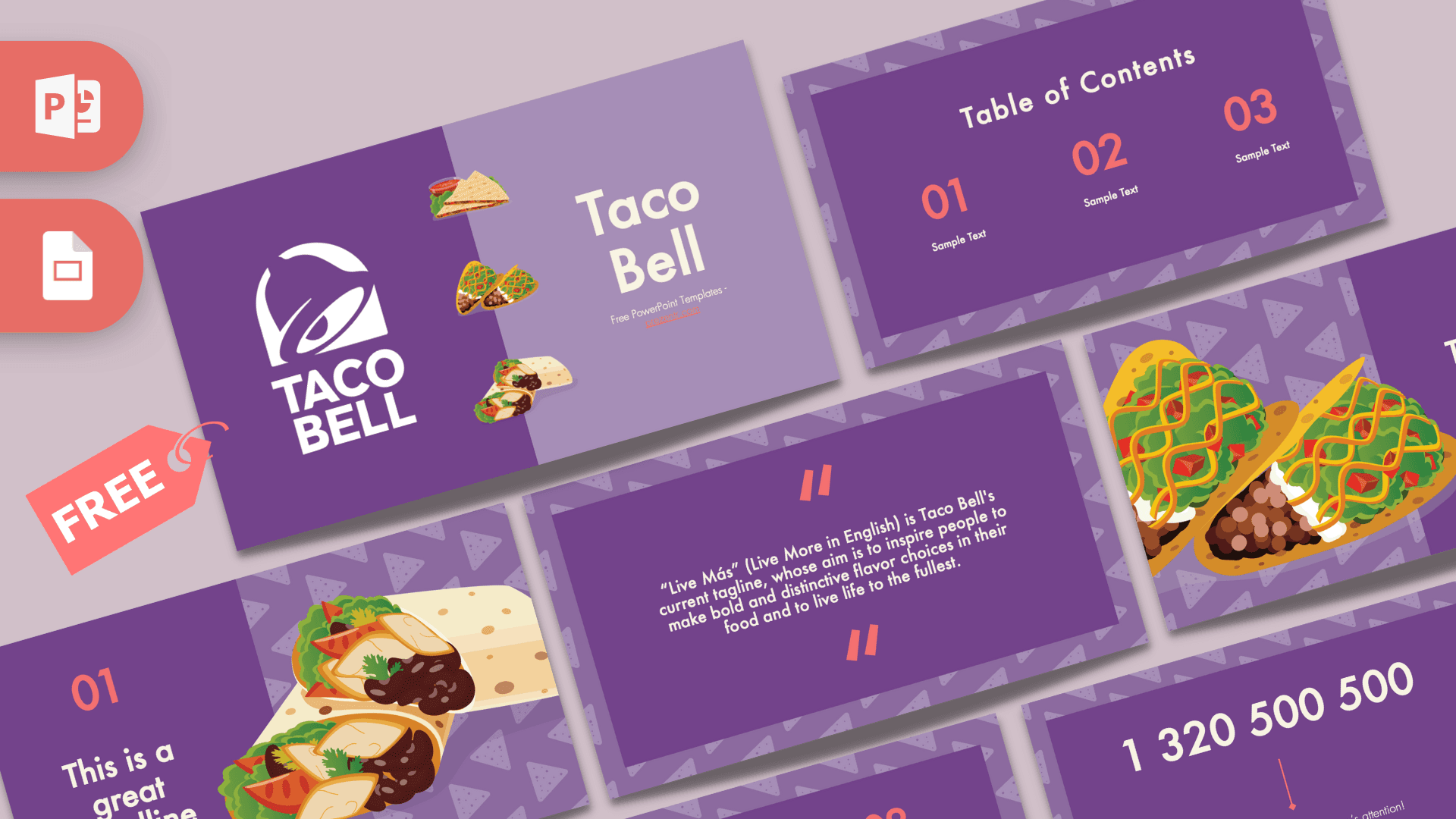
This free Taco Bell PowerPoint template serves up 10 widescreen slides in rich purple with coral accents, illustrated tacos, burritos and quesadillas, and a subtle pattern of tortilla chip triangles in the background. It opens with the bell logo and a split purple title slide, and includes a quote slide about the brand's "Live Más" tagline. Edit it in PowerPoint or Google Slides for food business projects, menu ideas or a fun team presentation.
What's Inside
The deck gives you a full set of everyday layouts, each one dressed in the same purple and coral style. Three different bullet point layouts mean you can present lists of different lengths without the deck ever looking repetitive:
- Title slide: a split design with the Taco Bell bell logo on a deep purple panel and the "Taco Bell" title on a lighter lavender panel, plus small illustrations of a quesadilla, taco and burrito.
- Table of Contents: three large coral numbers with short labels underneath, ready for your agenda.
- Section title: two oversized illustrated tacos with lettuce, cheese and tomato spill in from the left, next to the section heading.
- Quote slide: coral quote marks around a short sample text explaining the "Live Más" tagline. Keep it, or replace it with your own quote or message.
- Headline slide: a big "01" with a headline and subline on the left and a large illustrated burrito on the right.
- Slide Title with notes: a large heading with a bullet list. The sample text tells you which font is used.
- Bullet Points (three): three numbered points in a row, good for a simple process or three key ideas.
- Bullet Points (four): a 2 x 2 grid of numbered points for comparisons or features.
- Bullet Points (five): a title block and five numbered points for longer lists or menus.
- Big number slide: one large white figure with a coral arrow and caption to highlight your key statistic.
Design and Style
Purple is the base color throughout the Taco Bell PPT template, from the solid content panels to the patterned background, where faint triangle shapes look like scattered tortilla chips. Numbers, quote marks and arrows are set in a warm coral that stands out nicely against the purple, and white text keeps every slide readable. The food artwork uses flat, colorful illustrations with clean outlines, which feels friendly and modern rather than photographic. Headings use Futura, a geometric sans serif with a clean, contemporary look, as noted in the template itself. The mood is upbeat and casual but organized, so the deck fits a class project just as well as a marketing meeting. Because the illustrations sit on only a few slides, the remaining layouts are clean enough to hold charts, menus, tables and photos without looking crowded. This is a free fan-made design inspired by the brand and is not affiliated with or endorsed by Taco Bell.
Who Is This Template For?
Whether you are studying the fast food industry or planning a taco night, this deck has you covered. Here are some of the people who get the most out of it:
- Business and marketing students writing a case study on fast food branding, menus or advertising.
- Restaurant owners and food startups pitching a Mexican-inspired menu, a food truck or a new concept.
- Marketing and social media teams presenting campaign ideas with a bold, food-focused look.
- Teachers covering nutrition, food culture or brand recognition in an engaging way.
- Party hosts who want a fun slideshow for a taco night, Taco Tuesday event or food-themed birthday.
- Employees and managers sharing training, team updates or results in a lighthearted style.
How to Customize It
Getting the Taco Bell PowerPoint template ready for your talk is easy, and most changes take only a couple of clicks:
- Install Futura: the template recommends installing the font before editing so headings look as designed. If you do not have it, choose a similar geometric sans serif.
- Replace the sample text: click on "Sample Text" or any heading and type your own words.
- Swap illustrations: right-click a food illustration and select Change Picture to use your own product photo or graphic in the same position.
- Adjust colors: select coral numbers or purple panels and change the fill or font color to match your own brand.
- Organize slides: drag slides to reorder them, duplicate the bullet layouts for more content, and delete anything you do not need.
- Add movement: the slides are static, so use the Animations tab to bring in bullet points or the big number one step at a time.
Google Slides: upload the PPTX to Google Drive and open it with Google Slides. All elements stay editable. If Futura is not available, select a similar font from the font list.
Presentation Ideas
- How Taco Bell built a recognizable brand: logo, colors, tagline and menu innovation.
- A fast food marketing case study comparing two restaurant chains.
- Launching a new menu item: concept, target audience, pricing and promotion plan.
- Mexican food vs. Tex-Mex: a fun cultural and culinary comparison.
- A food truck business plan with costs, location ideas and key numbers.
- Taco night party slideshow with a menu, games and photo moments.
Using the Taco Bell PowerPoint template for a business class? Keep each slide focused on one idea and let the colorful food illustrations add personality. The big number slide is a great place for a surprising sales figure or survey result.
Related Templates
More fast food designs are just a click away: the KFC PowerPoint Template, the Animated McDonald's PowerPoint Template and the Burger King PowerPoint Template. For a broader food theme, try the Mexican Food PowerPoint Template, or see all designs in our brands and companies collection.
Frequently asked questions
- Is the Taco Bell template free to download?
- Yes, it is free for personal, school and business presentations. It is a fan-made design and is not affiliated with Taco Bell.
- How many slides does the Taco Bell PowerPoint template include?
- It includes 10 slides: title, table of contents, section title, quote, headline, a slide with notes, three bullet point layouts and a big number slide.
- Can I use the Taco Bell template in Google Slides?
- Yes. Upload the PPTX file to Google Drive and open it with Google Slides to edit it.
- What font is used in the Taco Bell slides?
- The template uses Futura. Install it before editing, or pick a similar geometric sans serif if you do not have it.
- Can I replace the food illustrations?
- Yes. Right-click any illustration and choose Change Picture to insert your own image in the same spot.
- Does the template have animations?
- No, the slides are static. You can add your own animations and transitions in PowerPoint or Google Slides.
This is a fan-made template inspired by Taco Bell PowerPoint Template. Prezentr is not affiliated with, endorsed by, or selling assets from Taco Bell PowerPoint Template. All brand names, logos, and trademarks belong to their respective owners.