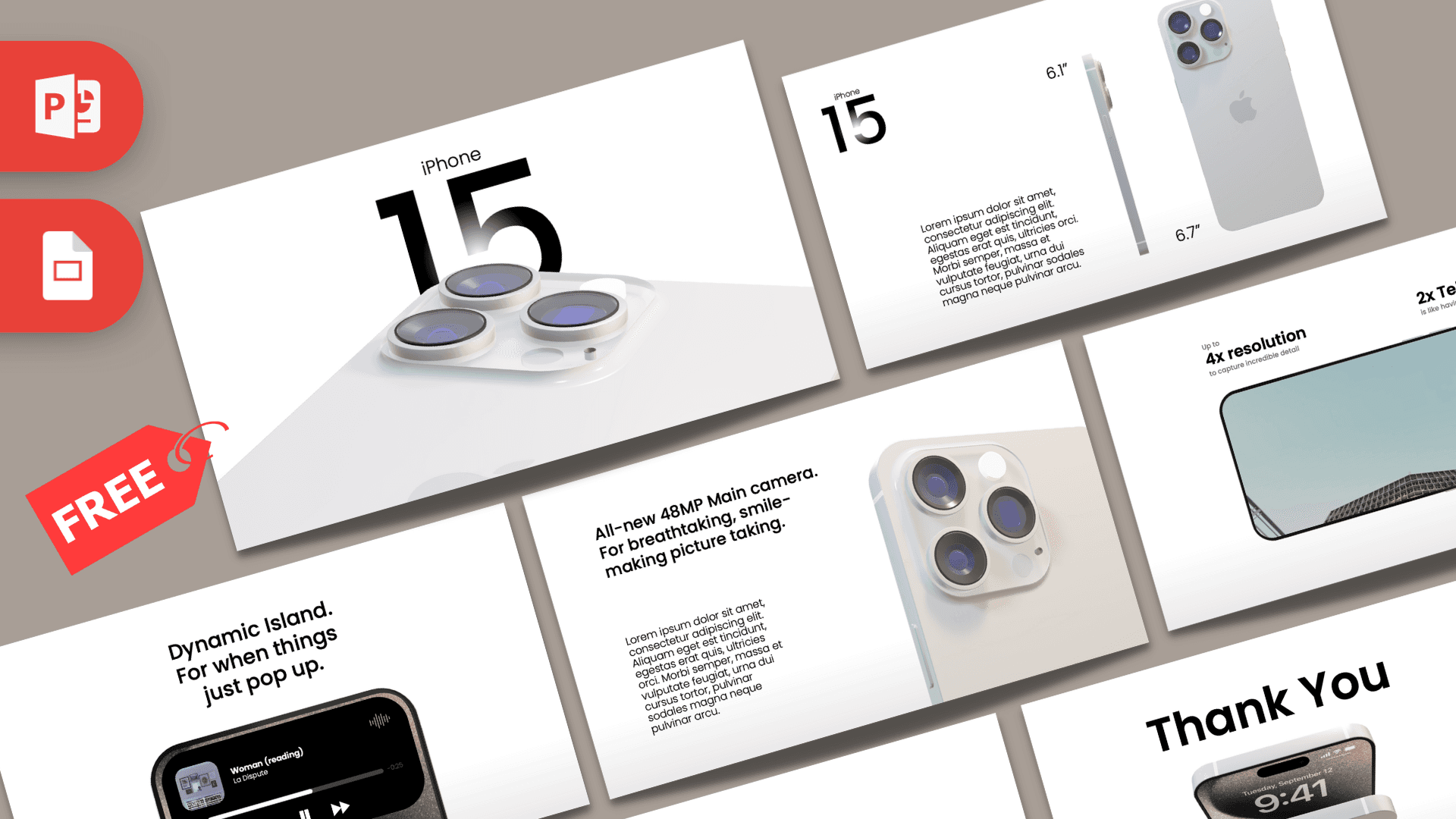
This free iPhone PowerPoint template is an animated, 10-slide deck built around a 3D iPhone 15 model that moves and rotates between slides using Morph transitions. The design is clean white and soft gray with bold black Poppins type and a dark, textured Thank You slide. It looks like a polished product launch, which makes it ideal for app demos, tech reviews and marketing pitches.
What's Inside
The deck includes 10 slides in 16:9. Because the 3D phone is present throughout, each slide feels like a new camera angle on the same product:
- Camera close-up: an extreme close-up of the rear camera lenses on a light background, a dramatic opening shot.
- Title: a huge "15" with "iPhone" above it, as the camera bump rises into view.
- Size comparison: the phone from the side and back with 6.1 and 6.7 inch labels and a paragraph, good for specs or a product overview.
- Dynamic Island (call): the top of the screen with a lock screen and a call indicator, under a feature heading.
- Dynamic Island (music): the same view with an expanded music player and controls, ready for your own text.
- Main camera: a feature heading and paragraph next to an angled view of the triple camera.
- Camera detail: the phone lying flat, seen from the back, with a short description at the top.
- Video slide: the phone turned sideways with a video playing on the screen and two stat headings, 4x resolution and 2x Telephoto.
- Thank You (dark): large white text over a dark, sandy textured wave.
- Thank You (light): bold black text with two phones, one showing the lock screen and one showing the camera.
The slides are arranged as a product story: tease the camera, reveal the name, show the sizes, then walk through features one by one before a clean finish. You can follow the same flow for your own product or app. Replace the feature headings with your own selling points, keep one idea per slide, and the motion will carry the audience from point to point. Two closing slides let you pick a dark or light ending to suit the room.
Design and Style
The iPhone PPT template follows the minimal style people associate with modern tech launches. Backgrounds are white with a subtle gray gradient at the bottom, so the silver and white phone stands out with soft shadows and reflections. Typography uses Poppins in Light, Medium and SemiBold, with very large numbers and short headings for impact and small body text for details. Color is used sparingly: the purple tint of the camera lenses, the warm tones of the lock screen wallpaper and the dark textured background of the closing slide. The result feels premium and calm, letting the 3D product and motion do the talking.
The animation is what sets this deck apart. Morph transitions smoothly zoom, rotate and slide the phone from one view to the next, and entrance animations bring in headings and screens at the right moment. Presented full screen, it plays like a short product video. Run it once in Slide Show mode before editing so you know which slides depend on the phone moving, and keep that object in place as you change text and images.
Who Is This Template For?
This iPhone PowerPoint template is a strong fit for anyone talking about phones, apps or tech:
- App developers and startups presenting a mobile app, with screenshots placed on the phone screen.
- Marketing teams pitching a mobile campaign or product launch.
- Tech reviewers and YouTubers comparing phones or summarizing new features.
- Students giving a presentation on smartphones, design or technology trends.
- Phone retailers and sales staff training teams on features and sizes.
- Designers showing a UI concept or portfolio piece in a realistic device.
- Teachers introducing a lesson on digital literacy or online safety with a familiar device on screen.
How to Customize It
- Install Poppins: it is a free Google font. Install the Light, Medium and SemiBold weights before editing.
- Edit text: click a heading or paragraph and type your own content. Keep headings short to match the style.
- Replace the screen: right-click the lock screen or music player image, choose Change Picture and insert your app screenshot.
- Swap the video: on the video slide, select the clip and use Video Format, Change Video (or delete it and insert your own) to show your app or footage.
- Adjust the 3D model: click the phone to see the 3D Model tab, where you can drag to rotate it or choose a preset view.
- Keep Morph smooth: do not rename or delete the phone on individual slides, and preview with the Transitions tab after changes.
The template is designed for PowerPoint, ideally Microsoft 365 or another recent version that supports 3D models and Morph. We do not offer a Google Slides version, since those effects would not carry over.
Presentation Ideas
- A mobile app launch with screenshots on the phone and key features on each slide.
- A smartphone comparison or buying guide for a tech blog or class.
- A school project on how smartphone cameras have improved.
- A sales training deck covering sizes, features and talking points.
- A UX case study showing your design inside a realistic device.
- A product roadmap for a team building a mobile feature.
- A digital wellbeing talk about screen time habits, with tips on each feature slide.
- A phone photography workshop that walks through camera tips, with sample shots on the screen.
Related Templates
For more device designs, see the Animated iPhone 16 PowerPoint Template, the iPhone 17 PowerPoint Template, the Animated Apple Watch PowerPoint Template and the Apple PowerPoint Template. Browse all animated templates for more slides with motion.
Frequently asked questions
- Is the iPhone 15 PowerPoint template free?
- Yes. The animated iPhone 15 deck is free to download from Prezentr.
- How many slides are in the iPhone template?
- It has 10 slides in 16:9, including a camera close-up intro, a title, size comparison, Dynamic Island, camera, video and Thank You slides.
- Does the template include a real 3D iPhone?
- Yes. A 3D iPhone model is used throughout the deck, and Morph transitions rotate and move it between slides.
- Can I open the iPhone template in Google Slides or Keynote?
- We only offer a PowerPoint version. The 3D model and Morph transitions are PowerPoint features, so use a recent version such as Microsoft 365 for the full effect.
- Can I put my own app screenshots or video on the phone screen?
- Yes. Right-click the screen image and choose Change Picture, or on the video slide use the Video Format tab to replace the clip with your own.
- Is this template made by Apple?
- No. It is a free product-inspired template by Prezentr and is not affiliated with or endorsed by Apple.