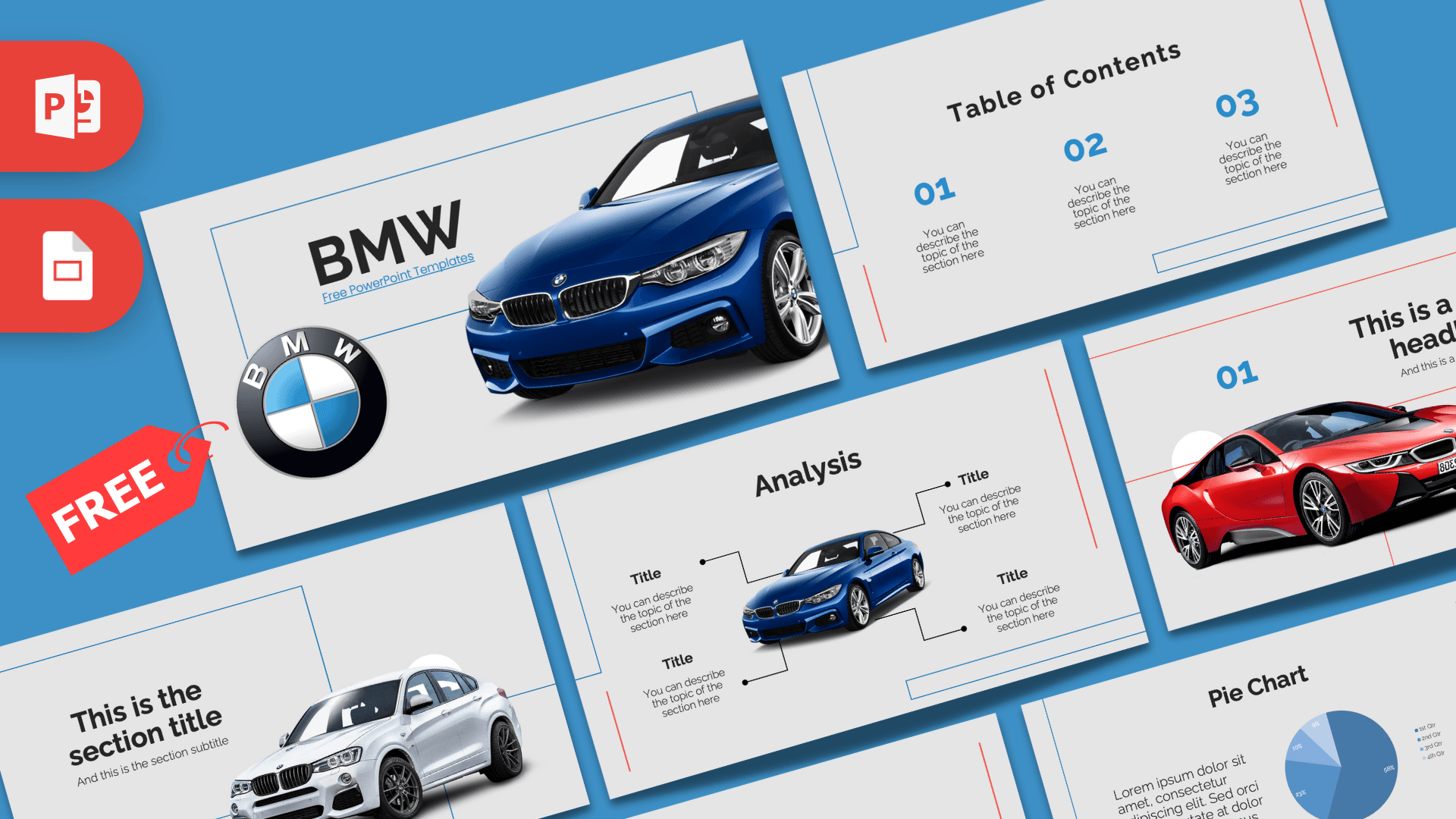
The BMW PowerPoint template is a free 10-slide deck with a sleek, showroom feel: a light gray background, thin blue and red outline frames, bright blue numbers and cutout photos of BMW cars in blue, white and red. It includes data-friendly slides such as a pie chart, a comparison and an analysis layout built around a car. It works in PowerPoint and Google Slides and fits car presentations, brand case studies and automotive projects.
What's Inside
Here is a slide-by-slide look at the deck:
- Slide 1, Title: a large "BMW" heading inside a thin blue outline, the round BMW roundel logo and a blue coupe cutting into the frame.
- Slide 2, Table of Contents: three blue numbers (01, 02, 03) with short descriptions and thin red and blue accent lines.
- Slide 3, Section title: a headline and subtitle beside a white SUV, connected to the outline frame.
- Slide 4, Numbered headline: "01" and a headline inside a red outline, with a red sports car in front.
- Slide 5, About Us: a centered heading and paragraph for a company overview or introduction.
- Slide 6, Five Bullet Points: a title block plus five points labeled One to Five in blue.
- Slide 7, Big number: one large figure with a blue arrow and caption, ideal for sales, horsepower or any headline stat.
- Slide 8, Pie Chart: a text block next to an editable pie chart in shades of blue with a quarterly legend.
- Slide 9, Analysis: a blue coupe in the center with four labeled callouts, perfect for pointing out features, specs or parts of a design.
- Slide 10, Comparison: two blue donut charts with "Vs" between them, great for comparing models, years or competitors.
This deck has more data slides than most brand templates, which makes it handy for reports and comparisons. A simple structure could be: title, table of contents, an About Us overview, a section slide for each model or topic, then the analysis slide to point out features. Use the pie chart for market share or sales split, the comparison slide for two models side by side, and the big number slide for a headline figure like top speed or units sold.
Design and Style
The look is clean and technical. A soft light gray background keeps the slides bright, while thin blue and red lines run along the edges like the outline of a blueprint. Blue is the main accent for numbers, labels and charts, echoing the BMW roundel, and red appears in a few lines and the sports car photo for contrast.
Headings are set in a bold, modern sans serif, and body text is light and easy to read. The car photos are clean cutouts with no background, so they sit neatly on the gray and can be swapped easily. The overall feel is premium but simple, letting the cars and your data stand out. This is a fan-made template and is not an official BMW product.
The light background also makes the deck practical for printing and for bright rooms, where dark templates can look washed out. Charts in shades of blue stay easy to read, and the thin outline frames give every slide a consistent, organized structure even after you add your own content.
Who Is This Template For?
Anyone presenting about cars, engineering or premium brands can use these layouts, from classrooms to dealership meetings.
- Car enthusiasts and clubs presenting a model history, a meetup plan or a road trip.
- Students doing a business case study, engineering project or marketing analysis on a car brand.
- Car dealers and salespeople showing models, features and offers to customers.
- Automotive bloggers and reviewers comparing cars with clear charts.
- Marketing teams in the automotive or mobility space pitching a campaign.
- Teachers covering topics like German industry, engineering or electric mobility.
How to Customize It
This BMW PPT template is simple to edit in PowerPoint.
- Replace the text: click on headings, "Title" labels and description lines and type your own content.
- Change the car photos: right-click a car and choose Change Picture. Images with a transparent background (PNG) will blend best with the gray slides.
- Edit the pie chart: right-click the chart, choose Edit Data and enter your numbers. The chart and legend update automatically.
- Update the comparison: change the percentage text and resize the blue arcs to match your values, then rename the two sides.
- Adjust the analysis callouts: move the labels and lines to point at the right parts of your car or product.
- Recolor: use Shape Fill and Font Color to swap the blue accent for another brand color.
To edit the BMW slides in Google Slides, upload the file to Google Drive and open it with Google Slides. Charts can be edited there through the linked chart options.
Before presenting, play the slideshow once from the start (F5) to make sure your new car photos line up with the outline frames and that the chart labels are easy to read.
Presentation Ideas
- The history of BMW and its best-known model lines.
- Electric versus combustion cars: a side-by-side comparison.
- Marketing strategy of a premium car brand.
- Key features of a new car model, using the analysis slide.
- Car sales by quarter for a dealership, with the pie chart slide.
- How cars are designed: from sketch to production line.
For a car comparison, combine the analysis slide for each model with the comparison slide at the end so your audience sees the details first and the verdict last.
Related Templates
For more car brand decks, try the Mercedes PowerPoint Template, the Audi PowerPoint Template, the Animated Porsche PowerPoint Template or the Tesla Motors PowerPoint Template. You can also browse all brand and company templates.
Frequently asked questions
- Is the BMW PowerPoint template free?
- Yes, the 10-slide BMW deck is free to download. It is a fan-made design and is not affiliated with or endorsed by BMW.
- How many slides are in the BMW template?
- It has 10 slides: a title, table of contents, section title, numbered headline, About Us, five bullet points, a big number, a pie chart, an analysis slide and a comparison.
- Does the BMW template work in Google Slides?
- Yes. Upload the file to Google Drive and open it with Google Slides to edit the text, photos and charts.
- Can I edit the pie chart and comparison data?
- Yes. Right-click the pie chart and choose Edit Data to change the numbers. On the comparison slide, update the percentage text and adjust the donut arcs.
- Can I use other car photos in the BMW template?
- Yes. Right-click any car and choose Change Picture. Transparent PNG images look best on the light gray background.
This is a fan-made template inspired by BMW PowerPoint Template. Prezentr is not affiliated with, endorsed by, or selling assets from BMW PowerPoint Template. All brand names, logos, and trademarks belong to their respective owners.