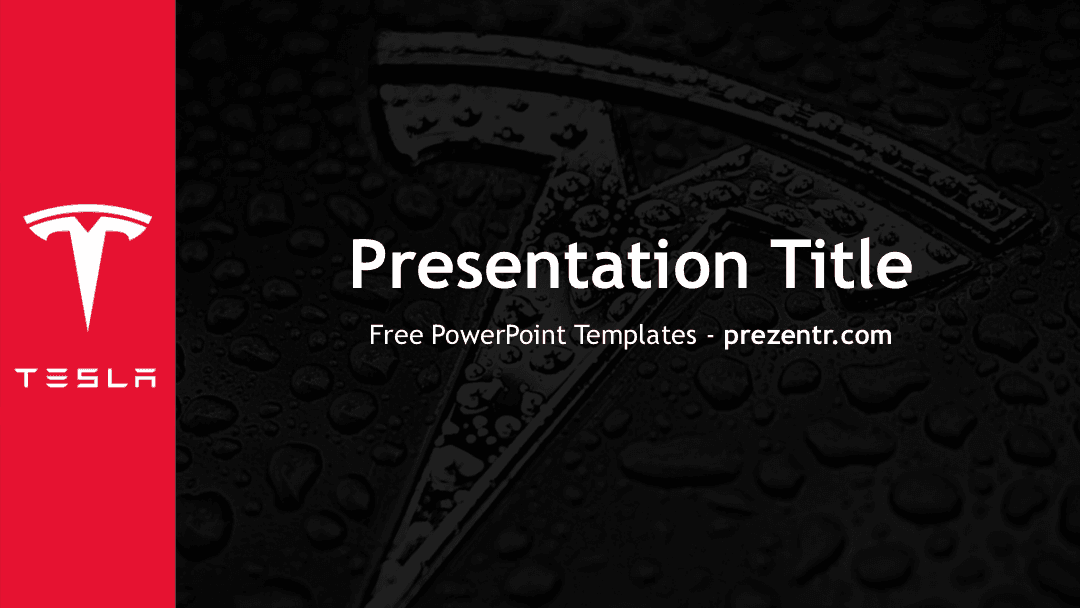
The Tesla Motors PowerPoint template is a free, fan-made design with a sleek dark look: a bold red band on the left holds the white Tesla "T" logo and wordmark, while the rest of the slide shows a close-up of the chrome T emblem covered in water droplets, dimmed almost to black. It comes as a PowerPoint template file (.potx) with 2 sample slides and 9 ready-made layouts in widescreen 16:9. If you need a clean, high-contrast look for a talk about electric cars, tech or automotive business, this Tesla PPT template gives you a strong start.
What's Inside
This is a master-style template. Instead of a long deck of pre-filled slides, it gives you a branded background built into the slide master, so every new slide you add carries the same Tesla look. The file includes:
- Sample title slide: a large white "Presentation Title" with a subtitle line, centered over the dark emblem background, with the red logo band on the left.
- Sample blank slide: the same background with no text, so you can see the full design and use it as a canvas for a photo, a chart or a big statement.
- Nine slide layouts you can pick from the New Slide menu:
- Title Slide, for your opening and closing slides.
- Title and Content, for bullet points, a chart or a picture with a heading.
- Section Header, to divide your talk into chapters.
- Two Content, for side-by-side text or images.
- Comparison, for before and after, pros and cons, or model against model.
- Title Only, when you want to place your own shapes or images under a heading.
- Blank, for full-slide photos or diagrams.
- Content with Caption and Picture with Caption, for an image or chart with a short explanation beside it.
Because the background lives in the master, you can build a deck of 5 slides or 50 slides and the design stays consistent from start to finish.
A simple structure works well here. Open with the Title Slide, follow with a Title and Content slide for your agenda, and use a Section Header before each main part. Put data on Title and Content slides, use Comparison when you weigh two options, and save the Blank layout for one strong photo of a car, a factory or a charging station. Close by reusing the Title Slide with "Thank You" or "Questions?" so your talk starts and ends on the same bold image. Keep text short: on a dark background, a headline and three or four bullets read much better than long paragraphs.
Design and Style
The design rests on three colors: a strong red, near-black charcoal and white. The red band runs the full height of the slide on the left side and carries the white Tesla logo and the spaced-out TESLA wordmark. The background is a moody macro photo of the T emblem with beads of water on it, darkened so that white text reads clearly on top.
The template uses Trebuchet MS, a clean and widely installed sans serif, so your text should look the same on most computers without extra font downloads. There are no cartoon illustrations or busy decorations. The mood is modern, premium and minimal, which suits business and technology topics.
Who Is This Template For?
- Business and marketing students preparing a company case study, a SWOT analysis or a brand strategy report on an electric car maker.
- Engineering and science students presenting on batteries, electric motors or sustainable transport.
- Car enthusiasts and clubs sharing a comparison of models, a road trip plan or a meetup agenda.
- Teachers introducing topics like renewable energy, innovation or how cars are changing.
- Investors' clubs and finance classes discussing the automotive and tech industries.
- Anyone who likes a dark, minimal style for a pitch or a short internal presentation.
How to Customize It
A .potx file opens as a new, untitled presentation based on the template, so the original stays clean. In PowerPoint:
- Add slides from the layouts: go to Home, then New Slide, and choose any of the nine layouts. Each one already has the Tesla background.
- Replace the text: click "Presentation Title" and the subtitle and type your own words.
- Insert your pictures: use the picture placeholders in the caption layouts, or go to Insert, then Pictures. To swap an image you added, right-click it and choose Change Picture.
- Edit the background or logo band: open View, then Slide Master, to adjust the red band, the logo or the background photo for every slide at once.
- Change colors: select text or shapes and pick new colors from the Home tab. White and red keep the look on brand.
- Reorder slides and add motion: drag slides in the thumbnail panel to reorder them. The template has no built-in animations, but you can add transitions or entrance effects from the Transitions and Animations tabs.
When you are done, save the file as a normal .pptx presentation.
Presentation Ideas
- Company case study: history, products, business model and competitors of an electric car company.
- Electric vs. gas cars: use the Comparison layout to put costs, range and emissions side by side.
- How electric cars work: a science talk on batteries, motors and charging, one section per topic.
- The future of transportation: self-driving technology, charging networks and city planning.
- Sustainability report: a class or club presentation on cleaner energy and transport choices.
- Product pitch practice: a mock launch of a new car feature or accessory for a business class.
Related Templates
Want more from the same world? Take a look at the Tesla Roadster PowerPoint Template, the Electric Cars PowerPoint Template and the SpaceX PowerPoint Template. For another car brand, try the Porsche PowerPoint Template. You can also browse all brand and company templates.
Frequently asked questions
- Is the Tesla Motors PowerPoint template free?
- Yes, it is free to download from Prezentr. It is a fan-made, brand-inspired design and is not an official Tesla file.
- How many slides are in the Tesla template?
- The file has 2 sample slides, a title slide and a blank background slide, plus 9 slide layouts. You can add as many slides as you need from the New Slide menu.
- What is a .potx file and how do I open it?
- A .potx file is a PowerPoint template. Double-click it and PowerPoint opens a new presentation based on the design, which you then save as a regular .pptx file.
- Can I use the Tesla template in Google Slides?
- A Google Slides version is not offered for this template. It is made for PowerPoint, so check the layout carefully if you try importing it into another app.
- Can I change the red band or the background photo?
- Yes. Open View, then Slide Master, in PowerPoint to edit the red band, logo or background for all slides at once.
This is a fan-made template inspired by Tesla Motors PowerPoint Template. Prezentr is not affiliated with, endorsed by, or selling assets from Tesla Motors PowerPoint Template. All brand names, logos, and trademarks belong to their respective owners.