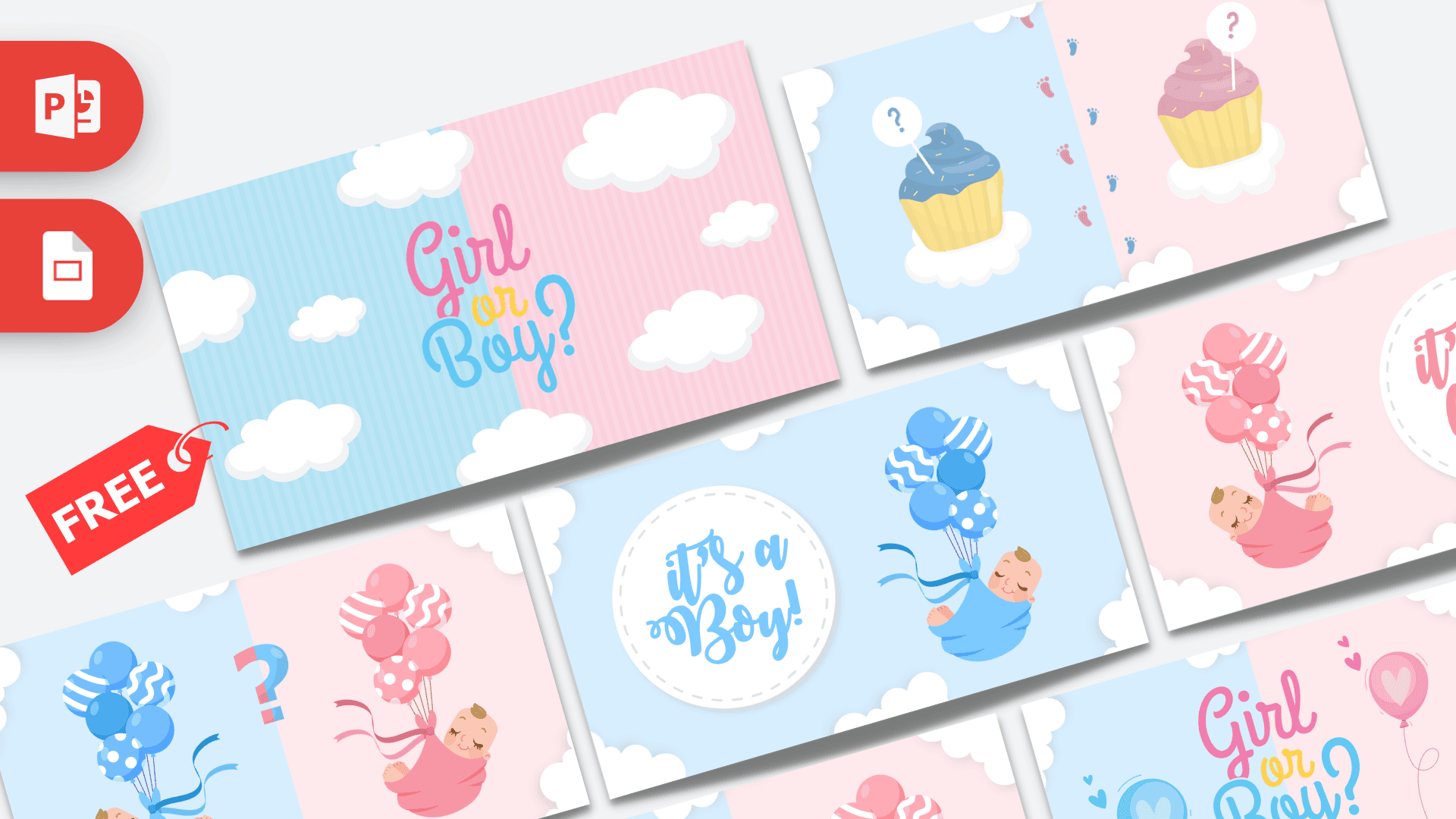
The Animated Gender Reveal PowerPoint template turns your big announcement into a short, sweet show: 8 animated slides in soft baby blue and pink, with fluffy clouds, cupcakes, balloons and two sleeping babies, ending with a big "It's a Boy!" or "It's a Girl!". The slides use Morph transitions and advance on their own every two seconds, so you can press play and watch the moment with your guests. It is free, fun and made for a party screen or a video you share with family.
What's Inside
The file contains two reveal sequences in one deck, one for a boy and one for a girl. You keep the one you need and delete the other. Here is the full set in order:
- Slide 1, Girl or Boy? opener: the words "Girl or Boy?" in pink, yellow and blue script over a split background of blue and pink stripes with white clouds.
- Slide 2, Girl or Boy? with balloons: the same lettering morphs into place between a blue and a pink heart balloon.
- Slide 3, Babies with question mark: a baby wrapped in blue and a baby wrapped in pink float on bunches of balloons, with a two-color question mark between them.
- Slide 4, Cupcakes: a blue cupcake and a pink cupcake, each with a little question mark pick, sitting on clouds with tiny baby footprints walking between them.
- Slide 5, It's a Boy!: an all-blue slide with "It's a Boy!" in a white circle badge and the baby in blue floating on blue balloons.
- Slide 6, Babies with question mark: the start of the girl sequence, with both babies and balloons again.
- Slide 7, Cupcakes: the blue and pink cupcakes return to build suspense.
- Slide 8, It's a Girl!: an all-pink slide with "It's a Girl!" in a white circle badge and the baby in pink on pink balloons.
For a boy reveal, delete slides 6 to 8. For a girl reveal, delete slides 3 to 5, so the deck flows from the openers straight into the girl sequence. Either way you get a smooth, short countdown to the big moment.
Design and Style
The design is soft, sweet and balanced between both outcomes. Most slides are split down the middle: pale baby blue on the left and blush pink on the right, framed by puffy white clouds along the edges. The illustrations use a friendly flat style with gentle shading: polka dot, striped and zigzag balloons, cupcakes with yellow wrappers and swirls of frosting, and two sleepy babies tucked into blankets.
The lettering is a playful, handwritten script, with "Girl" in pink, "or" in sunny yellow and "Boy?" in sky blue. On the final slides, one color takes over the whole screen, so nobody can miss the answer.
Animation and Motion
This is a fully animated PowerPoint template. Almost every slide uses the Morph transition, so balloons, babies and lettering glide from one position to the next instead of simply cutting. Slides are set to advance automatically after two seconds, without clicks, which makes the reveal feel like a short video. On top of that, motion path animations keep elements gently moving, and fade-in effects add a soft entrance on some slides. Morph needs PowerPoint 2019, PowerPoint 2021 or Microsoft 365.
A tip for the big day: run the slideshow once before guests arrive, on the same screen you will use, so you know the timing and the sound setup. If you want a longer build-up, duplicate the cupcake or question mark slides to stretch the suspense, or add a slide at the start with a short welcome message. Make sure only the person running the laptop knows which ending is left in the file.
Who Is This Template For?
- Expecting parents who want to reveal the news at a party, on a TV or projector.
- Friends and family planning a surprise gender reveal for the parents-to-be.
- Baby shower hosts looking for a fun moment in the middle of the celebration.
- Parents sharing online who can record the slideshow as a video for relatives far away.
- Event planners and party businesses offering a ready-made reveal for clients.
How to Customize It
- Pick your ending: delete the slides for the outcome you do not need, as described above.
- Edit the text: the reveal words are editable text, so you can add a name, a due date or a short message to the final slide.
- Swap pictures: right-click an illustration and choose Change Picture to add an ultrasound image or a photo of the parents.
- Change the timing: on the Transitions tab, change the "After" time to make each slide stay longer, or untick it and advance on click instead.
- Keep Morph working: when you move or replace an object, keep it on the matching slides so Morph can animate it smoothly between them.
- Make a video: go to File, then Export, then Create a Video to save the reveal as an MP4 for messaging apps and social media.
Presentation Ideas
- Party reveal: play it on a big screen at the end of a gender reveal party.
- Video call surprise: share your screen with family who cannot be there in person.
- Baby shower moment: add a slide with the due date and name ideas.
- Grandparent announcement: export a video and send it as a surprise.
- Social media post: record a short clip of the reveal to share with friends.
Related Templates
Planning more celebrations? Try the Birthday PowerPoint Template or the Kids PowerPoint Template, and for a little one's first favorite shows there is the CoComelon PowerPoint Template. For more Morph-powered fun, see the Animated Coca-Cola PowerPoint Template, or browse all animated templates.
Frequently asked questions
- Is the Animated Gender Reveal PowerPoint template free?
- Yes, it is free to download from Prezentr and use for your own reveal party or video.
- How many slides does the gender reveal template have?
- It has 8 slides: two openers, a boy reveal sequence ending with It's a Boy! and a girl sequence ending with It's a Girl!. You delete the ending you do not need.
- Do the slides advance automatically?
- Yes. Each slide moves on after two seconds with a Morph transition, so the reveal plays like a short video. You can change or turn off the timing on the Transitions tab.
- Which PowerPoint version do I need for the animations?
- Morph works in PowerPoint 2019, PowerPoint 2021 and Microsoft 365. Older versions show a simpler fade instead.
- Does the gender reveal template work in Google Slides?
- A Google Slides version is not offered. Google Slides does not support Morph, so use PowerPoint, or export the reveal as a video from PowerPoint and play that anywhere.
- Can I turn the reveal into a video?
- Yes. In PowerPoint, choose File, then Export, then Create a Video to save it as an MP4 you can share on phones and social media.