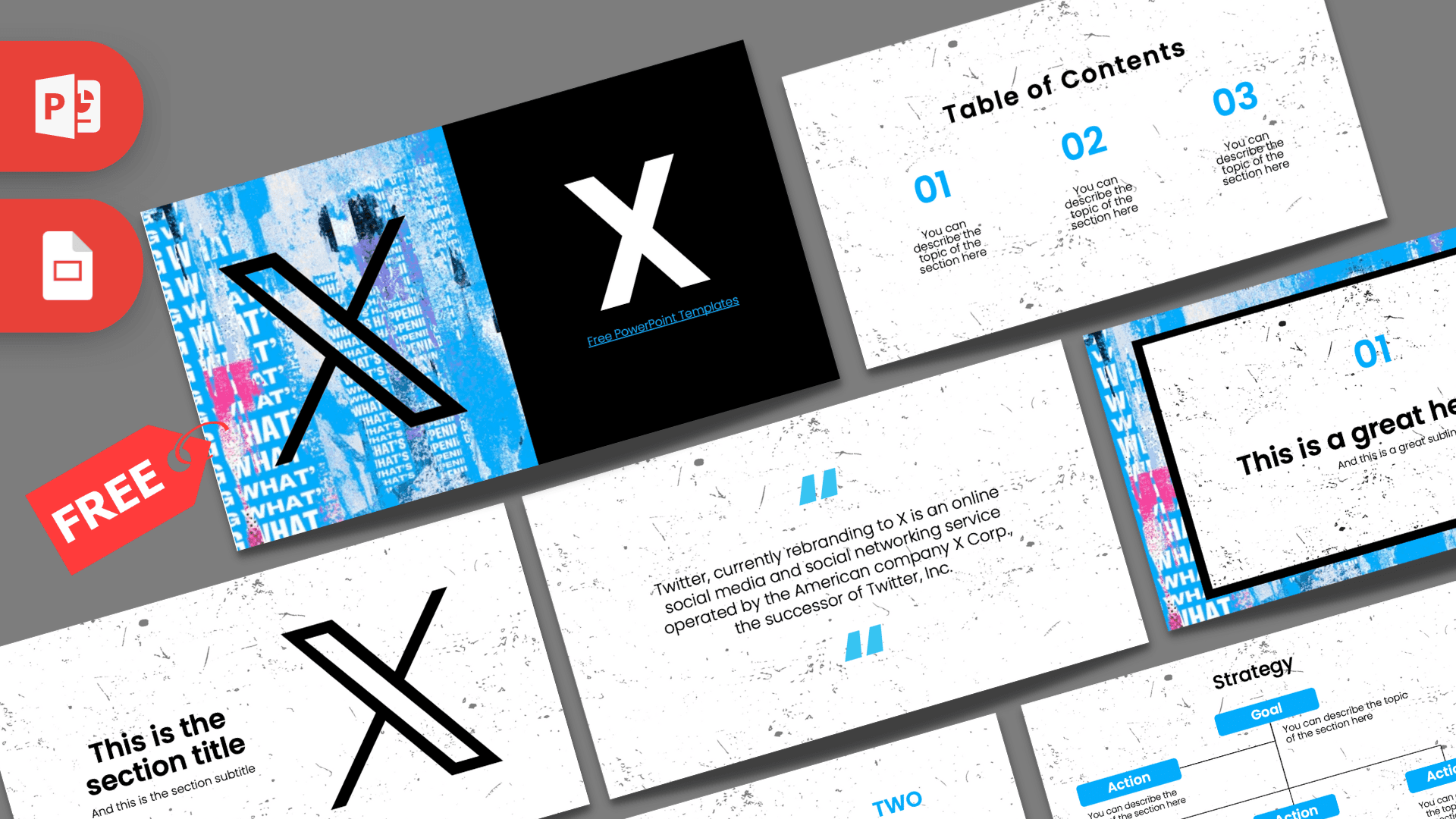
The X PowerPoint template (formerly the Twitter template) is a free 10-slide deck with a bold street-poster look: torn blue and pink collage textures, a big black X logo and speckled white backgrounds. It is built for talks about social media, online marketing and the platform itself, and it works in PowerPoint and Google Slides. The download page also keeps an older 2-slide legacy file with the classic blue bird design.
What's Inside
The main deck gives you a full set of layouts, from the cover to charts of key ideas:
- Slide 1, Title: a split cover with a ripped-paper collage in sky blue and pink on the left, the X logo in black over it, and a solid black panel with a white X on the right.
- Slide 2, Table of Contents: three blue numbers (01, 02, 03) with short descriptions on a white, ink-speckled background.
- Slide 3, Section title: a headline and subtitle beside a large outlined X logo.
- Slide 4, Numbered headline: a white box with a thick black border sitting on the blue collage texture, with "01" and a headline inside. Great for opening a new part of your talk.
- Slide 5, About Us: a centered heading and paragraph for introducing a brand, a team or a topic.
- Slide 6, Bullet Points (numbered): a title block plus five points labeled 01 to 05 in blue.
- Slide 7, Quote: blue quotation marks around a short statement. The sample text explains that Twitter rebranded to X and is operated by X Corp.
- Slide 8, Bullet Points (words): the same five-point layout with labels written out as One to Five.
- Slide 9, Strategy: a small org-chart style diagram with one Goal box and four Action boxes in blue, ideal for plans and campaigns.
- Slide 10, Big number: one large figure with a blue arrow and caption, for follower counts, reach or any key metric.
The legacy file is a simple 2-slide POTX in Twitter blue with the old bird logo, kept for anyone who needs the pre-rebrand look.
A practical way to use the deck: start with the cover and table of contents, introduce your brand or topic on the About Us slide, then use the two bullet layouts for goals and tactics. The strategy slide ties everything together, and the big number slide is a strong way to finish with a key result such as reach, engagement or growth. Add the quote slide wherever you want a pause, for example a customer comment or a short definition.
Design and Style
The style mixes clean layouts with a gritty, poster-like texture. Most slides sit on white with fine black ink specks, which feels like printed paper. The cover and the numbered headline slide bring in a torn collage of blue, pink and white paper with repeated text, giving the deck a loud, energetic character.
Text is set in Poppins, a friendly geometric sans serif, with headings in black and numbers in bright sky blue. The black X logo appears in both solid and outlined forms. The palette stays tight (blue, black, white and a touch of pink), so slides look consistent even after you add your own content. This template is fan-made and is not an official X Corp. product.
The texture is subtle enough on the content slides that charts, screenshots and logos still sit cleanly on top. If you want a calmer look, you can delete the speckled background image on any slide and keep a plain white page with the same blue accents.
Who Is This Template For?
Anyone talking about social networks, online communication or digital marketing will find layouts here that fit.
- Social media managers presenting a content plan, campaign results or a channel strategy.
- Marketing students doing a case study on X, Twitter or social networks in general.
- Agencies and freelancers pitching social media services to a client.
- Journalism and media classes discussing news, online platforms and public conversation.
- Business teams sharing quarterly growth numbers or engagement metrics.
- Teachers running a digital literacy or online safety lesson.
How to Customize It
This X PPT template uses regular text boxes and shapes, so you can make it your own quickly.
- Edit the text: click any heading or "You can describe the topic" line and type over it.
- Swap the logo: if you are presenting your own brand, delete the X logo and insert yours, or right-click an image and choose Change Picture.
- Update the strategy diagram: rename the Goal and Action boxes, and copy a box with Ctrl+D if you need more actions. Keep the connector lines aligned using the Align tools.
- Recolor: change the blue numbers with Font Color, or the action boxes with Shape Fill, to match your brand palette.
- Reorder slides: drag them in the thumbnail panel, and duplicate the bullet slides when you need more lists.
For Google Slides, upload the file to Google Drive and open it with Google Slides. Poppins is available in Google Slides, so the text should look the same.
Presentation Ideas
- From Twitter to X: what changed with the rebrand and how users reacted.
- A monthly social media report with follower growth and top posts.
- How to build a personal brand on X in five steps.
- Social media marketing strategy for a small business.
- Misinformation online: how to check a post before you share it.
- Comparing social networks: audiences, formats and best use cases.
For a report, duplicate the big number slide a few times so each metric gets its own moment instead of crowding one chart.
Related Templates
Presenting about other platforms too? Check out the Threads PowerPoint Template, the Instagram PowerPoint Template, the Facebook PowerPoint Template or the Social Media Marketing PowerPoint Template for a broader marketing deck. You can also browse all brand and company templates.
Frequently asked questions
- Is the X (Twitter) PowerPoint template free?
- Yes, both the 10-slide X deck and the older 2-slide Twitter legacy file are free to download. The template is fan-made and not affiliated with X Corp.
- How many slides are in the X template?
- The main X deck has 10 slides, including a title, table of contents, section title, two bullet point layouts, a quote, a strategy diagram and a big number slide. The legacy Twitter file has 2 slides.
- Can I still get the old Twitter bird design?
- Yes. The download includes a legacy version: a 2-slide POTX in Twitter blue with the classic bird logo.
- Does the X template work in Google Slides?
- Yes. Upload the file to Google Drive and open it with Google Slides. It uses Poppins, which is also available in Google Slides.
- Can I use it for a social media report?
- Yes. The big number slide, the strategy diagram and the bullet layouts are well suited to metrics, goals and campaign summaries.
This is a fan-made template inspired by X PowerPoint Template (ex Twitter). Prezentr is not affiliated with, endorsed by, or selling assets from X PowerPoint Template (ex Twitter). All brand names, logos, and trademarks belong to their respective owners.
Previous version
This is an updated version of the X PowerPoint Template (ex Twitter), redesigned in August 2023. The original version is still available here: