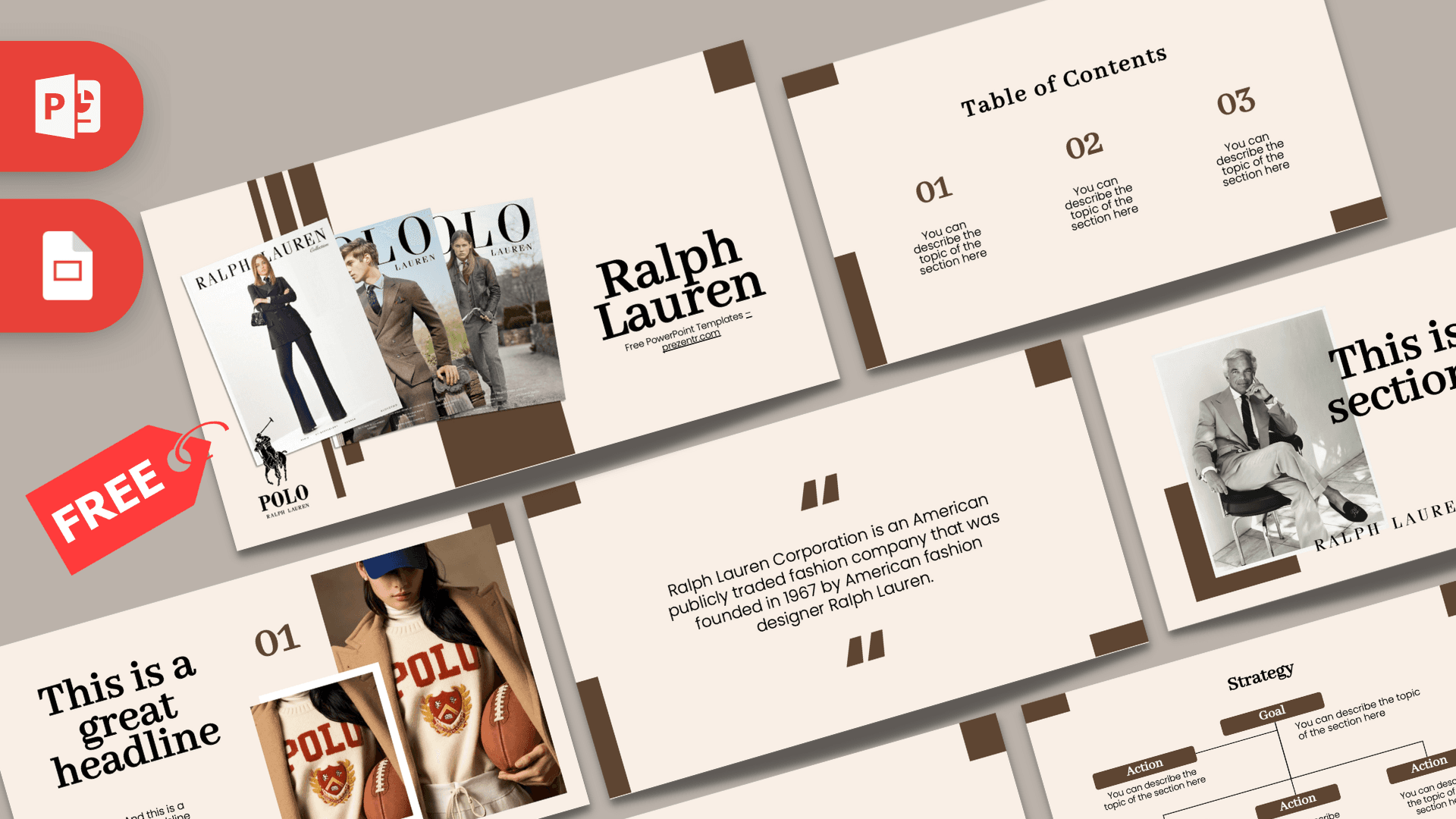
The Ralph Lauren PowerPoint template is a free 10-slide deck with a calm, editorial feel: soft cream backgrounds, chocolate brown block accents, elegant serif headings and fashion photography in the style of a magazine spread. It suits fashion presentations, brand case studies and lookbooks that need a classic, upscale look. It works in PowerPoint and Google Slides.
What's Inside
The first slides lean on photos, while the rest give you clean layouts for text, lists and plans:
- Slide 1, Title: "Ralph Lauren" in a large serif font next to three overlapping catalog covers with fashion photos, plus a Polo logo with the horse and rider emblem.
- Slide 2, Table of Contents: three numbered sections in brown serif numerals with short descriptions.
- Slide 3, Section title: a black and white portrait photo of a man in a light suit, set on a brown block, with a bold serif headline and the Ralph Lauren wordmark below.
- Slide 4, Numbered headline: "01" and a large headline next to two photos of a model in a cream Polo varsity sweater holding an American football.
- Slide 5, About Us: a centered heading and paragraph, good for a brand story or introduction.
- Slide 6, Bullet Points (numbered): a title block plus five points labeled 01 to 05.
- Slide 7, Quote: brown quotation marks around a short sentence about the company, which you can replace with your own text.
- Slide 8, Bullet Points (words): five points labeled One to Five in brown serif capitals.
- Slide 9, Strategy: a Goal box connected to four Action boxes in brown, ideal for a marketing plan or project steps.
- Slide 10, Big number: one large figure with an arrow and caption for a key statistic.
A typical flow for a brand presentation: start with the title and table of contents, tell the brand story on the About Us slide, then use the two photo slides to introduce key collections or themes. The bullet point layouts are useful for product lines, target customers or brand values, while the strategy slide works for a marketing plan. End with the big number slide to highlight one memorable figure, such as store count or a sales goal for your own label.
Design and Style
The palette is warm and restrained: a pale cream background, deep chocolate brown accents and black text. Brown rectangles and L-shaped blocks sit at the edges of each slide like frames on a printed page, giving the deck structure without clutter.
Headings use a refined serif typeface that feels classic and timeless, while body text is set in a clean modern sans serif for easy reading. The photography covers tailored suits, preppy knitwear and catalog covers, all in muted tones that match the palette. The overall mood is quiet luxury: polished, simple and confident. This is a fan-made template and is not an official Ralph Lauren product.
The generous white space is a big part of the style. Each slide holds only a few lines of text, which keeps the deck feeling premium and gives your photos room to breathe. If you add your own images, choose warm or neutral tones to keep the same soft, catalog-like mood across all slides.
Who Is This Template For?
The calm palette and serif type make this deck a good fit for anyone who wants a polished, magazine-like presentation rather than a loud, colorful one.
- Fashion students presenting a brand analysis, a designer profile or a trend report.
- Marketing and business students doing a case study on a luxury or lifestyle brand.
- Boutiques and clothing brands showing a new collection or a seasonal lookbook.
- Stylists and personal shoppers putting together a client mood board or style guide.
- Fashion bloggers and creators pitching a collaboration with a classic, clean look.
How to Customize It
This Ralph Lauren PPT template is easy to adapt in PowerPoint, even for your own brand.
- Replace the text: click any heading or description line and type. Keep serif headings short so they stay elegant.
- Change the photos: right-click a picture and choose Change Picture to add your own product shots or lookbook images. Use Crop to keep the same framing.
- Swap the logos: delete the Polo emblem and wordmark and insert your own logo if you are presenting a different brand.
- Recolor the blocks: select the brown shapes and use Shape Fill to try navy, forest green or black for a different mood.
- Update the strategy diagram: rename the Goal and Action boxes, and duplicate boxes for extra steps.
- Reorder slides: drag thumbnails in the left panel and duplicate any layout you want to reuse.
For Google Slides, upload the file to Google Drive and open it with Google Slides. If a heading font is substituted, choose a similar serif from the font menu.
Before you present, check each photo slide in Slide Show view. Large, high-resolution images keep the editorial look sharp, while small or blurry photos can make an elegant layout feel cheap.
Presentation Ideas
- The story of an American fashion house, from first collection to global brand.
- Preppy style explained: key pieces, colors and how to wear them.
- A fall and winter lookbook for a small clothing label.
- Luxury brand marketing: how heritage and lifestyle images build loyalty.
- A comparison of classic menswear brands for a fashion class.
- Building a capsule wardrobe in five steps.
For a lookbook, duplicate the numbered headline slide for each outfit or product and swap in your own photos, keeping one short line of text per look.
Related Templates
For more fashion brand decks, see the Gucci PowerPoint Template, the Burberry PowerPoint Template, the Louis Vuitton PowerPoint Template or the Dior PowerPoint Template. You can also browse all brand and company templates.
Frequently asked questions
- Is the Ralph Lauren PowerPoint template free?
- Yes, the full 10-slide deck is free to download. It is a fan-made template and is not affiliated with or endorsed by Ralph Lauren.
- How many slides does the Ralph Lauren template include?
- It includes 10 slides: a title, table of contents, section title, numbered headline, About Us, two bullet point layouts, a quote, a strategy diagram and a big number slide.
- Can I use the Ralph Lauren deck in Google Slides?
- Yes. Upload the file to Google Drive and open it with Google Slides. Check the serif headings in case a fallback font is used.
- Can I replace the fashion photos with my own?
- Yes. Right-click any photo in PowerPoint, choose Change Picture and pick your own image, then crop it to fit.
- Is this template good for a fashion lookbook?
- Yes. The cream and brown palette, serif headings and photo slides work well for collections, lookbooks and brand presentations.
This is a fan-made template inspired by Ralph Lauren PowerPoint Template. Prezentr is not affiliated with, endorsed by, or selling assets from Ralph Lauren PowerPoint Template. All brand names, logos, and trademarks belong to their respective owners.