The Dior PowerPoint template is a free, fan-made deck with soft gray backgrounds, classic serif headlines, handwritten script accents and luxury product photos of lipsticks, perfume and monogram bags. It has 10 editable slides in 16:9 and also works as a Google Slides theme. If you need an elegant Dior PPT template for a fashion or beauty presentation, this one looks refined from the first slide.
What's Inside
The slides mix fashion imagery with practical layouts you can fill with your own content:
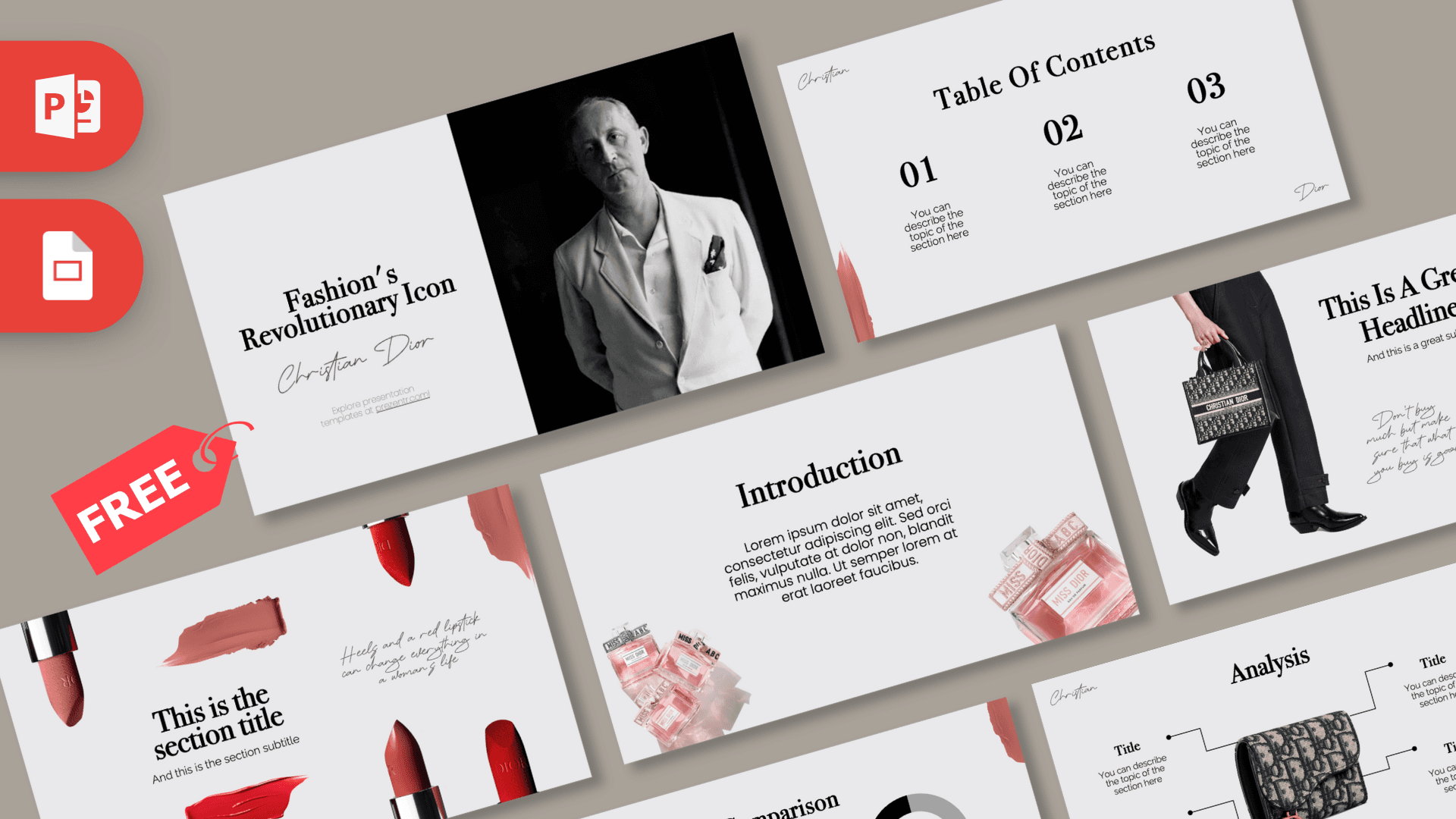
- Title slide: "Fashion's Revolutionary Icon" in a serif font with "Christian Dior" in a signature-style script, next to a black and white portrait. Christian Dior was the French designer who founded the fashion house.
- Table of Contents: three large serif numbers with short descriptions.
- Section Header: red and pink lipsticks and color swatches around a section title, with a short handwritten-style quote about red lipstick.
- Headline Divider: a model walking with a monogram tote bag, a second bag display, a big "01" and a handwritten note.
- Introduction: a heading and paragraph framed by pink perfume bottles.
- Five Bullet Points: five points labeled ONE to FIVE in serif type.
- Quote: bold quotation marks around a short quote.
- Big Numbers: one large serif figure with an arrow and caption.
- Analysis: a monogram handbag in the center with four labeled callouts, great for product features.
- Comparison: two donut charts with a "VS" between them, set up to compare a lipstick and a bag.
That makes this Dior PowerPoint template more than a mood board: the Analysis and Comparison slides let you present real findings, such as survey results, price comparisons or product features, while the photo slides keep the luxury feel. Duplicate any layout when you need more sections, and the script accents and brushstrokes carry over automatically.
Design and Style
The design feels like a high-end fashion magazine. Backgrounds are a soft, cool gray, headlines use a classic high-contrast serif, and body text is a light, clean sans-serif. Small script words, "Christian" in the top corner and "Dior" in the bottom corner, appear on most slides like a signature, and dusty rose brushstrokes run along the edges.
The color palette is quiet and luxurious: gray, black and white, with rose pink and red coming from the lipsticks, perfume bottles and brush marks. Product photos are cut out on transparent backgrounds so they float on the gray, just like in a beauty campaign. The handwritten notes on the section and headline slides add a personal, editorial touch.
Even the data slides stay elegant. The comparison donuts are simple black and gray rings, and the analysis slide uses fine lines and small dots for its callouts, so numbers never break the fashion mood.
Who Is This Template For?
- Fashion students presenting a designer profile, a collection review or a trend report.
- Beauty and makeup creators comparing products, shades or routines.
- Marketing classes studying luxury branding, packaging and advertising.
- Boutiques and stylists showing a lookbook or styling service (as a fan-made design, not official brand material).
- Bridal and event planners who want an elegant, feminine theme for a mood board.
- Business students doing a case study on a luxury fashion house.
- Perfume and cosmetics sellers presenting a new line or a gift guide in a soft, upscale style.
How to Customize It
- Edit the text: click any heading, number or paragraph and type your own content.
- Swap product photos: right-click an image and choose Change Picture. Cut-out product shots with transparent backgrounds look best.
- Update the comparison: click the donut charts to change the percentages, and rename "Dior Lipstick" and "Dior Bag" to the items you want to compare.
- Use the Analysis slide: place your product in the center and write a feature in each of the four callouts.
- Change accents: recolor the rose brushstrokes or text with Shape Fill and Font Color if you want a different shade.
- Reorder slides: drag thumbnails in the left panel or use View, Slide Sorter.
- Google Slides: open Google Slides, choose File, Import slides, upload the PPTX and select all slides. Check that the script and serif fonts look right after import.
Presentation Ideas
- A designer profile on Christian Dior and the fashion house he founded.
- A beauty product comparison using the donut charts.
- A luxury brand marketing analysis for a business or communications class.
- A fashion trend report for the season with one trend per bullet point.
- A handbag feature breakdown on the Analysis slide.
- A personal style mood board for a wedding, photo shoot or event.
Tips for an Elegant Deck
Luxury design is about space, so resist the urge to fill every corner. Keep headlines short, use one strong product photo per slide and let the gray background breathe. Pick product images with soft lighting to match the existing photos. Use the script accents sparingly; one or two words per slide is enough. If you quote designers or brand facts, check them in a reliable source and keep quotes short.
For a ten minute fashion talk, a good flow is: title, table of contents, a section header and introduction for the brand story, a headline divider for each main point, the five bullet points for key facts, then the Analysis and Comparison slides for your findings. Close with a quote and a big number. Printing a handout? The light gray background prints cleanly, and the serif headings stay sharp on paper.
Related Templates
For more luxury fashion houses, see the Gucci PowerPoint Template, the Louis Vuitton PowerPoint Template and the Hermès PowerPoint Template. Fashion movie fans will also like the Devil Wears Prada Animated PowerPoint Template. Browse more fashion and logo themes in our brands and companies templates.
Frequently asked questions
- Is the Dior PowerPoint template free?
- Yes, it is free on Prezentr. It is a fan-made design and is not affiliated with or endorsed by Christian Dior or the Dior fashion house.
- How many slides does the Dior template have?
- It has 10 slides in 16:9: title, table of contents, section header, headline divider, introduction, five bullet points, quote, big numbers, analysis and comparison.
- Can I open the Dior template in Google Slides?
- Yes. Import the PPTX with File, Import slides in Google Slides, then check the script and serif fonts.
- Can I edit the comparison charts?
- Yes. Click the donut charts to change the values and rename the two items to anything you want to compare.
- Is the Dior deck animated?
- No, the slides are static. You can add simple Fade transitions if you want a gentle, elegant feel.
- Is it good for a fashion school presentation?
- Yes. The editorial style suits designer profiles, trend reports and luxury branding projects.
This is a fan-made template inspired by Dior PowerPoint Template. Prezentr is not affiliated with, endorsed by, or selling assets from Dior PowerPoint Template. All brand names, logos, and trademarks belong to their respective owners.