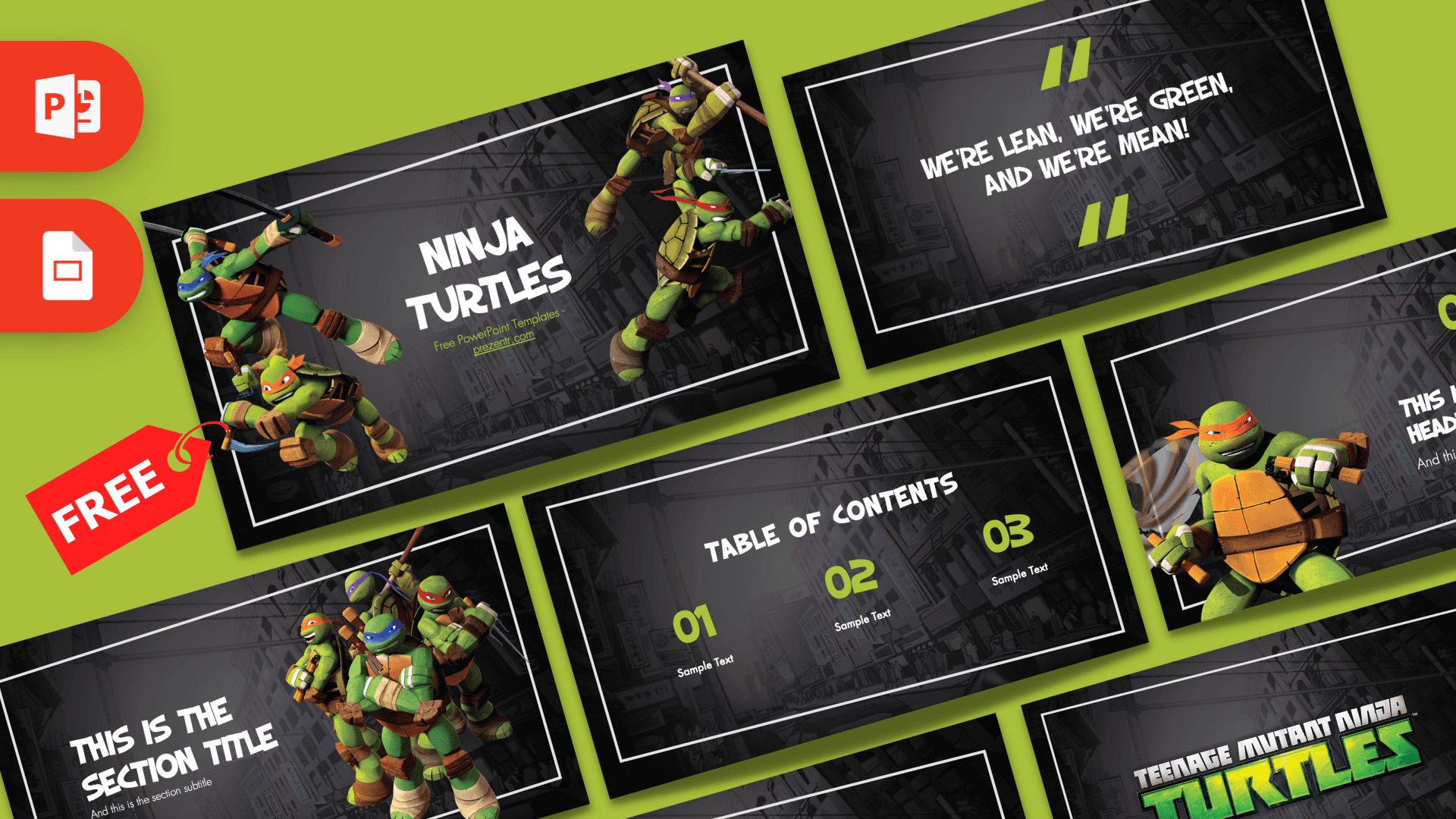
This free Ninja Turtles PowerPoint template drops all four heroes in a half shell into a gritty, after-dark city setting, with lime green headings and hand-drawn white frames on every slide. It includes 10 widescreen slides with comic-style lettering, a team quote slide and the Teenage Mutant Ninja Turtles logo for your finale. Open it in PowerPoint or Google Slides and start editing right away.
What's Inside
Every layout has a job, so you will not waste time deleting filler. The slides follow a clear story structure, from the opening title to a logo-driven closing slide:
- Title slide: the four turtles in action poses, wielding their weapons around a bold "Ninja Turtles" heading. A great first impression for any fan audience.
- Table of Contents: three numbered sections in lime green with short labels, perfect for your agenda.
- Section title: the whole team grouped together on the right, next to a large section heading and subtitle.
- Quote slide: lime green quote marks around a famous team catchphrase. Swap in your own quote, fun fact or key message.
- Headline slide: Michelangelo, in his orange mask, leans in from the left beside a big "01", a headline and a subline. Ideal for introducing your first main point.
- Slide Title with notes: a large heading on the left and a bullet list on the right. The sample text explains which fonts are used.
- Bullet Points (four): a 2 x 2 grid of numbered points for steps, facts or features.
- Bullet Points (five): a title block plus five numbered points in a grid, useful for longer lists.
- Big number slide: one oversized green figure with an arrow and a caption, made for a headline statistic.
- Logo slide: the Teenage Mutant Ninja Turtles logo centered on the dark city background, a strong way to end your talk or start a Q&A.
Design and Style
The background is a dark, slightly blurred street scene of city buildings, which gives the whole Ninja Turtles PPT template an urban, nighttime mood that fits the heroes' world. Each slide is framed by a sketchy white outline, like a panel drawn by hand, and the numbers and quote marks pop in bright lime green. Headings use SF Slapstick Comic, a playful comic book font, and body text uses Futura for clean, readable lines. The turtle artwork is colorful and modern, with each brother recognizable by his mask: blue for Leonardo, red for Raphael, purple for Donatello and orange for Michelangelo. The overall feel is fun and action-packed, with enough dark space that your text stays easy to read. This is a fan-made design and is not affiliated with or endorsed by the official franchise owners.
Who Is This Template For?
The comic look makes this deck a natural fit for younger audiences and fans of all ages, and the tidy layouts mean it still works when the topic is serious schoolwork rather than pure fun:
- Elementary and middle school students presenting a favorite cartoon, a book report or a "teamwork" project.
- Teachers looking for a fun theme for lessons on teamwork, reptiles, cities or storytelling.
- Parents planning a Ninja Turtles birthday party who want slides for invitations, games or a photo slideshow.
- Fan clubs and comic shops hosting a trivia night, a character showdown or a collection showcase.
- Youth coaches and camp leaders who want to explain team roles in a memorable way.
How to Customize It
You can personalize the Ninja Turtles PowerPoint template in a few minutes, no design skills needed:
- Install the fonts: download and install SF Slapstick Comic and Futura before editing, as the template recommends, so the headings keep their comic look.
- Edit the text: click on any "Sample Text" placeholder or headline and type your own content.
- Swap the turtle images: right-click a picture and choose Change Picture to replace it with your own photo or illustration in the same spot.
- Change the green accent: select the numbers or quote marks and pick a new font or fill color, for example blue, red, purple or orange to match a specific turtle.
- Rearrange the deck: drag slides in the thumbnail panel, duplicate the bullet slides for more content, or delete what you do not need.
- Add motion: the slides are static, so add entrance animations from the Animations tab if you want the turtles to jump onto the screen.
Google Slides: upload the PPTX to Google Drive and choose Open with Google Slides. Everything stays editable. If the comic font is not available there, pick a bold display font from the font menu as a substitute.
Presentation Ideas
- Meet the turtles: a character profile of Leonardo, Raphael, Donatello and Michelangelo and what each one brings to the team.
- Teamwork lessons from the Ninja Turtles, for a classroom or youth sports group.
- Real turtles vs. cartoon turtles: a fun science talk on turtle species, habitats and lifespans.
- How cartoons are made, from character design to animation.
- A Ninja Turtles birthday party slideshow with photos, a pizza menu and a games schedule.
- A trivia quiz night using the bullet and big number slides for questions and answers.
Want a longer deck? Duplicate the headline slide for each turtle and change the number from 01 to 04, so every brother gets his own chapter. With this Ninja Turtles PowerPoint template, pair a short headline with one turtle image per slide and your audience will stay engaged from start to finish.
Related Templates
For more animated heroes and kid favorites, try the Cartoons PowerPoint Template, the Free Spiderman PowerPoint Template and the Pokemon PowerPoint Template. The Kids PowerPoint Template is a good general option for young presenters. Explore more shows and films in our movies and Netflix templates.
Frequently asked questions
- Is the Ninja Turtles template free?
- Yes, you can download and use it for free in school, personal and party presentations. It is a fan-made design, not an official franchise product.
- How many slides are in the Ninja Turtles PowerPoint template?
- There are 10 slides, including a title, table of contents, section title, quote, headline, two bullet layouts, a big number slide and a closing logo slide.
- Does it work in Google Slides?
- Yes. Upload the PPTX to Google Drive and open it with Google Slides. You may need to choose a substitute for the comic heading font.
- Which fonts do I need for the Ninja Turtles slides?
- The template uses SF Slapstick Comic for headings and Futura for body text. Install both before editing for the best result.
- Can I replace the turtle pictures with my own?
- Yes. Right-click any image and choose Change Picture in PowerPoint, or Replace image in Google Slides.
- Is it good for a kids' birthday party?
- Yes. The title, quote and logo slides make a fun party slideshow, and you can add your own photos to the open areas.