The Marvel PowerPoint template is a free, fan-made design built around the famous red Marvel logo and a deep red starfield that looks like a view into a crimson galaxy. It comes as a PowerPoint template file (.potx) with 2 sample slides and 9 layouts in widescreen 16:9, and it also works in Google Slides. Use it when you want a superhero feel without cluttering your slides, whether you are presenting a comic book report, a movie ranking or a fan club plan.
What's Inside
This is a master-based template. The look is built into the slide master and layouts, so every new slide you add already has the Marvel style. The previews show four of the main designs:
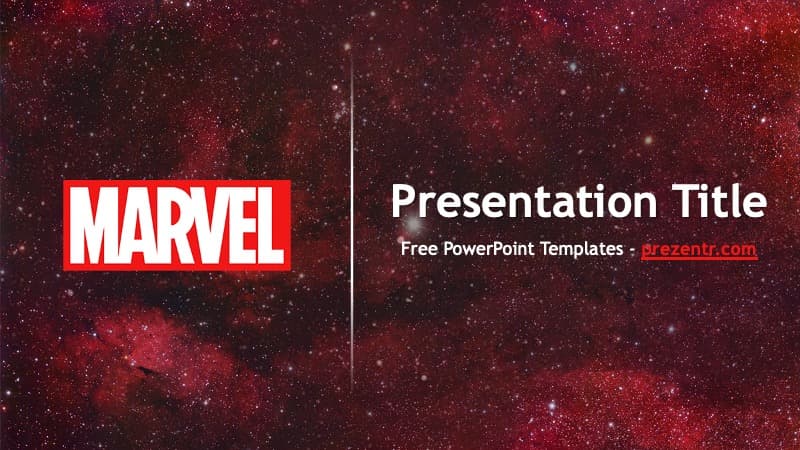
- Title slide: the red and white Marvel logo on the left, a thin vertical line in the middle and a white "Presentation Title" with a subtitle on the right, all on the red starfield. This is your opener and your closing slide.
- Title and Content: the slide title sits in a red galaxy band across the top, the content area is a soft light gray panel for bullet points or charts, and a footer band carries the Marvel logo between two thin lines.
- Section Header: a large dark red "Section Title" with a short line of text on the light panel, with the logo footer below. Use it to split your talk into chapters.
- Blank: the light panel with the galaxy edges and logo footer, ready for a full image, a timeline or your own layout.
A good plan for a deck like this: open with the title slide, add a Title and Content slide for your agenda, then use a Section Header before each big part, such as heroes, villains and your verdict. Fill the middle with Title and Content and Comparison slides, drop a full-size comic panel or poster on a Blank slide when you want a dramatic moment, and end on the title slide again with a "Thank You" or "Questions?" headline.
Alongside these, the file includes the other standard layouts: Two Content, Comparison, Title Only, Content with Caption and Picture with Caption. That gives you nine layouts in total for side-by-side lists, versus slides, image slides and more. Build a short 5-slide talk or a long 40-slide deck and it will look consistent the whole way through.
Design and Style
The color palette is red, dark maroon, white and light gray. The background photo is a dense field of stars and nebula clouds tinted in red and burgundy, which gives a cosmic, cinematic mood that fits superhero stories. On content slides, that starfield frames a pale panel so your text stays easy to read.
The only branding is the Marvel logo, shown large on the title slide and small in the footer of the content slides. There are no character illustrations, which makes the template flexible: you can add pictures of any hero, team or comic cover you want to talk about. Text is set in Trebuchet MS, a clean sans serif that comes with most computers. The overall style is modern and bold but still simple.
Who Is This Template For?
- Students writing a report on a superhero, a comic series or the history of comic books.
- Teachers using superheroes to talk about storytelling, heroism, ethics or even physics.
- Fan clubs and movie nights planning a watch order, a quiz or a ranking of favorite films.
- Content creators preparing slides for a video, stream or podcast about comics and movies.
- Party hosts organizing a superhero birthday and needing a slideshow for games.
- Office teams who want a fun, recognizable theme for a team-building session or "team of heroes" kickoff.
How to Customize It
When you open a .potx file, PowerPoint creates a new presentation based on it, so the template itself stays untouched. Then:
- Add slides: go to Home, then New Slide, and pick a layout. Each one already carries the starfield and logo design.
- Replace the text: click any title or text placeholder and type. Delete the "Free PowerPoint Templates" line on the title slide and add your name or date.
- Insert pictures: use Insert, then Pictures, or the picture placeholder in Picture with Caption. To swap an image later, right-click it and choose Change Picture.
- Edit the design for all slides: open View, then Slide Master, to change the background, the panel color or the footer logo once for the whole deck.
- Recolor text: select text and choose a new color from the Home tab. Dark red titles and black body text match the original.
- Add animation: the template is static, so add your own transitions or entrance effects from the Transitions and Animations tabs if you want some action.
For Google Slides, upload the file to Google Drive and open it with Google Slides, or create a new presentation and use File, then Import slides. The layouts and background come along and stay editable.
Presentation Ideas
- My favorite superhero: origin story, powers, allies and why the hero matters to you.
- Watch order guide: a timeline of movies or series using the Title and Content and Blank layouts.
- Heroes vs. villains: put two characters side by side on the Comparison layout.
- The science of superpowers: a fun physics or biology lesson asking what could be possible.
- History of comic books: how comics grew from print to big-screen stories.
- Superhero quiz night: questions on one slide and answers revealed on the next.
Related Templates
Want more from the same universe? Try the Avengers PowerPoint Template, the Marvel Heroes PowerPoint Template, the Iron Man PowerPoint Template or the Spiderman PowerPoint Template. You can also browse all movie and TV templates.
Frequently asked questions
- Is the Marvel PowerPoint template free?
- Yes, it is free to download from Prezentr. It is a fan-made design and is not an official Marvel product.
- How many slides and layouts does the Marvel template have?
- The file contains 2 sample slides and 9 slide layouts, including Title Slide, Title and Content, Section Header, Comparison and Picture with Caption. You can add as many slides as you need.
- Can I use the Marvel template in Google Slides?
- Yes. Upload the file to Google Drive and open it with Google Slides, or use File, then Import slides, in a new presentation.
- Does the template include superhero pictures?
- No, the design uses the Marvel logo and a red starfield background, with no character images. You can insert pictures of any hero yourself.
- Why does the file open as a new untitled presentation?
- It is a .potx template file, so PowerPoint creates a fresh presentation from it each time. Save your work as a regular .pptx file.