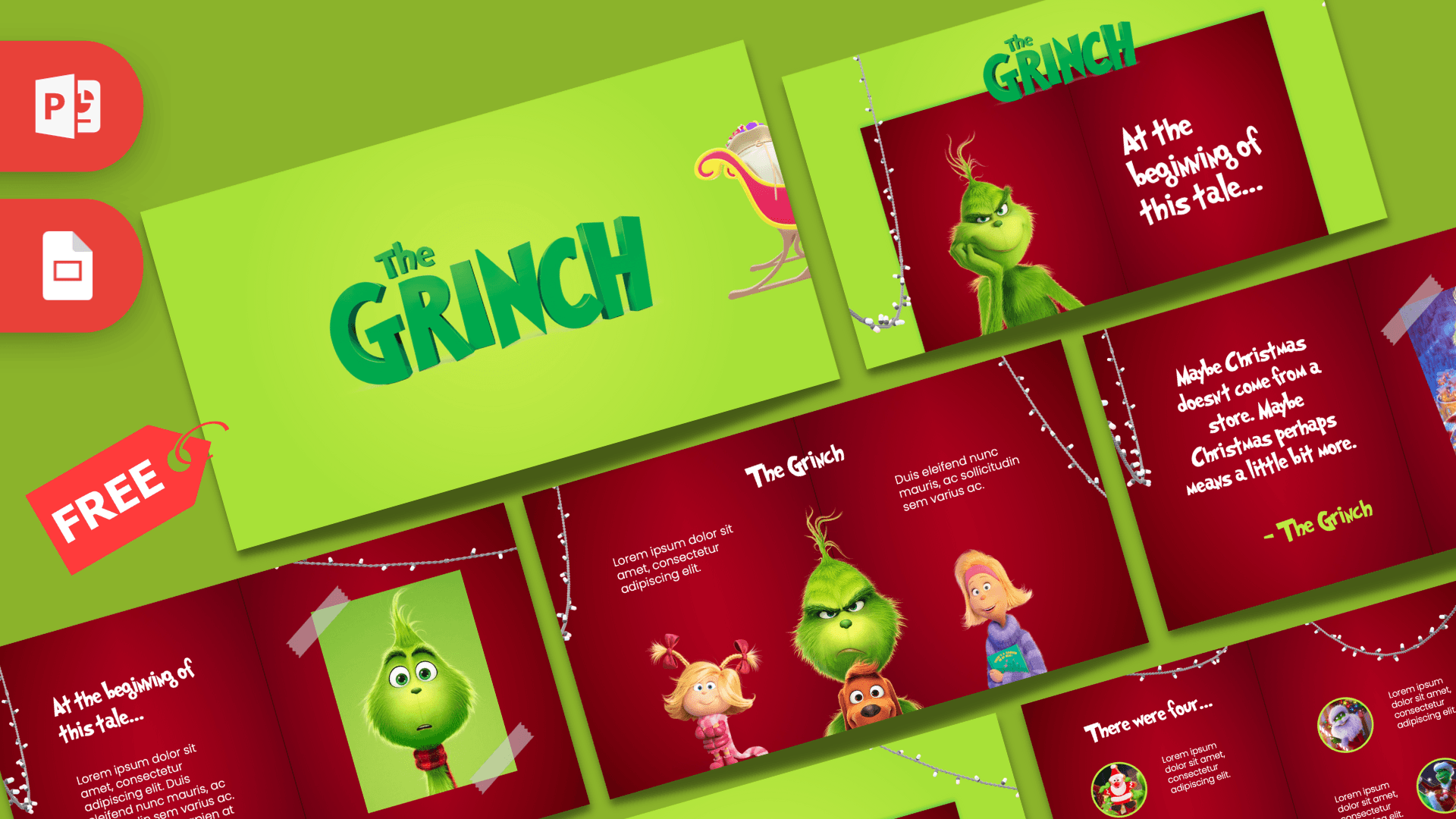
This free Grinch PowerPoint template is an animated holiday deck with 10 slides that unfold like a storybook. Lime green backgrounds frame a deep red open book, white string lights hang across the pages, and the Grinch, Cindy-Lou Who, Donna Who and Max the dog appear on the inside pages. Morph transitions and a 3D sleigh make the whole thing feel like a short Christmas movie, which is great for class parties, office celebrations and family slideshows.
What's Inside
The deck has 10 slides in 16:9, written as a little story from start to finish:
- Sleigh intro: a lime green slide with a 3D red and gold sleigh filled with presents, ready to glide into the next slide.
- Title: a big green "The Grinch" logo-style title with the sleigh peeking in from the side.
- Story opening: the red book opens with a grinning Grinch on the left page and "At the beginning of this tale..." in the hand-drawn title font on the right.
- Story page: the opening line with a text paragraph and a taped-on picture of the Grinch, perfect for your introduction.
- "There were four...": four round pictures, each with a short caption, for four points, people or ideas.
- Cindy-Lou Who: a character slide with her name, a paragraph and the characters lined up at the bottom.
- The Grinch: a centered character slide with text on both sides.
- Donna Who: a third character slide with Donna large on the right.
- Quote page: a famous line from the story in the title font with a taped picture of the Grinch facing a Christmas tree.
- The End: a bold closing slide on the red book against lime green.
The story structure makes the deck easy to plan. Use the opening pages for your introduction, the four-picture slide for your main points, the character slides for people or topics, and finish with the quote and The End. You can duplicate any page to make the story longer, and the book frame keeps it looking like one continuous tale. Because the slides are mostly red and green with white text, they read well on a classroom projector or a big TV at a party.
Design and Style
The Grinch PPT template plays with two strong Christmas colors: a bright lime green that matches the Grinch himself and a rich crimson red for the book pages. A soft shadow down the middle of each red slide makes it look like a real open book, and strings of white fairy lights drape across the top and sides. The titles use the Grinched font, a wobbly, hand-lettered style that captures the feel of the classic story, and it is included in the download. Body text is set in Poppins Light for clean, easy reading. The characters are bright, cut-out 3D-style renders, and some pictures are styled as photos held in place with pieces of tape, which adds a scrapbook touch.
The animation is the real highlight. Morph transitions carry the sleigh, the book and the characters between slides, so instead of hard cuts the deck moves like a camera. That makes it a great pick when you want people to smile the moment the first slide appears. Click through it once in Slide Show mode before you edit, so you can see which objects travel between slides and which ones stay put.
Who Is This Template For?
If you need a festive deck in December, this one is hard to beat. It works for:
- Teachers running a Christmas lesson, holiday reading time or a class party.
- Students giving a holiday-themed presentation or a book report on the story.
- HR and office teams announcing a holiday party, secret Santa rules or the end-of-year schedule.
- Families making a Christmas slideshow with photos and wishes.
- Libraries and kids' clubs hosting a holiday story hour.
- Small businesses sharing holiday opening hours or a seasonal promotion with staff.
How to Customize It
- Install the Grinched font: it is in the "grinch font" folder in the download. Install it before opening the deck so titles appear correctly.
- Edit text: click any heading or paragraph and type over the lorem ipsum.
- Change pictures: right-click a character or a taped photo, choose Change Picture and insert your own image. Family photos look great in the taped frames.
- Keep Morph working: when you replace an object that moves between slides, replace it on every slide so the transition stays smooth.
- Adjust animations: open the Animations tab and the Animation Pane to change timing, or the Transitions tab to set how long each Morph lasts.
- Use a recent PowerPoint: Morph and 3D models need a modern version such as Microsoft 365. Older versions may show the slides without animation.
The template is made for PowerPoint, and we do not offer a Google Slides version, since the Morph transitions and 3D sleigh would not carry over.
Presentation Ideas
- A Christmas story time where each slide is a page of the book.
- A class lesson on kindness and the true meaning of the holidays.
- Office holiday party announcement with date, venue, dress code and secret Santa rules.
- A family Christmas recap with photos from the year in the taped frames.
- A "meet the team" slideshow, swapping the characters for colleagues on the character slides.
- A holiday trivia quiz with four answer choices on the "There were four..." slide.
- A school winter concert or holiday play program, introducing each act on the character slides.
- A charity toy drive appeal with goals, drop-off points and a thank you at The End.
Related Templates
Looking for more holiday designs? Try the Animated Christmas PowerPoint Template, the Santa Claus PowerPoint Template, the Merry Christmas PowerPoint Template and the Christmas Tree PowerPoint Template. For more motion, browse all animated templates.
Frequently asked questions
- Is the animated Grinch PowerPoint template free?
- Yes. You can download the full animated deck from Prezentr for free.
- How many slides are in the Grinch template?
- There are 10 slides in 16:9, from a sleigh intro and 3D title to character slides, a quote slide and The End.
- Is the Grinch template animated?
- Yes. Most slides use Morph transitions, several have entrance animations, and a 3D sleigh model is part of the deck, so it plays like a short storybook animation.
- Will it work in Google Slides?
- We do not offer a Google Slides version. Morph transitions and 3D models are PowerPoint features, so for the full effect open the deck in a recent version of PowerPoint, such as Microsoft 365.
- What font is used for the titles?
- The titles use the Grinched font, which is included in the download. Its readme says it is free for non-commercial use, so check the license before using it for business.
- Is the Grinch template official?
- No. It is a free fan-made holiday template and is not affiliated with or endorsed by the rights holders of the Grinch.