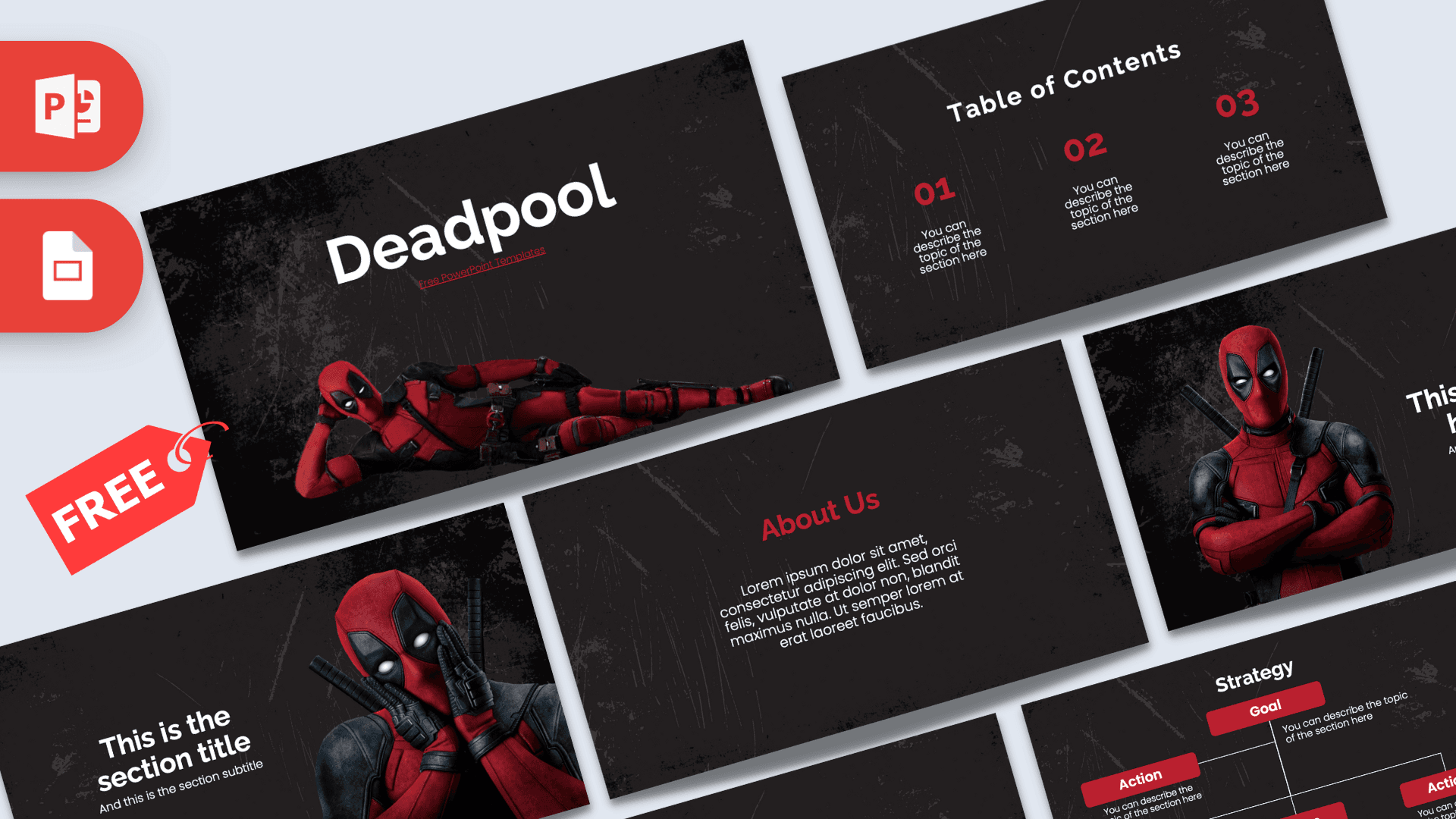
This free Deadpool PowerPoint template puts the Merc with a Mouth front and center, striking his trademark poses on a dark, scratched-up charcoal background with bold red accents. It contains 10 widescreen slides, from a title slide with Deadpool lounging across the screen to a strategy diagram and a big number slide. Use it in PowerPoint or Google Slides for fan talks, movie reviews or any presentation that needs a little attitude.
What's Inside
Each of the 10 slides has a clear purpose, so you can build a complete presentation without hunting for extra layouts. The three character slides are spread through the deck, which keeps the energy up between the more text-heavy pages:
- Title slide: a large white "Deadpool" heading above a photo of the antihero in his red and black suit, lying on his side in a relaxed, cheeky pose. It sets a playful tone from the very first click.
- Table of Contents: three numbered sections in red, each with a short description line, to outline your agenda.
- Section title: Deadpool with both hands pressed to his mask in a surprised pose, next to a section heading and subtitle. Great for a dramatic reveal or a new chapter.
- Headline slide: Deadpool with crossed arms beside a red "01", a headline and a subline, perfect for introducing your first big point.
- About Us: a red heading and a centered paragraph for background, a plot summary or an introduction.
- Bullet Points (numbered): a title block with five numbered points (01 to 05) in red for facts, steps or arguments.
- Quote slide: red quote marks frame a short statement. Use it for a memorable line from a review, your own opinion or a key takeaway.
- Bullet Points (labeled): five points labeled ONE to FIVE, a nice alternative layout for a ranked list.
- Strategy: a Goal box connected to several Action boxes in red, useful for plans, story structure or cause and effect.
- Big number slide: one oversized white figure with a red arrow and caption, ready for your most impressive statistic.
Design and Style
The Deadpool PPT template uses a near-black background covered in subtle grunge textures and scratches, which feels rough, edgy and very fitting for the character. Red is the main accent color, used for numbers, headings, quote marks and the strategy boxes, while white text keeps everything readable. Headings are set in a strong, modern sans serif that looks confident without being hard to read. The three character slides use photo-style images of Deadpool in his full suit, each with a different pose, so the deck has personality without every slide being crowded. The rest of the layouts stay clean and simple, which balances the playful attitude of the images with a structure that still works for a serious presentation. Thanks to the dark background, the deck also looks great on a big screen or projector in a dim room, which makes it a natural pick for movie nights and fan events. This is a free fan-made design and is not affiliated with or endorsed by Marvel or Disney.
Who Is This Template For?
The dark style and red highlights appeal to a wide range of presenters, from fans to professionals:
- Movie and comic fans giving a talk about the character, the films or the comics.
- Film and media students analyzing antiheroes, humor in superhero films or breaking the fourth wall.
- Bloggers and YouTubers preparing a review, a ranking or a reaction summary.
- Party hosts planning a Deadpool-themed birthday, movie marathon or costume party.
- Teams and trainers who want a humorous theme to make a dry topic more fun.
- Comic shops and fan clubs announcing events, trivia nights or new arrivals.
How to Customize It
Everything in the Deadpool PowerPoint template can be edited with standard PowerPoint tools:
- Change the text: click into any heading or "You can describe the topic of the section here" line and type your own content.
- Replace the images: right-click a Deadpool photo and choose Change Picture to drop in a different image while keeping the same size and position.
- Edit the strategy diagram: click each Goal or Action box to rename it, and copy and paste boxes to add more steps.
- Recolor accents: select the red numbers or boxes and change their fill or font color if you want a different highlight.
- Reorder or duplicate slides: drag slides in the thumbnail panel or right-click and choose Duplicate Slide to add more content slides.
- Add animations: the slides are static, so you can add entrances and transitions from the Animations and Transitions tabs for extra punch.
Google Slides: upload the PPTX file to Google Drive, right-click it and choose Open with Google Slides. Text, images and shapes stay editable, and you can use Replace image to swap pictures.
Presentation Ideas
- What makes Deadpool different from other superheroes: humor, attitude and the fourth wall.
- The rise of the antihero in comics and movies.
- A movie review or ranking of your favorite Marvel characters.
- How comedy works in action films, with examples and audience reactions.
- A Deadpool-themed party plan with a schedule, games and a snack menu.
- A trivia quiz for a fan club, using the bullet and big number slides for questions and answers.
To get the most from this Deadpool PowerPoint template, keep text short and let the character photos carry the jokes. A single punchy headline next to a strong image usually lands better than a long paragraph.
Related Templates
Explore more of the same universe with the Marvel PowerPoint Template, the Avengers PowerPoint Template, the Free Iron Man PowerPoint Template and the Hulk PowerPoint Template. For more film and TV themes, browse our movies and Netflix templates.
Frequently asked questions
- Is the Deadpool PowerPoint template free?
- Yes, it is free to download and use for personal, school and fan presentations. It is a fan-made design and not an official Marvel product.
- How many slides are included in the Deadpool template?
- The template has 10 slides: title, table of contents, section title, headline, About Us, two bullet point layouts, a quote, a strategy diagram and a big number slide.
- Can I edit the Deadpool template in Google Slides?
- Yes. Upload the PPTX to Google Drive and open it with Google Slides. All text and images remain editable.
- Can I swap the Deadpool pictures for my own?
- Yes. Right-click a picture and choose Change Picture in PowerPoint, or Replace image in Google Slides.
- Are there animations in this template?
- No, the slides are static. You can easily add your own animations and transitions in PowerPoint or Google Slides.
- Is this template appropriate for a school presentation?
- The layouts themselves are clean and suitable for school use. The character images are poses only, but check with your teacher if you are unsure about the theme.