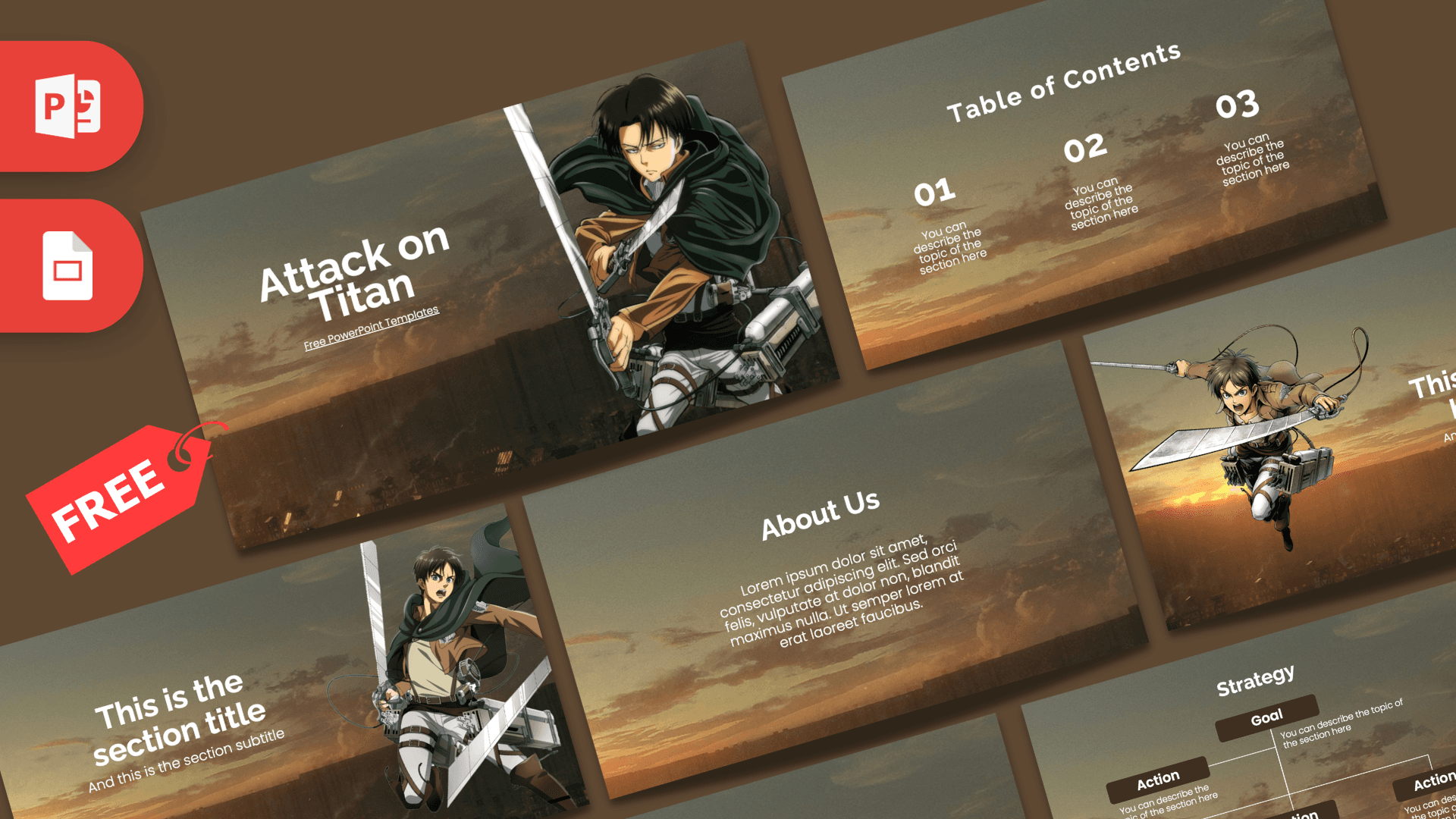
This free Attack on Titan PowerPoint template is a fan-made, 10-slide deck set against a hazy sunset sky over a city skyline, with warm brown, amber and cream tones. Levi opens the presentation on the title slide, and Eren leaps across two more slides in full gear. It is a ready-made design for anime reports, fan club meetings and themed events, with layouts that also hold up for more serious content like plans and strategy.
What's Inside
You get 10 slides in widescreen 16:9. All of them share the same moody sky background, so the deck feels consistent from start to finish:
- Title slide: "Attack on Titan" in large white letters on the left, with Levi holding his blades on the right.
- Table of contents: three numbered columns (01, 02, 03), each with a short description. Use it to map out the parts of your talk.
- Section title: a big title and subtitle with Eren on the right, perfect for opening each chapter.
- Headline slide: Eren flying in from the left with a numbered headline and subline on the right.
- About Us: a centered heading with a short paragraph. Great for an introduction, a summary or a team description.
- Five bullet points: a title block plus five numbered items in a grid.
- Quote slide: large quotation marks framing a line of text, ideal for a memorable line or a key takeaway.
- Five bullet points with words: the same grid labeled ONE to FIVE instead of numbers, for a slightly different rhythm.
- Strategy chart: a Goal box at the top connected to four Action boxes, a simple org chart or plan diagram.
- Big number: a large figure with an arrow and a short caption for one standout stat.
A simple way to build a full talk is title, contents, then one section slide per chapter followed by a bullet or About slide. The two Eren slides work well as chapter openers, and the strategy chart is a nice surprise for anyone who wants to plan something, from a club event to a group project, with an anime twist.
Design and Style
The background is a soft, slightly grainy photo-style sky at dusk, fading from gray-green at the top to glowing orange near a dark skyline at the bottom. That gives every slide a cinematic, end-of-the-day mood that suits the series without being too dark to read. Text is white or cream in a clean, rounded sans serif, with bold headings and simple short descriptions. The strategy slide uses dark brown boxes with white labels, which match the warm palette. The character art is full color and cut out, so Levi and Eren sit naturally over the sky with their green cloaks, belts and gear clearly visible. Layouts are centered and uncluttered, leaving room for your own words.
Because the background is the same on every slide, the deck reads like one continuous scene. The warm light also flatters photos, so if you add your own screenshots or fan art they will sit comfortably on top. Keep text short and large, as the slightly textured sky looks best with a few words per slide rather than long paragraphs.
Who Is This Template For?
The Attack on Titan PowerPoint template works for fans and non-fans alike, since the layouts are general purpose. Some typical users:
- Students presenting on anime, storytelling, character development or Japanese pop culture.
- Anime and manga clubs planning meetings, watch parties or season recaps.
- Teachers who want a themed deck to make a lesson on narrative structure or media analysis more engaging.
- Party hosts organizing an Attack on Titan themed birthday or cosplay night.
- Content creators preparing theory breakdowns, rankings or episode reviews for a video or stream.
- Team leads with a sense of humor who want to present a project plan with the strategy chart in a fun wrapper.
How to Customize It
All slides are fully editable in PowerPoint:
- Edit text: click into any placeholder and type over "You can describe the topic of the section here" or the lorem ipsum text.
- Change pictures: right-click Levi or Eren, choose Change Picture and pick your own image. A transparent PNG keeps the sky visible around the figure.
- Adjust the strategy chart: click a box to rename it, copy and paste a box to add more actions, and drag the connector lines to reconnect them.
- Recolor: select headings or chart boxes and change their fill or font color. Deep red or forest green both work well with the sunset background.
- Reorder slides: drag thumbnails in the left pane, and use Duplicate Slide to repeat a section or headline layout.
For the Attack on Titan Google Slides theme, upload the PPTX to Google Drive and choose Open with Google Slides. Everything stays editable, and you can share the deck with classmates to edit together. Tip: keep character images as PNG files so the transparent edges survive the upload.
Presentation Ideas
- A character study of Eren and Levi, using the two character slides as section openers.
- A school talk on how the anime builds suspense, with the quote slide for a favorite line.
- A season-by-season recap using the table of contents and five-point grids.
- A cosplay workshop plan with materials, steps and budget on the bullet slides.
- An anime club strategy for the year, using the Goal and Action chart.
- A fan trivia night with questions on the bullet slides and the final score on the big number slide.
Related Templates
If you like this design, check out the Demon Slayer PowerPoint Template, the Jujutsu Kaisen PowerPoint Template, the One Piece PowerPoint Template and the Naruto PowerPoint Template. For more designs you can edit in the browser, see our Google Slides templates.
Frequently asked questions
- Can I download the Attack on Titan template for free?
- Yes. The template is free to download on Prezentr, with no sign-up fee.
- How many slides does the Attack on Titan PPT template have?
- It has 10 slides in 16:9, including a title slide, table of contents, two character slides, an About Us slide, bullet layouts, a quote, a strategy chart and a big number slide.
- Does it work in Google Slides?
- Yes. Upload the PPTX to Google Drive and open it with Google Slides. Text, images and the chart boxes remain editable.
- Which characters appear on the slides?
- Levi appears on the title slide and Eren appears on the section and headline slides, both in their Survey Corps gear.
- Can students use this template for a school presentation?
- Yes. It works well for anime reports, media studies projects and club presentations. Just replace the placeholder text with your own content.
- Is the template officially licensed?
- No. It is a free fan-made design inspired by the anime and is not affiliated with or endorsed by the creators or publishers.