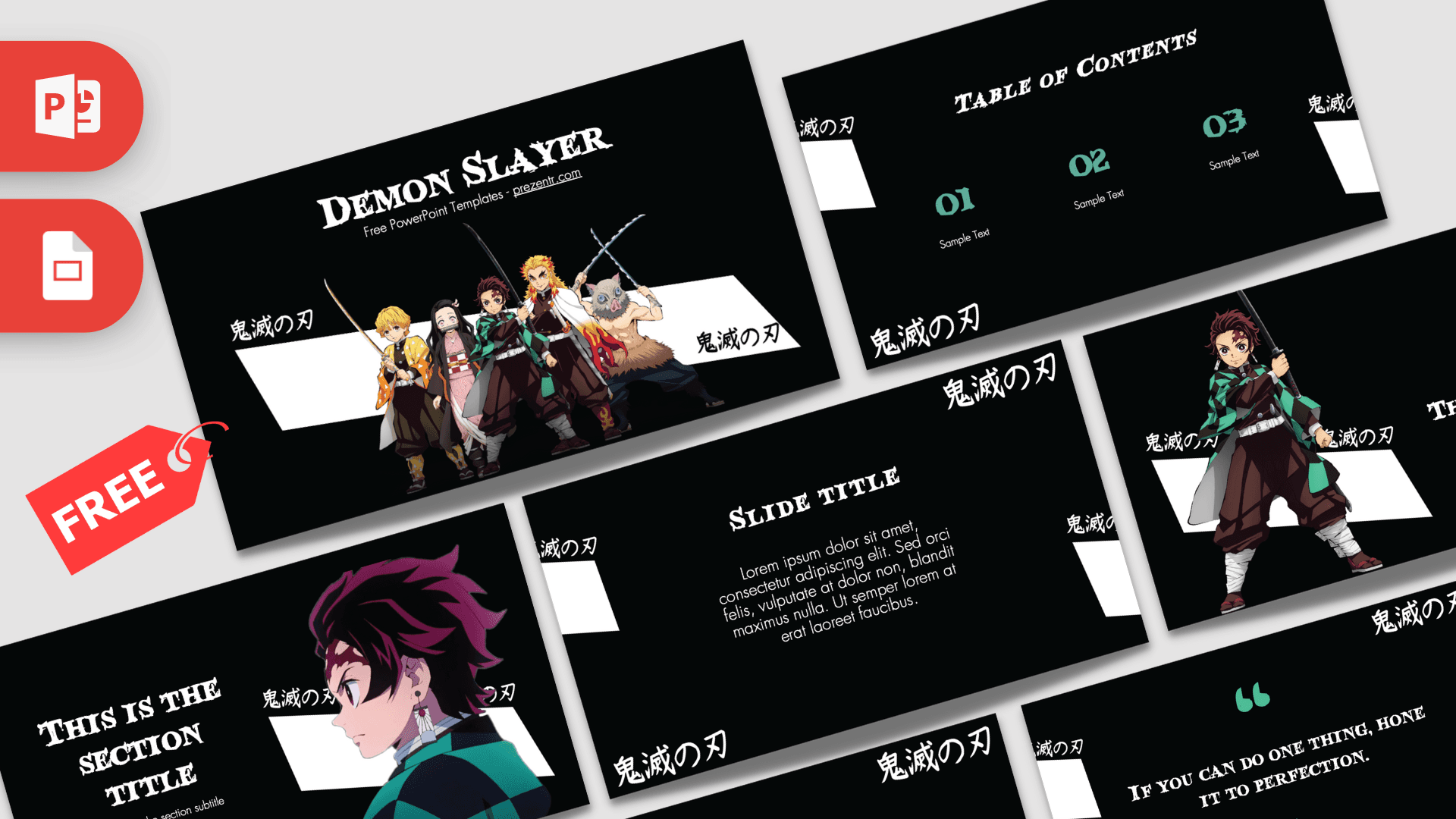
This free Demon Slayer PowerPoint template is a fan-made, 10-slide deck built on a deep black background with white brush strokes, teal-green accents and the series' Japanese title repeated around the edges. Tanjiro appears on several slides, and the title slide lines up the main group with swords drawn. It is a quick way to give an anime report, club meeting or birthday slideshow a bold look without designing anything from scratch.
What's Inside
The deck has 10 slides in 16:9 widescreen. Every slide keeps the same frame: a black canvas, slanted white shapes along the sides and the Japanese title in a brush font in the corners. Here is what each layout does:
- Title slide: a large "Demon Slayer" heading in a brush-style font above five characters, including Tanjiro, Nezuko, Zenitsu, Inosuke and a Hashira, posed in front of a white slash.
- Slide title with paragraph: a centered heading and a short block of text. Use it for an introduction, a summary or a plot overview.
- Table of contents: three numbered columns (01, 02, 03) in teal with short labels, ideal for outlining the parts of your talk.
- Section title: a large title and subtitle on the left with a close-up profile of Tanjiro on the right. Duplicate it to open each chapter.
- Quote slide: big teal quotation marks around a line of text in the title font. Swap in your own favorite line or a key message.
- Headline slide: a full-length Tanjiro with his sword on the left and a numbered headline with a subline on the right.
- Text and bullets: a two-part layout with a big slide title on one side and bullet points on the other.
- Four bullet points: a 2x2 grid of numbered items, good for comparing characters, listing facts or showing steps.
- Five bullet points: a title block plus five numbered items, handy for agendas, top five lists or rankings.
- Big number: a large figure with a teal arrow and a short caption, made for one stat you want people to remember.
Ten slides is enough for a complete short talk: open with the title, set expectations with the table of contents, then alternate section and content slides. Because every layout shares the same frame, you can duplicate any slide as often as you need and the deck still looks planned.
Design and Style
The look is high contrast and simple: black backgrounds, white type and teal-green numbers that echo the green in Tanjiro's checkered jacket. Titles use a rough, brush-like display font (Blood Crow) that feels hand painted, while the body text is set in clean Futura so paragraphs stay easy to read. Slanted white bars cut across the corners of every slide and frame the content like a torn scroll, and the Japanese title repeats in white brush lettering as a decorative pattern. The character art is bright and colorful against all that black, so the people on screen pop. The overall mood is dramatic but tidy, with plenty of empty space for your own text.
Who Is This Template For?
The Demon Slayer PowerPoint template suits anyone who wants an anime look that still leaves room for real content. A few examples:
- Students giving a presentation about a favorite anime, Japanese pop culture or a character analysis.
- Teachers and club leaders running an anime club, art class or manga reading group who want slides that match the topic.
- Birthday party hosts planning a Demon Slayer themed party and needing a slideshow for games, photos or a schedule.
- Fan groups and streamers sharing episode reviews, watch party plans or ranking lists.
- Cosplayers presenting costume progress, materials and photos at a meetup or convention panel.
How to Customize It
Editing the Demon Slayer PPT template takes a few minutes in PowerPoint:
- Install the fonts first: download Futura and Blood Crow so the titles keep their brush look. Without them PowerPoint substitutes a default font.
- Replace the text: click any placeholder and type. The "Sample Text" labels and lorem ipsum paragraphs are there only to show sizing.
- Swap character images: right-click a picture, choose Change Picture and select your own file. Cut-out PNGs with transparent backgrounds look best on the black canvas.
- Recolor accents: select the teal numbers or quote marks and change the font color, for example to red or orange if you prefer a different character's palette.
- Reorder and duplicate: in the slide thumbnails pane, drag slides into order, or right-click and choose Duplicate Slide to reuse a layout such as the section title.
To use the Demon Slayer slides in Google Slides, upload the PPTX to Google Drive and open it with Google Slides. Text and images stay editable. If a font does not load, select the text and choose a similar font from the menu.
Presentation Ideas
- A character profile series, one section per member of the main group, using the headline and section slides.
- A school report on how anime adapts manga, with the four-point grid comparing the two.
- A "Top 5 fights" or "Top 5 episodes" countdown on the five bullet points slide.
- An introduction to Japanese words and symbols seen in the series, using the quote and text slides.
- A themed birthday party slideshow with the guest list, games and a photo slide for the birthday kid.
- An anime club kickoff meeting with the agenda on the table of contents and club stats on the big number slide.
Related Templates
Looking for more anime designs? Try the Jujutsu Kaisen PowerPoint Template, the Attack on Titan PowerPoint Template, the Naruto PowerPoint Template or the general Anime PowerPoint Template. You can also browse every template that opens in Google Slides in our Google Slides templates collection.
Frequently asked questions
- Is this Demon Slayer PowerPoint template really free?
- Yes. You can download it from Prezentr for free and use it for school projects, fan presentations and personal events.
- How many slides are in the Demon Slayer template?
- There are 10 slides in 16:9, including a title slide, table of contents, section title, quote, headline, bullet layouts and a big number slide.
- Can I open the Demon Slayer slides in Google Slides?
- Yes. The template works in PowerPoint and Google Slides. If the Blood Crow title font is not available, Google Slides will swap in a default font, so you may want to pick a similar display font.
- Which fonts does the template use?
- The slides use Futura for body text and Blood Crow for the brush-style titles. Install both before editing for the best result.
- Can I replace the Tanjiro pictures with other characters?
- Yes. Right-click any character image in PowerPoint, choose Change Picture and pick your own file, ideally a cut-out PNG with a transparent background.
- Is this an official Demon Slayer product?
- No. It is a free fan-made template inspired by the anime and is not affiliated with or endorsed by the rights holders.