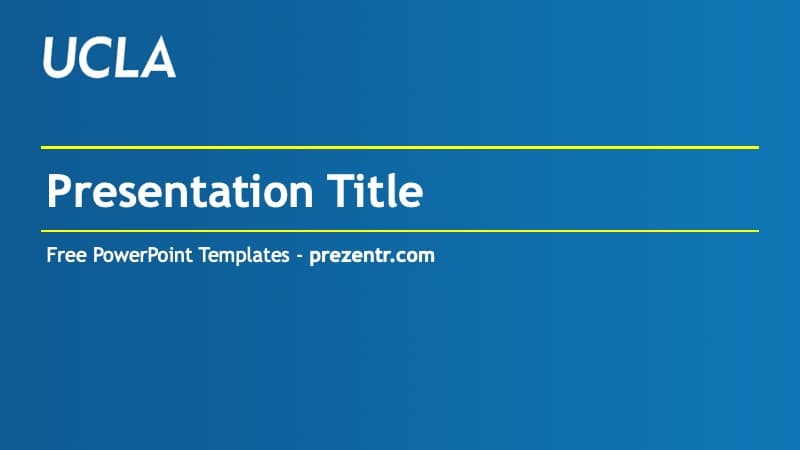
This free UCLA PowerPoint template is a very simple blue and white background set for students. It has just 2 slides: a blue title slide and a white content slide. There are no charts, icons or extra designs inside, so treat it as a starting point and not as a finished deck.
What's Inside
The download is a ZIP with one 16:9 PowerPoint template file (POTX).
- Title slide: a blue background with a soft gradient and a white UCLA wordmark in the top left corner. The title sits between two thin yellow lines, in white and aligned left, with a subtitle line under it.
- Content slide: a white slide with a blue title, a blue line under the title area and a text area with small blue square bullets. A UCLA wordmark in a blue box sits in the bottom right corner.
The New Slide menu also holds the standard PowerPoint layouts, such as Section Header, Two Content and Comparison, so you can add more slide types.
Design and Style
The look is blue and white, with yellow used only for the two lines on the title slide. The font is Trebuchet MS, a sans serif that comes with most Windows and Mac computers, so there is nothing to install. As a UCLA presentation template it stays out of the way. The content slide is almost all white space, which keeps long bullet lists, tables and screenshots easy to read on a projector.
Who Is This Template For?
- Students who need a quick cover and content slide for a class presentation.
- Graduate students preparing a research update or a thesis talk with their own figures.
- Student clubs making a meeting or recruitment deck.
How to Customize It
- Unzip the download and open the POTX file. PowerPoint starts a new presentation from it.
- Type over "Presentation Title" and replace the placeholder subtitle with your name, course and date.
- Add slides from Home > New Slide. Each new slide keeps the same colors and font.
- To use it as a UCLA slides template in Google Slides, save the file as a PPTX in PowerPoint, then upload the PPTX to Google Drive and open it with Google Slides.
Related Templates
If this UCLA PPT template is too plain for a big talk, look at the Thesis Defense PowerPoint Template or the Academic PowerPoint Template. For other school themes, see the UIUC PowerPoint Template, the Free UCF PowerPoint Template, the High School PowerPoint Template and the Student Certificate PowerPoint Template. This is an unofficial, fan-made design and is not affiliated with or endorsed by UCLA.
Frequently asked questions
- Is the UCLA PowerPoint template free?
- Yes. It is a free download on Prezentr, licensed for personal use, with no payment needed.
- How many slides are in the UCLA template?
- Two: a blue title slide and a white content slide. It is a simple background set with no charts or diagrams, and you add more slides from the New Slide menu.
- Can I use the UCLA template in Google Slides?
- Yes, with one extra step. The download is a POTX file, so open it in PowerPoint and save it as a PPTX, then upload the PPTX to Google Drive and open it with Google Slides.
- Is this an official UCLA template?
- No. It is an unofficial, fan-made design and is not affiliated with or endorsed by UCLA. If you need official university slides, ask your department.