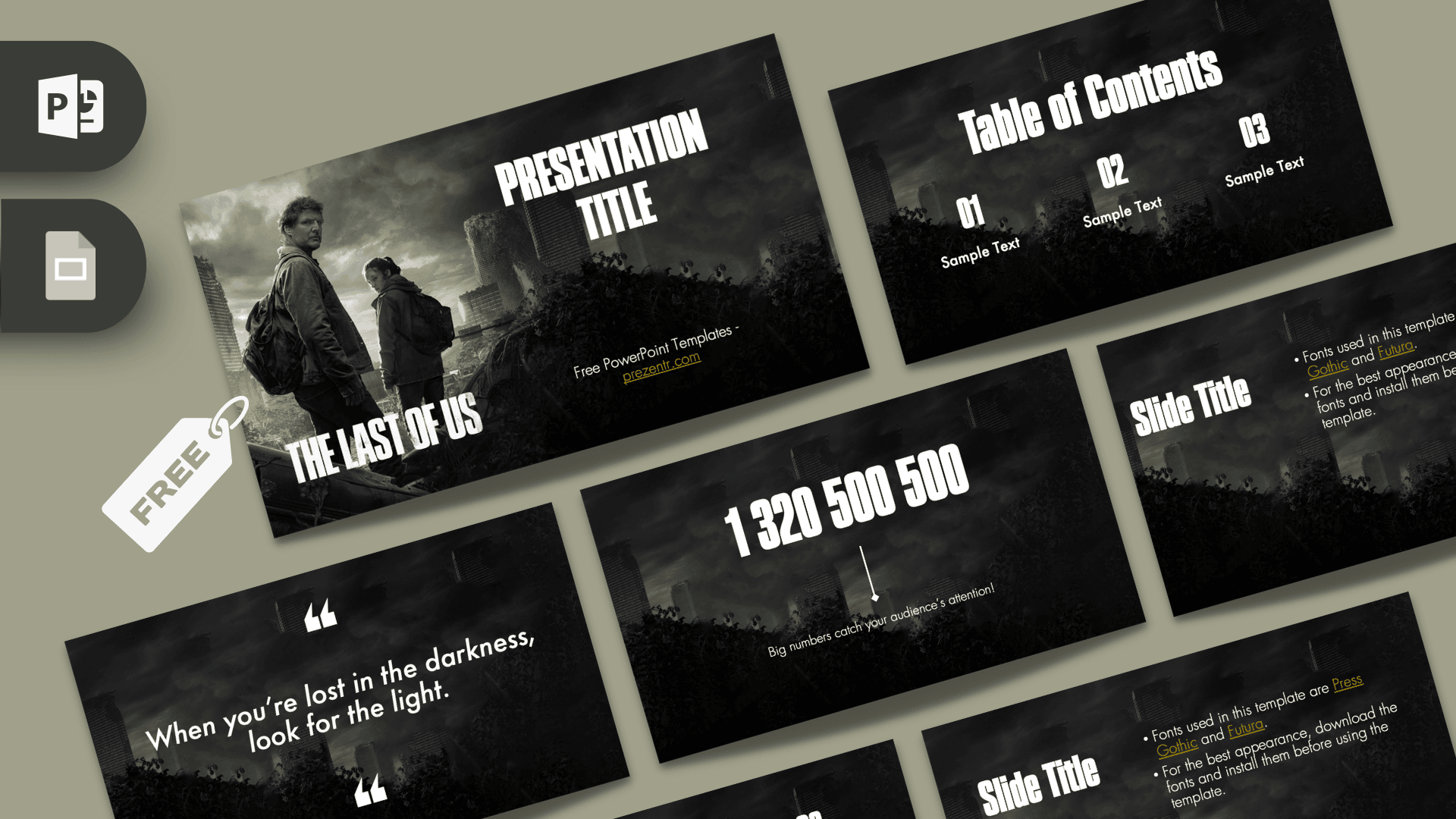
The The Last of Us PowerPoint template is a free, fan-made deck of 9 slides set in a dark, overgrown city where nature has taken back the ruins. Joel and Ellie appear on the title and section slides, and tall condensed headlines in white give every slide the feel of a movie poster. It works in PowerPoint and Google Slides, making it a moody, memorable choice for a game or TV series review, a story analysis or a post-apocalyptic themed talk.
What's Inside
The deck keeps things focused: a few cinematic hero slides and a set of clean layouts for your content. Here is each slide:
- Title slide: Joel and Ellie stand on a rubble-covered hill in front of a ruined skyline, with "PRESENTATION TITLE" in large white letters on the right and The Last of Us logo in the lower left.
- Section title: a close-up of Ellie and Joel against a dark wall with creeping growth, next to a big section title and a subline, with the logo in the corner.
- Slide title with bullets: a title on the left and bullet points on the right. The sample text explains the fonts the template uses.
- Background slide: the empty atmospheric backdrop of a dim, cloudy skyline and overgrown plants, ready for an image, a chart or a single statement.
- Quote slide: a short italic quote framed by large white quotation marks, ideal for a favorite line or your main takeaway.
- Bullet Points: a heading and five numbered points in a grid, great for main characters, key events or reasons.
- Table of Contents: three numbered sections with short labels, to show the structure of your talk.
- Big number slide: one huge figure with a thin arrow pointing to a caption, made to highlight a statistic.
- Closing logo slide: a large, weathered "THE LAST OF US" logo across the center, a strong way to end your presentation.
To build a full talk, start with the title, show your plan on the Table of Contents, and use the section slide to open each part. Fill the middle with bullet, quote and big number slides, and close on the logo slide. Duplicate any layout when you need more room.
Design and Style
The mood is dark, quiet and cinematic. Every slide shares the same backdrop: a stormy gray sky above crumbling city towers, with dense, dark green plants creeping across the bottom. Colors stay muted, mostly charcoal, gray and deep olive, so the white text stands out sharply.
The template uses two fonts: Press Gothic, a tall condensed display face for titles and numbers, and Futura for body text and quotes. Together they give the poster-like look of the series' branding. For the best result, download and install both fonts before you edit, as the template itself suggests. The character images are used on the first two slides only, so the rest of the deck stays calm and easy to read. Short headlines and a few words per slide suit this style best, letting the atmosphere do the work.
Who Is This Template For?
- Students analyzing the story, characters or themes of the game or the TV series for a literature or media class.
- Gamers and fan communities preparing a review, a ranking or a discussion night.
- Content creators making slides for a video essay, a podcast or a stream about video game storytelling.
- Teachers using a popular story to discuss survival, ethics, loyalty or how games and TV adapt each other.
- Game design students presenting on narrative design, world building or environment art.
- Anyone needing a dark, dramatic theme for a horror, survival or disaster preparedness topic.
How to Customize It
The text sits in standard placeholders, so editing in PowerPoint is simple:
- Install the fonts first: add Press Gothic and Futura to your computer so titles and body text look as intended. If you skip this step, PowerPoint will swap in a default font.
- Replace the text: click any title, number or "Sample Text" line and type your own words.
- Change the pictures: right-click a character image and choose Change Picture to use a screenshot or a photo of your own.
- Adjust colors: the white text works best on the dark background, but you can highlight key words with a muted yellow or green from the Home tab.
- Reorder and duplicate: drag slides in the thumbnail panel, or right-click and choose Duplicate Slide for extra bullet or quote slides.
- Add transitions: the deck has no built-in animations. A slow Fade transition between slides fits the quiet mood if you want some movement.
In Google Slides, upload the file to Google Drive and open it with Google Slides. If Press Gothic or Futura are not available there, choose a similar condensed font for titles and a geometric sans serif for body text.
Presentation Ideas
- Character study: how Joel and Ellie's relationship changes over the story.
- From game to TV: what changes when a video game story becomes a series.
- The science behind the fungus: a biology talk on real fungi and how fiction exaggerates them.
- Storytelling in video games: a game design lecture on narrative and environmental storytelling.
- Survival skills: a themed talk on emergency kits and preparedness.
- Fan review night: rank episodes or chapters on the bullet slide and reveal your top pick on the big number slide.
Related Templates
Into dark, story-driven worlds? Try the Stranger Things PowerPoint Template, the Game of Thrones PowerPoint Template or the Horror PowerPoint Template. For the gaming side, the PlayStation PowerPoint Template is a natural pick. You can also browse all game templates.
Frequently asked questions
- Is The Last of Us PowerPoint template free?
- Yes, it is free to download from Prezentr. It is a fan-made template and is not an official product of the game or the series.
- How many slides does The Last of Us template include?
- It includes 9 slides: title, section title, title with bullets, background, quote, bullet points, table of contents, big number and a closing logo slide.
- Which fonts does The Last of Us template use?
- It uses Press Gothic for titles and numbers and Futura for body text. Install both before editing for the best look.
- Can I open The Last of Us template in Google Slides?
- Yes. Upload it to Google Drive and open it with Google Slides. If the fonts are missing there, pick similar ones from the font menu.
- Are there animations in the template?
- No, the slides have no built-in animations or transitions. You can add a simple Fade between slides to match the moody style.
- Can I change the pictures of Joel and Ellie?
- Yes. In PowerPoint, right-click the image and choose Change Picture to insert any image you want.