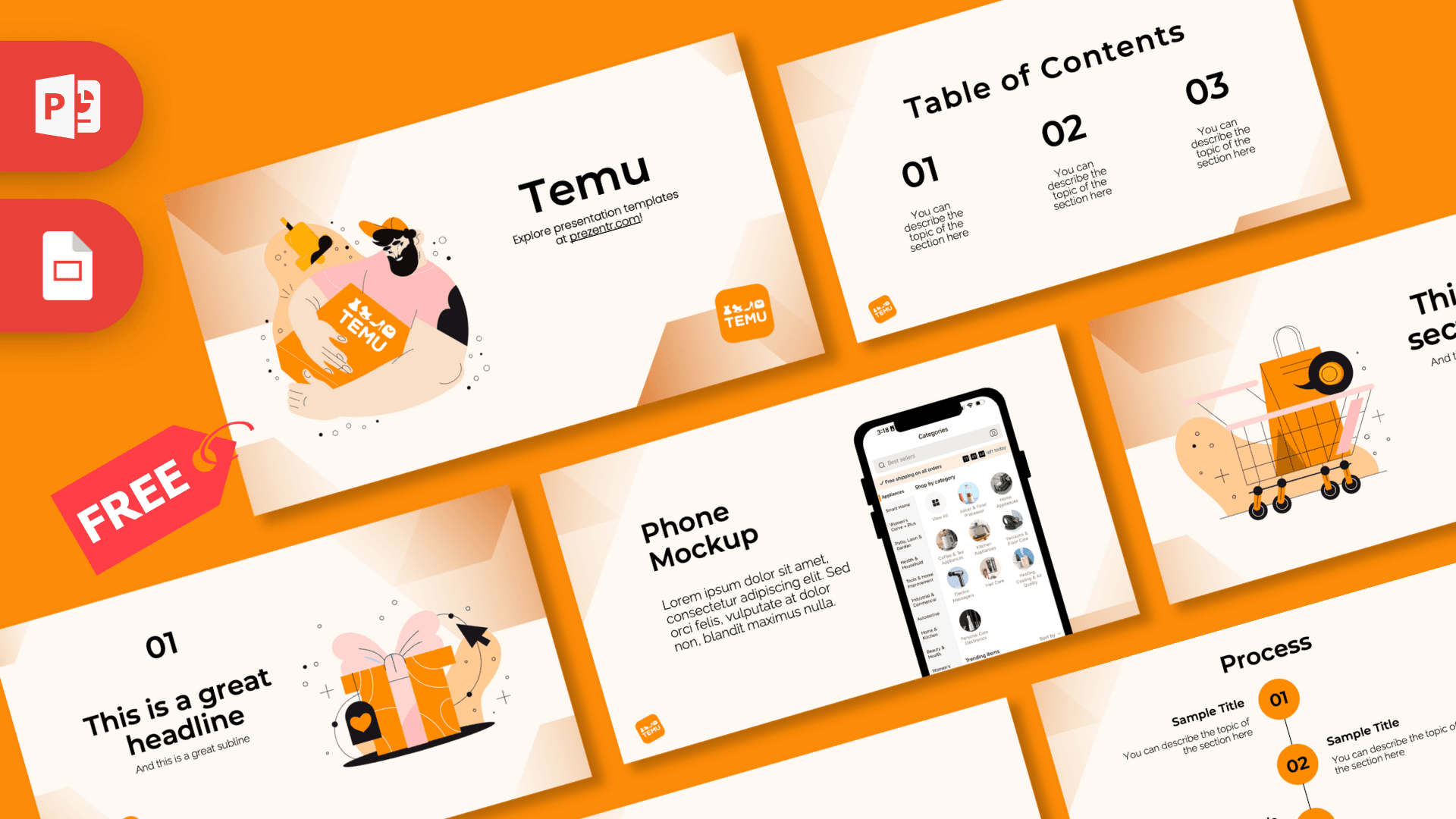
This free Temu PowerPoint template is a 10-slide deck in bright orange and warm cream, inspired by the online shopping app's signature color, with lively flat illustrations of a delivery hug, a shopping cart and a gift box. Soft peach gradients in the corners and a small orange logo badge on most slides tie everything together. It works in PowerPoint and Google Slides and is a quick way to make any e-commerce or shopping talk look polished and fun.
What's Inside
The deck includes 10 slides in 16:9 format, with layouts that cover a full business or class presentation.
- Title slide: a cheerful illustrated man in a cap hugging a big orange parcel, with the title and the orange logo badge on the right.
- Table of contents: three large black numbers with short descriptions.
- Section title: an orange shopping bag sitting in a shopping cart with pink wheels, next to the section heading.
- Headline slide: a large "01" and headline beside an orange gift box with a pink bow and a mouse cursor clicking on it.
- Introduction: a centered text block for your opening message or background.
- Five bullet points: numbered points 01 to 05 with a heading block in the corner.
- Quote slide: bold black quotation marks around a short statement or customer review.
- Big number: one large figure with a thin arrow pointing to a caption.
- Phone mockup: a smartphone showing a shopping app category screen, next to a text block. Swap the screen for your own app, store or product page.
- Process: three numbered steps in orange circles connected by a vertical line, for order flows, plans or timelines.
Design and Style
The background is a warm cream color with soft peach and orange gradient shapes in the corners, which gives the slides depth without feeling busy. Bright orange is the main accent, used for the logo badge, the step circles and parts of the illustrations, while numbers and headings are in crisp black. Small touches of pink in the illustrations, like the gift bow and cart wheels, add a playful note.
The illustrations use a modern, hand-drawn flat style with bold outlines, simple shading and little decorative dots and plus signs around them. They all relate to shopping, deliveries and gifts, so the deck tells a consistent story from the first slide to the last. Headings use a bold, geometric sans serif that feels friendly and easy to read. The mood is vibrant, upbeat and modern, perfect for consumer topics.
The color scheme is easy to extend. Orange bar charts, cream tables with black text and product photos on white or transparent backgrounds all blend in well. Because the logo badge sits small in a corner, the slides do not feel like an advert; they feel like a clean, branded deck that leaves most of the space for your own content and data.
This is a free, brand-inspired template made by Prezentr. It is not an official Temu product and is not endorsed by the company.
Who Is This Template For?
- E-commerce sellers and marketers presenting sales plans, product launches or promotions.
- Business and marketing students preparing a case study on online marketplaces or shopping apps.
- Startups pitching a delivery, retail or app idea to investors or partners.
- Teachers running lessons on consumer habits, budgeting or online shopping safety.
- Customer service and logistics teams explaining order and delivery processes.
- Anyone planning a gift exchange or holiday shopping guide who wants a fun, colorful deck.
How to Customize It
Open the Temu PPT template in PowerPoint and click any placeholder to add your own text. To replace the phone screen or an illustration, right-click the image and choose Change Picture, then pick your screenshot or product photo. If you are presenting your own store, you can delete the logo badge from each slide and insert your logo in its place.
To change the orange accent, select a shape and use Shape Fill, or use Font Color for text. The process slide is made of separate circles, lines and text boxes, so you can copy a step to add a fourth stage. Duplicate slides by right-clicking them in the thumbnail panel, drag them to reorder, and delete any layouts you do not need.
To use it as a Temu Google Slides theme, open Google Slides, choose File, then Import slides or Open, and upload the PowerPoint file. Everything stays editable, and you can share the deck with your team for comments before a meeting.
A quick tip: keep text on the illustrated slides short so the drawings have room to breathe, and use the introduction and bullet slides for the details. When you are done, save a PDF copy with File, then Save As, so you can share the Temu slides with people who do not have PowerPoint.
Presentation Ideas
- A case study on how shopping apps attract new customers with deals and gamified features.
- A product launch plan for an online store, with the process slide showing the order journey.
- A lesson on smart online shopping: comparing prices, reading reviews and spotting fake deals.
- A holiday gift guide with five picks on the bullet points slide and a phone mockup of the store.
- A logistics update explaining how an order moves from warehouse to doorstep.
- A startup pitch for a delivery or marketplace app, with your key metric on the big number slide.
- A class debate on fast, low-cost online shopping, with one side's arguments on the bullet points slide and a short quote from each team.
Related Templates
For more shopping and e-commerce designs, try the Aliexpress PowerPoint Template, the Amazon PowerPoint Template and the eBay PowerPoint Template. You can also browse all brands and companies templates.
Frequently asked questions
- Is the Temu PowerPoint template free?
- Yes, you can download it free from Prezentr. It is brand-inspired and not an official Temu template.
- How many slides does the Temu template include?
- It includes 10 slides: title, table of contents, section title, headline, introduction, five bullet points, quote, big number, phone mockup and process.
- Does the Temu template work in Google Slides?
- Yes. Upload the PowerPoint file to Google Slides through File, then Import slides or Open, and edit it there.
- Can I put my own app screenshot in the phone mockup?
- Yes. Right-click the screen image and choose Change Picture to add your own screenshot or product page.
- Can I remove the logo badge for my own brand?
- Yes. The orange badge is a separate image on each slide, so you can delete it and insert your own logo.
- Is the Temu template animated?
- No, the slides are static. You can add animations from the Animations tab in PowerPoint if you want.
This is a fan-made template inspired by Temu PowerPoint Template. Prezentr is not affiliated with, endorsed by, or selling assets from Temu PowerPoint Template. All brand names, logos, and trademarks belong to their respective owners.