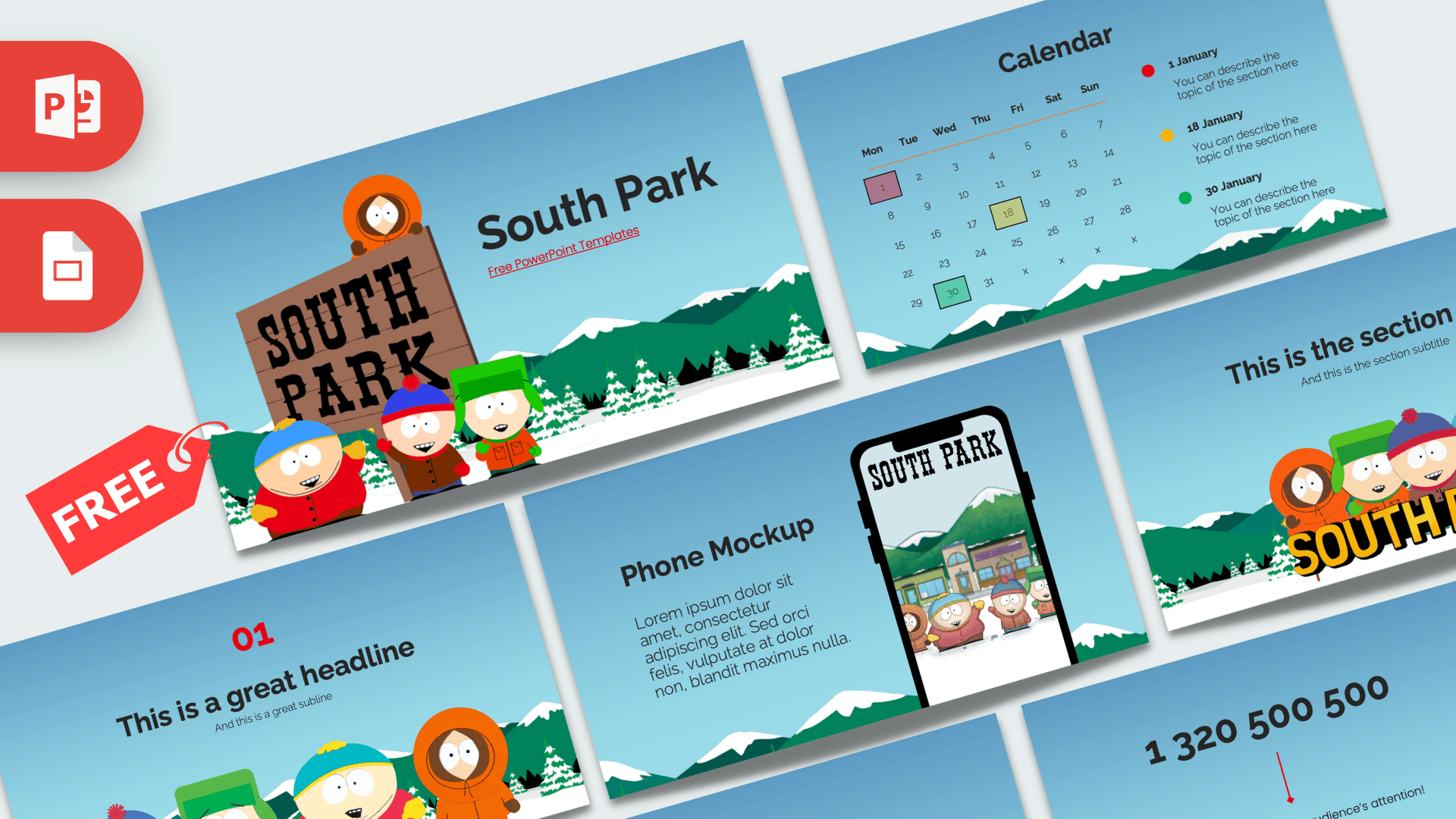
The South Park PowerPoint template is a free, fan-made deck of 10 slides that drops your content right into the show's snowy mountain town. A bright sky blue background, green hills topped with snow and rows of pine trees frame every slide, while Stan, Kyle, Cartman and Kenny pop up on the title, section and headline slides. It works in PowerPoint and Google Slides and includes some handy extras, like a calendar and a phone mockup.
What's Inside
The deck gives you a solid mix of illustrated slides and practical layouts. Here is the full lineup:
- Title slide: a wooden South Park sign with Kenny peeking over the top and Cartman, Stan and Kyle in front of it, plus a "South Park" title and subtitle on the right.
- Table of Contents: three red numbers with a short description under each, so your audience knows what is coming.
- Section title: a centered section title above Kenny, Kyle, Stan and Cartman and the yellow South Park logo. Use it to start each new part of your talk.
- Numbered headline slide: a red "01", a headline and a subline above the four boys standing in a row. A good slide for one big idea or a chapter opener.
- About Us: a heading and a paragraph of text for an introduction or a summary.
- Five Bullet Points: a heading and five numbered points arranged in a grid, nice for lists, steps or rankings.
- Quote slide: a short line of text framed by big red quotation marks.
- Big number slide: a huge figure with a red arrow pointing to a caption, for the stat you want people to remember.
- Calendar: a full month grid from Monday to Sunday with three highlighted dates and a matching legend on the right, where you describe what happens on each date.
- Phone Mockup: a smartphone showing a South Park scene with the town and characters, next to a heading and a paragraph. Swap the screen image for your own app, website or social post.
A simple way to use the set: open with the title slide, share your plan on the Table of Contents, and introduce each part with the section or headline slide. Fill in details with the bullet, quote and big number slides, then use the calendar and phone mockup for dates and digital links near the end.
Design and Style
The whole deck sits on a sky blue gradient that gets lighter toward the bottom, where layers of snowy green mountains and pine trees form a border. It feels wintry and cheerful, just like the town the show is set in. The characters use the show's flat, cut-out cartoon style, with their famous hats and coats in red, green, teal and orange.
Numbers, quotation marks and arrows are in a strong red, and the text is dark gray in a clean, rounded sans serif that is easy to read from the back of a room. The title slide also uses the show's wooden sign lettering for a touch of extra character. The overall mood is playful, with enough simple layouts to keep the deck useful for real content.
Who Is This Template For?
South Park is an animated comedy aimed at adults, so this theme fits older students and grown-up audiences best:
- College and high school students presenting on animation, satire, TV history or media studies.
- Fan groups planning a watch party, a trivia night or a ranking of favorite episodes.
- Content creators and podcasters preparing slides for a review, a video essay or a stream.
- Office teams who want a lighthearted look for a team update, a schedule or a fun quiz.
- Event organizers using the calendar slide to plan dates for a club or season.
- Social media managers who can show a post or page in the phone mockup.
How to Customize It
Everything is editable in PowerPoint with a few clicks:
- Change the text: click any heading, number, date or placeholder paragraph and type your own words.
- Replace pictures: right-click a character image or the phone screen and choose Change Picture to insert your own image. The phone mockup is great for a screenshot of your website or app.
- Edit the calendar: type new numbers into the grid for your month, move or recolor the highlight squares, and update the dates and notes in the legend.
- Recolor accents: select the red numbers or arrows and choose a new color from the Home tab. Kenny orange or Kyle green would look right at home.
- Reorder and duplicate: drag slides in the thumbnail panel, or right-click and choose Duplicate Slide to add more sections or bullet slides.
- Add animations: the deck has no built-in animations, but you can add entrance effects from the Animations tab, for example having the four boys fly in one by one.
In Google Slides, upload the file to Google Drive and open it with Google Slides. Right-click an image and choose Replace image to swap pictures, and edit the calendar text just like in PowerPoint.
Presentation Ideas
- Satire on TV: how animated comedy comments on news and culture, for a media studies class.
- How cut-out animation works: a look at simple shapes and flat character design.
- Character guide: one slide per main character with traits and memorable moments.
- Episode ranking: a top five on the bullet slide, with your winner on the big number slide.
- Watch party schedule: plan dates on the calendar slide and share the plan with friends.
- Team trivia game: questions on the headline slides and answers revealed after each one.
Related Templates
Love animated comedy? Try the Simpsons PowerPoint Template, the Family Guy PowerPoint Template or the Rick and Morty PowerPoint Template. For a broader mix of cartoon styles, see the Cartoons PowerPoint Template. You can also browse all TV show and movie templates.
Frequently asked questions
- Is the South Park PowerPoint template free?
- Yes, you can download it free from Prezentr. It is a fan-made template and is not affiliated with the show or its creators.
- How many slides come with the South Park template?
- There are 10 slides, including a title slide, table of contents, section title, headline, five bullet points, quote, big number, calendar and phone mockup.
- Can I use the South Park template in Google Slides?
- Yes. Upload it to Google Drive and open it with Google Slides, and all text and images stay editable.
- Which South Park characters are in the template?
- Stan, Kyle, Cartman and Kenny appear on the title, section and headline slides. You can replace them with Change Picture in PowerPoint.
- Can I change the dates on the calendar slide?
- Yes. The slide shows a Monday to Sunday month grid with three highlighted dates and a legend, so you can retype the numbers and notes to match your own month.
- Is the South Park template animated?
- No, the slides are static, but you can add your own animations and transitions in PowerPoint or Google Slides.