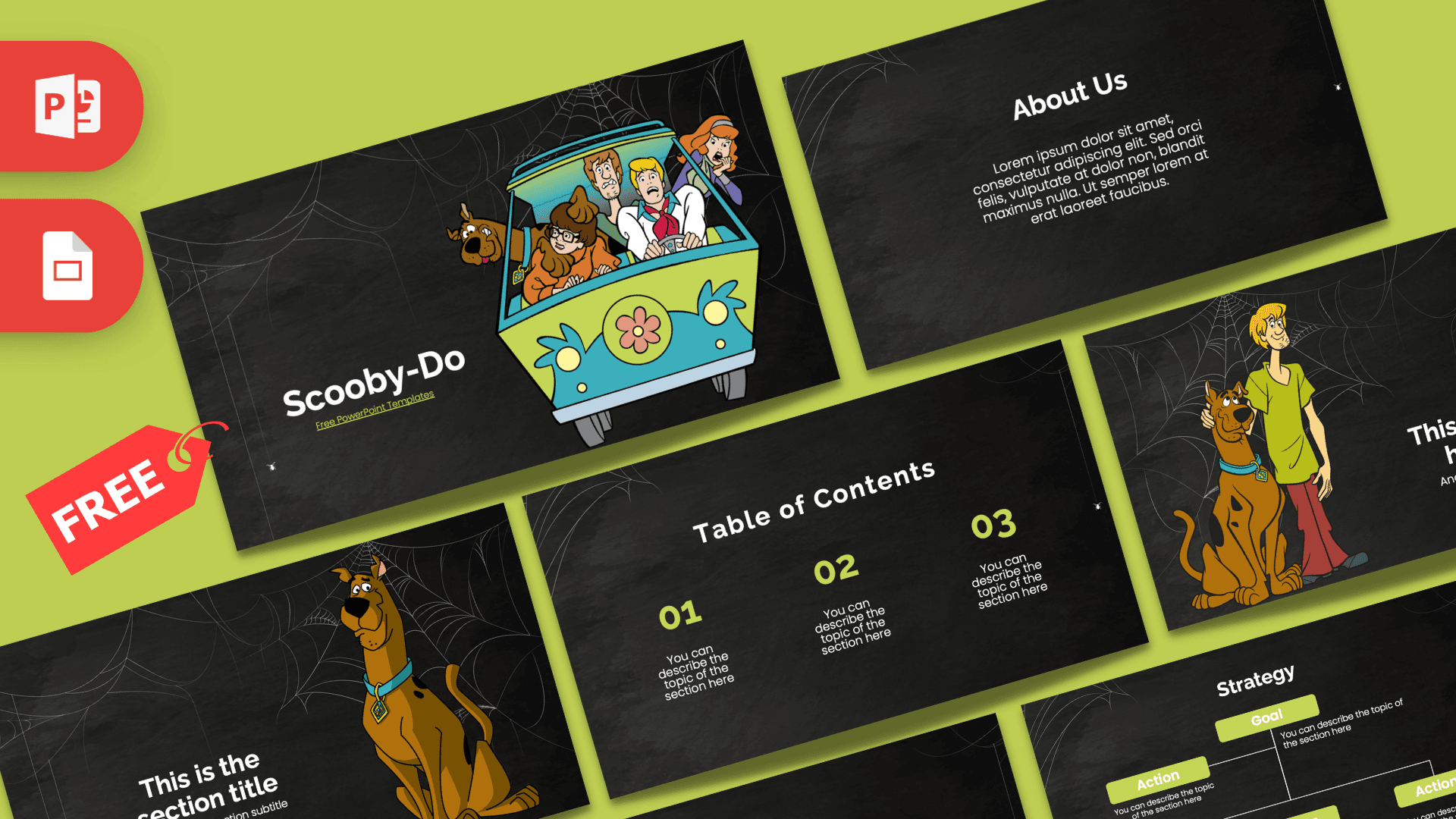
Grab a flashlight and climb into the van: this free Scooby-Doo PowerPoint template puts the whole gang on a dark chalkboard background covered in spider webs. The 10-slide deck mixes black, white and a bright lime green with classic cartoon art of the Mystery Machine, Scooby-Doo and Shaggy. It is spooky in a fun way, and it works in both PowerPoint and Google Slides.
What's Inside
The deck covers everything a typical school or club presentation needs, from the cover to a big closing number:
- Title slide: the Mystery Machine bursts toward the viewer with Scooby, Shaggy, Fred, Velma and Daphne inside, next to a bold title and a small lime subtitle link.
- Table of Contents: three numbered columns (01, 02, 03) in lime green with short descriptions, perfect for outlining your three main points.
- Section title: Scooby-Doo sits tall beside a large section heading and subtitle. Use it to open each part of your talk.
- Numbered headline slide: Scooby and Shaggy stand together next to a big "01", a headline and a subline. Great for introducing a key idea or a chapter.
- About Us: a centered heading with a short paragraph, ideal for an introduction, a summary or a "what this show is about" slide.
- Five bullet points (numbers): a heading on the left and five numbered blocks from 01 to 05, so you can list clues, facts or steps.
- Quote slide: a single centered line between oversized lime quotation marks for a favorite line, a definition or a key takeaway.
- Five bullet points (words): the same five-point idea with spelled-out labels ONE through FIVE, for when you want variety.
- Strategy diagram: a simple tree with a Goal box at the top and four Action boxes below, connected by thin white lines. It works well for plans, cause and effect, or "how the mystery was solved."
- Big number slide: one huge figure with a lime arrow pointing to a short caption, for a statistic you want the room to remember.
All text is placeholder copy you can type over, and the slides are 16:9 widescreen.
Design and Style
The background looks like a dusty black chalkboard, with thin white spider webs hanging from the corners and tiny spiders dangling on threads. That one texture runs through every slide, so the Scooby-Doo slides feel like a single, consistent haunted setting.
Lime green is the accent color, used for numbers, quote marks, labels and diagram boxes, which echoes the green of the Mystery Machine on the cover. Headings use a bold, clean sans-serif (Raleway) and body text uses a light, rounded sans-serif (Poppins), both in white for strong contrast on the dark background. The character art is classic, full-color cartoon style, used on the first four slides; the rest of the deck stays clean and text-friendly so your content gets the spotlight. The overall mood is playful and mysterious rather than scary, so it is fine for younger audiences.
Who Is This Template For?
The Scooby-Doo PowerPoint template is friendly enough for young kids and clean enough for older students, so it covers a lot of ground:
- Elementary and middle school students presenting a book report, a favorite cartoon or a "solve the mystery" project.
- Teachers who want a Halloween or detective theme for a reading lesson, a logic puzzle class or a science "investigation."
- Parents planning a party such as a Scooby-Doo birthday or a mystery-themed sleepover, with games and schedules on slides.
- Fan clubs and cartoon fans sharing character rankings, trivia or favorite episodes.
- Escape room and game night hosts who need slides for rules, clues and the final reveal.
How to Customize It
Editing the Scooby-Doo PowerPoint template in PowerPoint is quick:
- Replace the text: click any heading, number or paragraph and type your own. Start with the cover, where you can set the exact title you want.
- Change the characters: on the cover, section and headline slides the character art is part of the background image, so it will not move while you edit text. To use a different picture, right-click the slide, choose Format Background, then Picture or texture fill, and insert your own image. To place extra photos on top, use Insert, then Pictures, and swap them later with Change Picture.
- Recolor the accents: select the lime numbers or diagram boxes and pick a new color from Font Color or Shape Fill. Orange or purple also look great on the chalkboard.
- Edit the diagram: click a Goal or Action box to rename it, or copy a box and its line to add another step.
- Reorder and duplicate: drag slides in the left panel, or right-click and choose Duplicate Slide when you need more sections.
- Add your own motion: the template has no built-in animations, so use the Animations tab if you want clues or bullet points to appear one at a time.
Prefer Google Slides? Open the Google Slides version from this page and choose File, then Make a copy to save an editable copy to your Drive. Text edits work the same way, and Replace image in the right-click menu swaps pictures. If the fonts look different, make sure Raleway and Poppins are selected, as both are available in Google Slides.
Presentation Ideas
- How to solve a mystery: observe, collect clues, test ideas and reveal the culprit.
- Meet the Mystery Inc. gang, with one slide per character and their best skills.
- A book report on a detective story, using the strategy diagram for the plot.
- Halloween safety tips for trick-or-treating, presented by "Scooby and Shaggy."
- A classroom trivia game about classic cartoons, with answers on the following slide.
- The science of fear: why spooky stories make our hearts race.
Related Templates
If you like classic cartoons, take a look at the Looney Tunes PowerPoint Template, the Cartoon Network PowerPoint Template and the Cartoons PowerPoint Template. For more spooky-season slides, try the Halloween PowerPoint Template. You can also browse every theme that opens in Google Slides in our Google Slides templates.
Frequently asked questions
- Is the Scooby-Doo PowerPoint template free?
- Yes. It is completely free to download on Prezentr for school, parties and personal projects.
- How many slides are in the Scooby-Doo template?
- There are 10 slides: a title slide, table of contents, section title, numbered headline, About Us, two five-point bullet slides, a quote slide, a strategy diagram and a big number slide.
- Can I use the Scooby-Doo template in Google Slides?
- Yes. Open the Google Slides version from this page and make a copy to edit it in your own Drive.
- Which characters appear in the template?
- The cover shows the Mystery Machine with Scooby-Doo, Shaggy, Fred, Velma and Daphne. Scooby appears on the section slide, and Scooby and Shaggy appear together on the headline slide.
- Does the template have animations?
- No, the slides are static. You can add your own effects in PowerPoint from the Animations tab, for example to reveal clues one by one.
- Is this an official Scooby-Doo product?
- No. It is a free fan-made template and is not affiliated with or endorsed by the owners of Scooby-Doo.