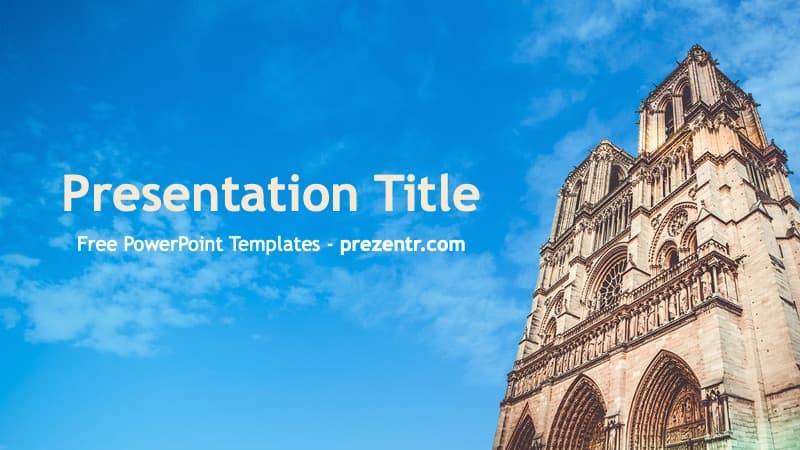
This free Notre-Dame PowerPoint template shows the Notre-Dame cathedral in Paris. It is not a University of Notre Dame design. The download is a small background set with 2 slides, a title slide and a content slide, both built on a photo of the cathedral's stone towers against a bright blue sky. It suits history, art, architecture, French class and travel presentations.
What's Inside
The download is a ZIP with one 16:9 PowerPoint template file (POTX).
- Title slide: the photo looks up at the front of the cathedral, which rises in the lower right corner with its pointed arches and carved stonework. Blue sky and thin clouds fill the rest. The title sits on the left in cream, with a white subtitle under it.
- Content slide: a wider crop of the same photo. The cathedral is smaller and tucked into the bottom right corner, which leaves more open sky for a title and bullet text in cream and white.
The New Slide menu also holds the standard PowerPoint layouts, such as Two Content and Title Only. There are no charts, icons or maps in the file.
Design and Style
The photo does all the work: deep blue sky, warm stone tones and light text on top. The font is Trebuchet MS, which comes with most Windows and Mac computers. Because every slide has a photo background, keep your text short and let it sit over the sky. Long paragraphs that run across the stonework will be hard to read.
Who Is This Template For?
- Students writing a history, art history or architecture report.
- French class students and teachers presenting Paris or French culture.
- Travelers and travel clubs sharing a trip to Paris.
How to Customize It
- Unzip the download and open the POTX file. PowerPoint starts a new presentation from it.
- Type over "Presentation Title" and replace the placeholder subtitle.
- Add slides from Home > New Slide and place your own photos with Insert > Pictures.
- For Google Slides, save the file as a PPTX in PowerPoint, then upload the PPTX to Google Drive and open it with Google Slides.
Presentation Ideas
- A school report on Gothic cathedrals and how they were built.
- A French class talk on the landmarks of Paris.
- A book report on The Hunchback of Notre-Dame.
- A short talk on the 2019 fire and the restoration.
Related Templates
For more Paris and France themes, see the Paris PowerPoint Template, the Eiffel Tower PPT Template and the France PowerPoint Template. For a school report that needs a plainer look, see the Academic PowerPoint Template.
Frequently asked questions
- Is this a University of Notre Dame template?
- No. It shows the Notre-Dame cathedral in Paris, France. There is no university logo or name on the slides.
- How many slides are in the Notre-Dame template?
- Two: a title slide and a content slide. Both use a photo of the cathedral against a blue sky, and you add more slides from the New Slide menu.
- Is the Notre-Dame PowerPoint template free?
- Yes. It is a free download on Prezentr, licensed for personal use, with no payment needed.
- Can I use the Notre-Dame template in Google Slides?
- Yes, with one extra step. The download is a POTX file, so open it in PowerPoint and save it as a PPTX, then upload the PPTX to Google Drive and open it with Google Slides.