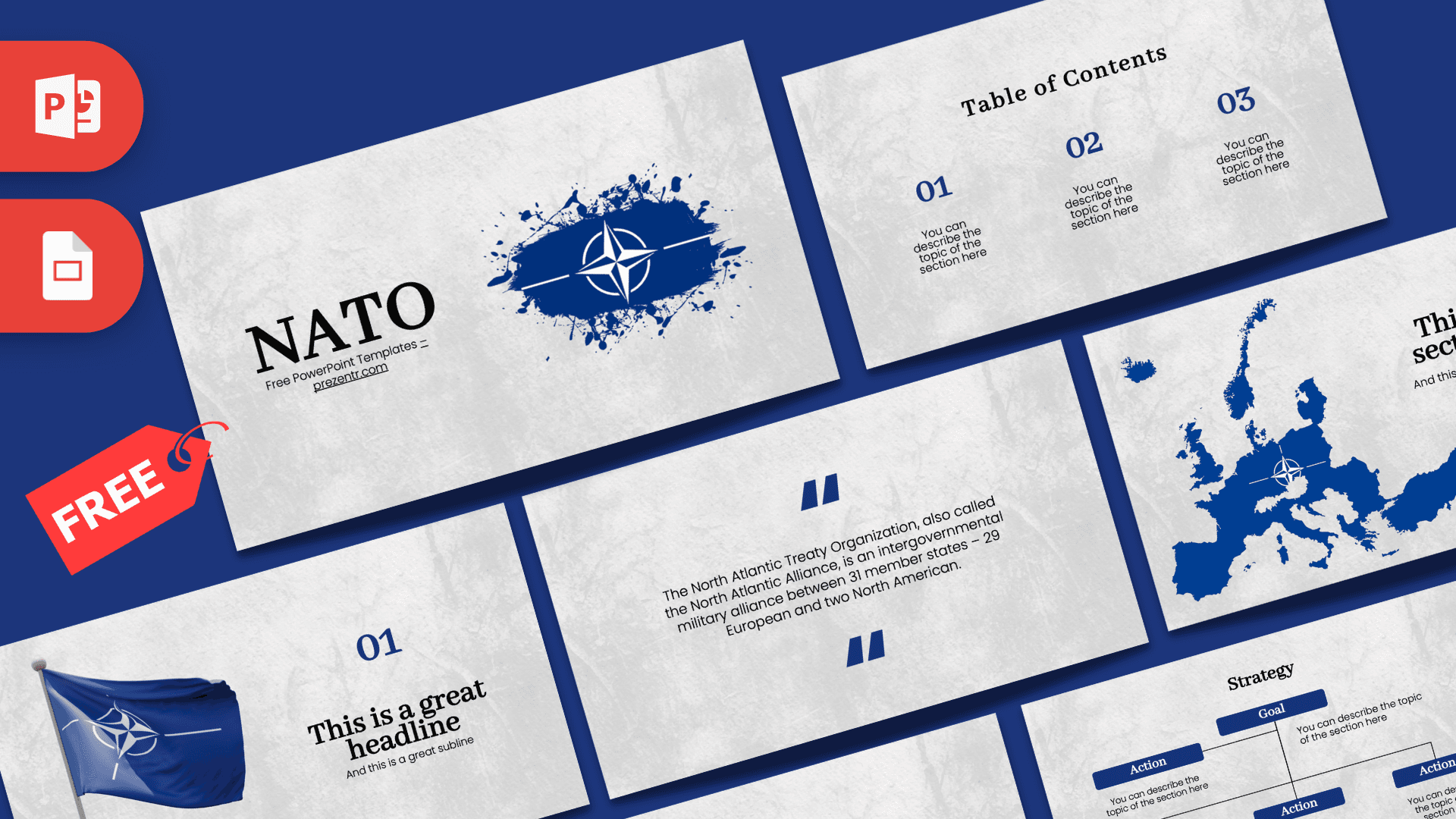
This free NATO PowerPoint template gives you a clean, serious-looking deck for talks about international security, alliances and modern history. It has 10 widescreen slides in deep navy blue on a light gray stone texture, with the NATO compass star emblem, a waving flag and a blue map of Europe. It is fully editable in PowerPoint and Google Slides, so you can go from blank page to finished presentation quickly.
What's Inside
The deck covers everything a typical school report or briefing needs, from the opening title to a closing statistic:
- Title slide: a large black serif "NATO" heading next to the alliance emblem set inside a dark blue ink splash. Strong and simple, it sets a formal tone right away.
- Table of Contents: three numbered sections in navy with short descriptions, ideal for laying out your agenda.
- Section title: a solid blue silhouette map of Europe with the compass star placed over it, next to a section heading and subtitle. Useful for chapters about geography, member countries or regional security.
- Headline slide: a photo-style NATO flag on a flagpole beside a big "01" number, a headline and a subline.
- About Us: a centered heading with a paragraph block for background information or an introduction.
- Bullet Points (numbered): a title block plus five numbered points (01 to 05), good for timelines, key facts or main arguments.
- Quote slide: navy quotation marks around a short description of the alliance. Replace it with your own quote or definition.
- Bullet Points (labeled): the same five-point structure with ONE to FIVE labels, for a second list in a different style.
- Strategy: a small diagram with one Goal box at the top connected to several Action boxes, great for showing objectives, plans or a chain of decisions.
- Big number slide: one large figure with an arrow and a caption, made for a headline statistic such as budgets, troops or member counts.
Design and Style
The NATO PPT template keeps the palette tight: a pale gray textured background that looks like worn stone or concrete, navy blue for numbers, boxes and graphics, and black for headings. Headings use an elegant serif typeface that gives the slides an official, newspaper-like feel, while body text is set in a clean, modern sans serif for easy reading. The graphics are limited to the emblem splash, the flag and the Europe map, which keeps the focus on your content. The result is calm, structured and professional, a good fit for academic and policy topics where a playful design would feel out of place.
A quick note on context: NATO, the North Atlantic Treaty Organization, is a military alliance of countries in Europe and North America. The quote slide includes a short sample description of the alliance with a member count, so check current figures from an up-to-date source before you present, because membership has changed over time. This is an independent, free design and is not an official NATO product.
Who Is This Template For?
The neutral, formal style suits anyone who needs to present facts clearly and keep the audience focused on the message:
- High school and university students preparing reports on international relations, history or political science.
- Teachers and lecturers building lessons about the Cold War, European history or global organizations.
- Model United Nations and debate clubs presenting positions on security and defense topics.
- Researchers and analysts sharing briefings on defense policy, alliances or geopolitics.
- Journalists and bloggers who need tidy visuals for an explainer talk or webinar.
How to Customize It
Every element in the NATO PowerPoint template is a regular PowerPoint object, so you can adapt it in a few minutes without any special tools:
- Edit the text: click into any placeholder and type. The sample lines such as "You can describe the topic of the section here" are there only to show the layout.
- Change pictures: right-click the flag image and choose Change Picture to swap in your own photo while keeping its position.
- Adjust the map and emblem: resize or move them like any other image, or delete them on slides where you need more room for text.
- Recolor: select boxes in the Strategy slide or the numbers and use Shape Fill or Font Color to adjust the blue.
- Reorder and duplicate: drag slides in the thumbnail panel, or right-click and choose Duplicate Slide to add more sections, bullet slides or strategy diagrams.
- Add animations if you like: the file comes without animations, so you can use the Animations tab to reveal points one at a time.
Using Google Slides: upload the PPTX to Google Drive, then open it with Google Slides. Text, shapes and images remain editable, and you can swap pictures with Replace image. If a font looks different, pick a similar serif in the font menu.
Presentation Ideas
- The history of NATO: why it was founded and how it has changed over the decades.
- How collective defense works and what it means for member countries.
- NATO and the Cold War: alliances, tensions and the balance of power in Europe.
- Comparing international organizations, such as NATO, the UN and the EU.
- A Model UN briefing on a current security issue, with goals and proposed actions.
- Defense spending explained, using the big number slide for your key figure.
Tip: keep one idea per slide, use the big number slide for your most important statistic, and close with the Strategy diagram to show what should happen next. Whatever your angle, this NATO PowerPoint template gives you a consistent, credible look from the first slide to the last.
Related Templates
For more history and global affairs topics, try the UN PowerPoint Template and the Cold War PowerPoint Template. Military themes are covered by the Army PowerPoint Template and the Tank PowerPoint Template. You can also browse our full education templates for classroom-ready designs.
Frequently asked questions
- Is this NATO presentation template free to use?
- Yes, it is free to download and use for school, university and work presentations. It is an independent design and is not made or endorsed by NATO.
- How many slides does the NATO template include?
- It includes 10 slides: title, table of contents, section title with a map of Europe, headline slide with a flag, About Us, two bullet point slides, a quote, a strategy diagram and a big number slide.
- Does the NATO template work in Google Slides?
- Yes. Upload the PPTX file to Google Drive and open it with Google Slides to edit the text, images and shapes.
- Is the information on the slides up to date?
- The quote slide contains a short sample description of the alliance that includes a member count. Membership has changed over time, so verify current numbers before presenting.
- Can I replace the flag and map images?
- Yes. Right-click an image and choose Change Picture in PowerPoint, or Replace image in Google Slides.
- Does it have animations?
- No, the slides are static. You can add your own animations and transitions from the Animations and Transitions tabs.