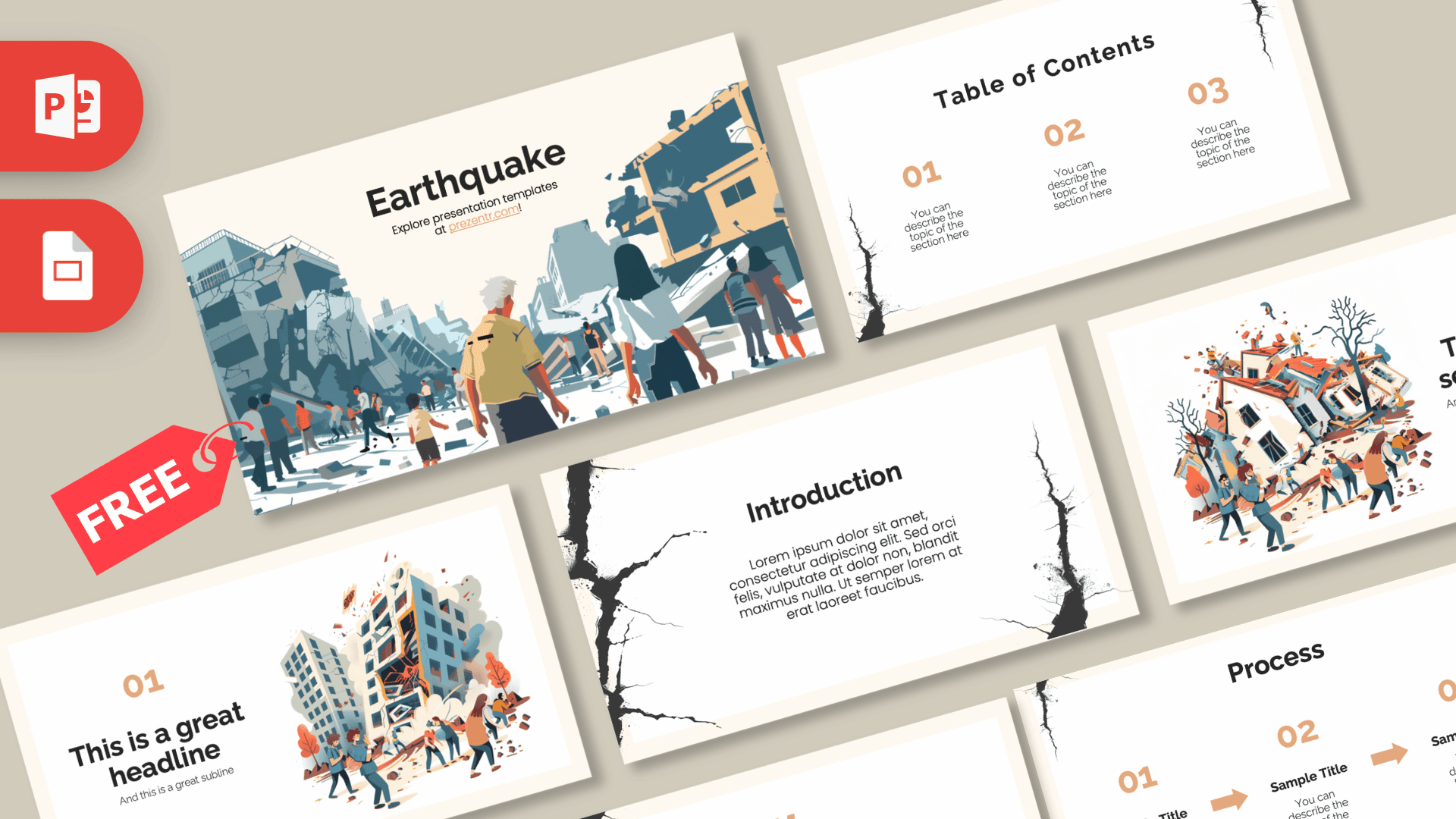
This free Earthquake PowerPoint template is a 10-slide deck for science lessons, safety talks and disaster preparedness presentations, built on a warm cream background with dramatic flat illustrations of damaged buildings and people moving through rubble. Black crack graphics creep in from the edges of the content slides, and soft terracotta orange accents keep the design calm and readable rather than alarming. It works in PowerPoint and Google Slides and gives a serious topic a clear, professional structure.
What's Inside
The download includes 10 slides in 16:9 format, combining illustrated openers with practical layouts for facts, comparisons and step-by-step plans.
- Title slide: a wide illustration of a city street after an earthquake, with collapsed buildings and a crowd of people walking through debris, and the title at the top.
- Table of contents: three numbered sections in terracotta, with a thin crack running down the side.
- Section title: a tilted, broken house with people gathered around it, next to a heading and subtitle.
- Headline slide: an orange "01" and headline beside a cracked apartment block with people moving away from it.
- Introduction: a centered text block framed by bold black cracks, for background or a definition.
- Four bullet points: four numbered points in a two-by-two grid, good for key facts or safety tips.
- Quote slide: large terracotta quote marks around a short statement.
- Big number: one oversized figure with an arrow pointing to a caption, for a key statistic.
- Comparison: two donut charts with percentages and a large "Vs" between them.
- Process: three numbered steps connected by orange arrows, ideal for a before, during and after plan.
Design and Style
The base color is a soft cream that feels like paper, paired with white content cards. Accents come in a muted terracotta orange for numbers, arrows and charts, while the illustrations use dusty blue-gray, sand, rust and warm orange. Jagged black cracks, drawn with a rough ink texture, appear at the corners and edges of most content slides, a simple visual cue that ties every page back to the topic.
The illustrations are detailed but flat, showing ruined buildings, falling debris and groups of people responding together. They set the scene without graphic or upsetting detail, which makes the deck suitable for classrooms. Headings use a bold, modern sans serif in near-black, and the body text is light and easy to read. The overall mood is serious, informative and steady, the right tone for science and safety content.
Because the palette is restrained, charts, maps and diagrams fit in easily. A seismic map, a cross-section of tectonic plates or a photo of an emergency kit will sit comfortably on the cream background.
The layout rhythm also helps with a heavy subject. The illustrated title, section and headline slides set the scene, while the plain content slides give the audience room to focus on facts and numbers. Mixing the two keeps attention without overwhelming people, which is especially useful with younger students or in a workplace briefing where the goal is clear, calm information.
Who Is This Template For?
- Science and geography teachers explaining plate tectonics, faults and how earthquakes happen.
- Students preparing a report on a natural hazard or a famous earthquake.
- Schools and workplaces running earthquake drills or emergency preparedness briefings.
- Civil protection and NGO teams sharing community awareness or relief project updates.
- Engineers and architects presenting on building safety and earthquake-resistant design.
- Researchers summarizing data on seismic activity or risk.
- Families and community groups putting together a simple household emergency plan.
How to Customize It
Download the Earthquake PPT template and open it in PowerPoint. Click any placeholder to replace the sample text. To swap an illustration for a map, chart or photo, right-click it and choose Change Picture. The crack graphics are separate images, so you can move, resize or delete them if they get in the way of your content.
The donut charts on the comparison slide are made of shapes; adjust the colored arc and type your own percentages. On the process slide, edit the three step titles and copy an arrow and step to add a fourth stage. To change the accent color, select text or a shape and use Font Color or Shape Fill. Duplicate slides from the thumbnail panel, drag them into order and delete what you do not need.
To use it as an Earthquake Google Slides theme, open Google Slides, choose File, then Import slides or Open, and upload the PowerPoint file. All text and images stay editable, which makes group projects easy: each student can take one section, and the teacher can leave comments directly on the Earthquake slides before the final presentation.
When you present safety information, use guidance from your local civil protection authority or school safety plan, and cite your sources on the slides. The template gives you the structure; the official advice should come from trusted experts.
Presentation Ideas
- A science lesson on what causes earthquakes, with the process slide showing how stress builds up along a fault.
- An earthquake preparedness briefing for a school or office, organized into before, during and after.
- A comparison of two well-documented earthquakes, using the donut charts and big number slide.
- A geography project on the world's most seismically active regions.
- A presentation on earthquake-resistant buildings and how engineers reduce damage.
- A fundraising or relief update from a community organization after a disaster.
- A class activity where groups build and test simple model structures, then present their results using the comparison slide.
Related Templates
For more science and planet topics, try the Science PowerPoint Template, the Geography Lesson PowerPoint Template and the Global Warming PowerPoint Template. You can also browse all education templates.
Frequently asked questions
- Is the Earthquake PowerPoint template free?
- Yes, you can download it free from Prezentr for school, training and work presentations.
- How many slides are in the Earthquake template?
- There are 10 slides: title, table of contents, section title, headline, introduction, four bullet points, quote, big number, comparison and process.
- Does the Earthquake template work in Google Slides?
- Yes. Import the PowerPoint file into Google Slides through File, then Import slides or Open, and edit it there.
- Is it suitable for an earthquake drill or safety briefing?
- Yes. The process slide works well for before, during and after steps. Fill it with guidance from your local authority or school safety plan.
- Can I replace the illustrations with maps or photos?
- Yes. Right-click any illustration and choose Change Picture, or delete it and insert your own map, chart or photo.
- Are the Earthquake slides animated?
- No, the slides are static. You can add animations or transitions yourself if you want extra emphasis.