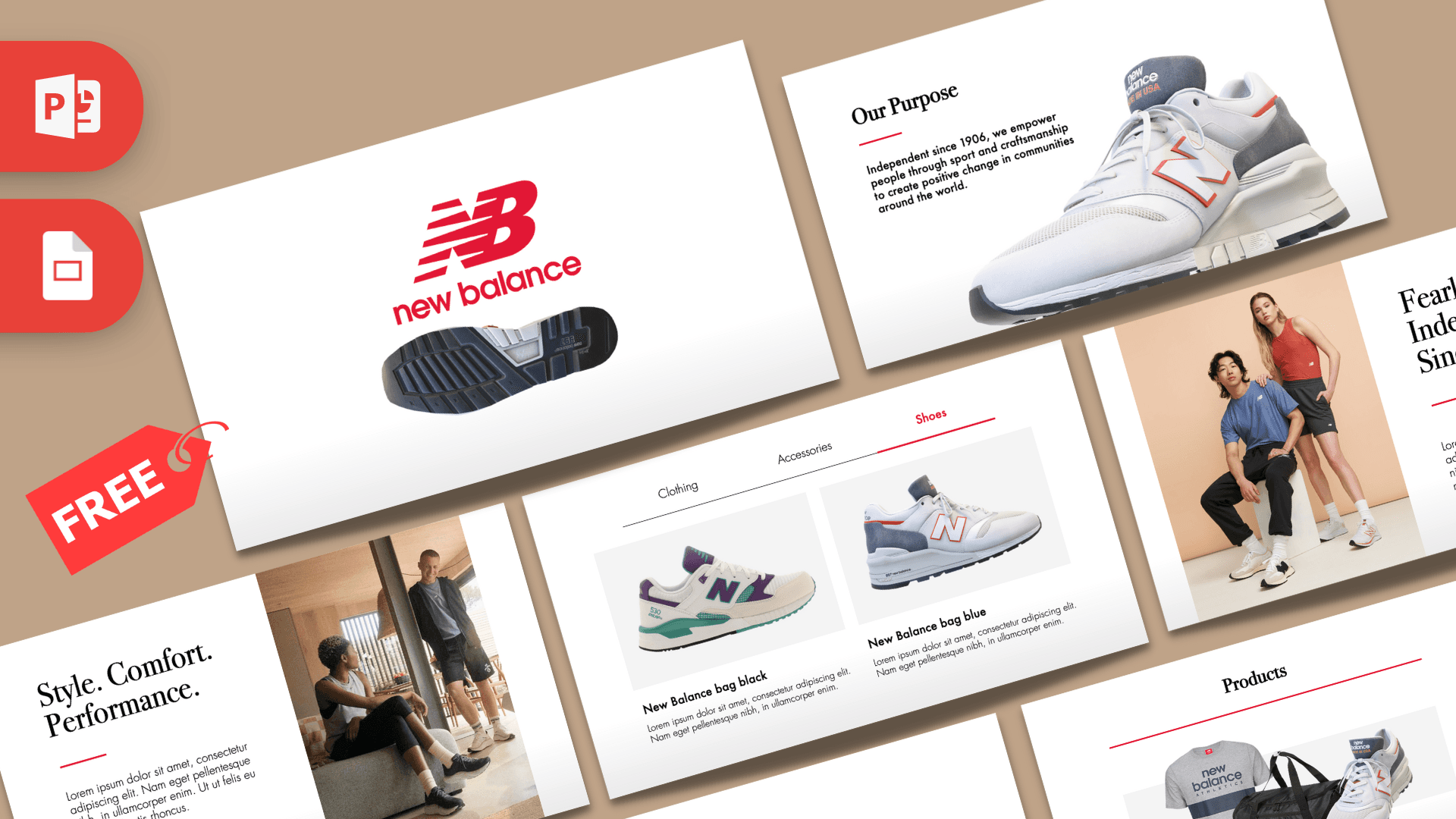
The New Balance PowerPoint template is a free, animated deck with clean white slides, the brand's signature red, elegant serif headlines and a 3D sneaker that moves from slide to slide. It has 10 slides in 16:9, built with Morph transitions and an embedded 3D shoe model. If you want a New Balance PPT template that looks like a premium product catalog, this is it.
What's Inside
The deck is laid out like a small brand lookbook, with a clear path from logo to thank you:
- Logo slide: the red New Balance logo above the sole of a sneaker, seen from below.
- Our Purpose: a heading with a red underline and a short statement, next to a large side view of a white, gray and orange sneaker.
- About Us: a longer paragraph on the left and a front close-up of the shoe on the right.
- Style. Comfort. Performance.: a big serif headline, a short paragraph, a red "Products" button and a lifestyle photo of two people relaxing in sneakers.
- Products: a T-shirt, a duffel bag and a sneaker grouped together under a "Products" heading.
- Clothing, Accessories and Shoes: three slides with a tab bar at the top. Each highlights one tab in red and shows two products with a name and a short description, such as two shirts, two bags and two sneakers.
- Fearlessly Independent Since 1906: a large studio photo of two models in athletic wear, with a headline and paragraph.
- Thank You: a red serif "Thank You" with the sneaker below it.
Because the three tab slides share the same structure, you can turn them into any category set you like, such as men, women and kids, or road, trail and lifestyle. Duplicate one more tab slide if you need a fourth category.
Design and Style
The style is bright, minimal and fashion-focused. Backgrounds are white with a soft light gray fade at the bottom, so product images look like they sit on a studio floor. Red is used sparingly, for the logo, short underline accents, active tabs and the "Products" button, which makes it stand out every time it appears.
Headlines are set in Bodoni 72, a classic high-contrast serif that gives the deck a magazine feel, while body text uses Futura, a clean geometric sans-serif. That mix of sporty and elegant matches the product photos: crisp sneakers, apparel shots and warm lifestyle images.
The standout feature is motion. Most slides use the Morph transition, and the sneaker is a real 3D model, so it turns and glides into new positions as you move from the logo to the purpose and about slides and back again at the end. The tab slides also use Morph, so the red underline and products slide smoothly when you switch between Clothing, Accessories and Shoes. The first slide adds a short entrance and exit effect for a polished opening.
Who Is This Template For?
- Marketing and fashion students analyzing a sportswear brand, its products and its image.
- Sneaker fans and resellers showing a collection, a new release or a buying guide.
- Sports shops presenting a product range on an in-store screen (as a fan-made design, not official material).
- Designers who want a ready-made product showcase with Morph motion to adapt for any brand.
- Business classes doing a case study on a heritage brand, using the timeline-style "since" slide.
- Running and fitness clubs introducing team gear or a sponsor.
How to Customize It
- Use a recent PowerPoint: 3D models and Morph work in Microsoft 365, PowerPoint 2019 and PowerPoint 2021. Older versions show a still image instead.
- Edit the text: click any heading or paragraph and type. Note that the product names on the Shoes slide still read "bag", so rename them when you add your own shoes.
- Swap product photos: right-click a picture and choose Change Picture. Images with a white or transparent background fit the style best.
- Move or rotate the 3D sneaker: click the shoe and drag the rotation handle in the middle to turn it, or use the 3D Model tab for preset views. If you replace it, insert your own model through Insert, 3D Models.
- Keep the Morph motion: Morph animates objects that appear on two slides in a row. Duplicate a slide, then move or resize items on the copy, and the transition does the rest.
- Change the accent color: select the red shapes and text and pick a new color with Shape Fill or Font Color.
- Install the fonts: Bodoni 72 and Futura ship with macOS. On Windows, install them or choose similar fonts.
Presentation Ideas
- A brand case study: purpose, products and marketing style of a sportswear company.
- A sneaker collection showcase with your favorite pairs on the Shoes tab.
- A school project comparing running shoe designs and materials.
- A new product pitch for a fictional sneaker, using the 3D model to show it from every side.
- A store presentation on a new season of clothing, accessories and shoes.
- A fashion class talk on how sportswear became everyday streetwear.
Tips for a Smooth Animated Deck
The file is large because of the 3D model and high-resolution photos, so save a copy before editing and close other heavy files. Run the slideshow once from start to finish to see how each Morph move looks, then adjust positions on the slides where the shoe or products feel rushed. Keep text short so the motion stays the star. If you plan to present from another computer, test it there first, because Morph and 3D models need a recent version of PowerPoint to play.
Related Templates
For more sportswear brands, see the Nike PowerPoint Template, the Adidas PowerPoint Template and the Vans PowerPoint Template. If your topic is fashion retail, the ZARA PowerPoint Template keeps a similar clean style. Find more decks with motion in our animated templates.
Frequently asked questions
- Is the New Balance PowerPoint template free?
- Yes, it is free on Prezentr. It is a fan-made design and is not affiliated with or endorsed by New Balance.
- How many slides are in the New Balance template?
- There are 10 slides in 16:9: logo, purpose, about us, a product intro, a products overview, three tabbed product slides, a heritage slide and a thank you slide.
- Is the New Balance deck animated?
- Yes. Most slides use Morph transitions, the opening slide has a short entrance and exit effect, and a 3D sneaker model moves between slides.
- Can I rotate or replace the 3D sneaker?
- Yes. Click the shoe and drag its rotation handle, or use the 3D Model tab. You can replace it with your own model through Insert, 3D Models.
- Which version of PowerPoint do I need?
- Use Microsoft 365, PowerPoint 2019 or PowerPoint 2021 for Morph and 3D models. Older versions will not play the motion.
- Does it work in Google Slides?
- It is made for PowerPoint. We have not confirmed a Google Slides version, and Morph and 3D models do not carry over to Google Slides.
This is a fan-made template inspired by New Balance PowerPoint Template. Prezentr is not affiliated with, endorsed by, or selling assets from New Balance PowerPoint Template. All brand names, logos, and trademarks belong to their respective owners.