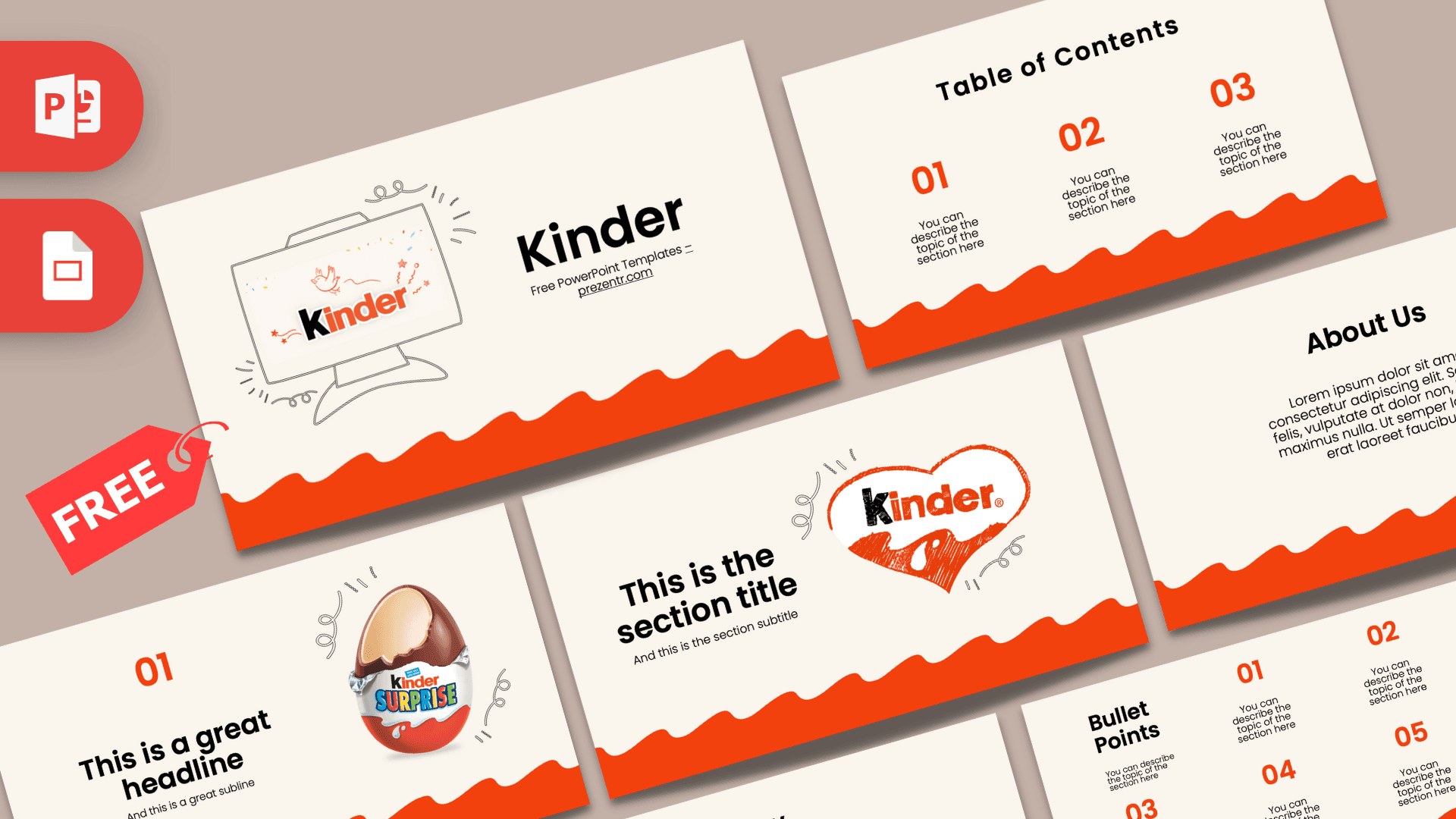
The Kinder PowerPoint template is a free, fan-made deck with a warm cream background, a wavy orange-red band along the bottom and playful hand-drawn doodles. It has 10 editable slides in 16:9 and also works as a Google Slides theme. The sweet, friendly look makes it an easy pick for kids' topics, snack brand projects and school talks.
What's Inside
This Kinder PPT template follows a clear structure, so you can build a complete talk without designing anything from scratch:
- Title slide: a sketched computer monitor showing the Kinder logo with confetti and a little bird, next to a big "Kinder" title.
- Table of Contents: three numbered sections in orange, each with a short description line.
- Section Header: the Kinder logo inside a hand-drawn heart, with space for a section title and subtitle.
- Headline Divider: a large "01" with a Kinder Surprise egg and doodle swirls, useful for marking each main point.
- About Us: a centered heading with a paragraph for an introduction or background story.
- Five Bullet Points (numbers): a grid of five numbered points from 01 to 05 with a short label on the left.
- Quote: big quotation marks around a short sample tagline you can replace with your own quote.
- Five Bullet Points (words): the same grid labeled ONE to FIVE for a softer look.
- Strategy: a goal with several action steps underneath, good for plans and processes.
- Big Numbers: one large figure with an arrow pointing to a caption, for the stat you want people to remember.
Design and Style
The design borrows the feel of a chocolate treat wrapper. The background is a soft cream, almost like milk, and the bottom of every slide has a wavy orange-red band that looks like melted chocolate or a candy wrapper edge. That one shape ties the whole deck together and gives it instant brand recognition.
Headings are set in a bold, rounded sans-serif (Poppins), with numbers in bright orange and body text in black. Thin hand-drawn doodles, little loops and swirls appear around the images, which keeps the mood light and fun without crowding the slides. Product images, such as the Kinder Surprise egg and the logo in a sketched heart, add color in just the right places.
There is a lot of empty cream space on each slide, which makes the text easy to read on a projector and leaves room for your own photos.
Who Is This Template For?
- Students presenting a report on a famous chocolate brand, packaging or advertising aimed at kids.
- Marketing and business classes analyzing how a brand builds a friendly, family image.
- Teachers who want a cheerful theme for younger classes, class rules or a reward chart talk.
- Parents and party planners making a birthday slideshow or a treat-themed game.
- Small shops and cafes showing a simple sweets menu or promotion on a screen (as a fan-made design, not an official brand asset).
- Food and nutrition classes comparing snacks, ingredients and portion sizes in a friendly, non-scary way.
How to Customize It
- Edit the text: click any placeholder, such as "This is the section title", and type your own words.
- Change pictures: right-click an image and choose Change Picture to swap in your own photo while keeping its place on the slide.
- Adjust colors: the orange accents can be changed with Font Color or Shape Fill. Keep the cream and orange pairing for the Kinder feel.
- Add slides: right-click a thumbnail and choose Duplicate Slide to reuse a layout, for example extra headline dividers for 02 and 03.
- Reorder: drag slides in the thumbnail panel or use View, Slide Sorter.
- Fonts: the deck uses Poppins and Futura. Install them for the best match; otherwise PowerPoint uses a similar default.
- Google Slides: open Google Slides, choose File, Import slides, upload the PPTX and select all slides. Then edit text and images the same way.
Presentation Ideas
- The story of a chocolate egg with a toy inside and why kids love surprises.
- A school project on how sweets are packaged and marketed to families.
- A healthy snacking talk comparing treats and fruit, with one big number per slide.
- An Easter or birthday party game with questions on the bullet point slides.
- A business class case on brand colors and logo design.
- A class welcome deck for young students, using the Strategy slide for weekly goals.
For a short school talk, a good order is: title, table of contents, one section header per topic, a headline divider and a bullet point slide for each section, then a quote and a big number to finish. Ten to twelve slides is plenty for five minutes. If you are presenting to young children, cut the text down to one short line per point and let the pictures do the talking.
Tips for a Sweet Result
Use photos with a white or transparent background so they sit nicely on the cream color, the way the Kinder Surprise egg does on the headline slide. Stick to one accent color, the orange-red from the wave, for numbers and highlights, and keep body text black for contrast. If you add charts, color the bars orange and leave the gridlines light gray. Finally, keep the wavy band visible at the bottom of each slide: it is the detail that makes the deck feel like Kinder, so avoid covering it with images or text boxes.
Related Templates
For more sweet brands, check out the Nutella PowerPoint Template and the M&M's PowerPoint Template. If you want a general chocolate theme, try the Free Chocolate PowerPoint Template, and for spring parties the Easter Egg PowerPoint Template pairs nicely. You can find more logo-inspired designs in our brands and companies templates.
Frequently asked questions
- Is the Kinder PowerPoint template free to use?
- Yes, it is free on Prezentr. It is a fan-made design and is not affiliated with or endorsed by Ferrero or the Kinder brand.
- How many slides does the Kinder template have?
- It has 10 slides in 16:9, including a title, table of contents, section header, headline divider, about us, two bullet point grids, quote, strategy and big numbers.
- Can I open it in Google Slides?
- Yes. Import the PPTX into Google Slides with File, Import slides. Install or choose similar fonts if Poppins or Futura look different.
- Can I replace the Kinder images with my own?
- Yes. Right-click any picture and choose Change Picture, or delete it and insert your own image.
- Is the Kinder deck animated?
- No, the slides have no animations or transitions, which keeps them simple to edit. You can add your own from the Transitions and Animations tabs.
- Is it suitable for a school presentation?
- Yes. The clean layouts, large headings and friendly colors work well for class reports and kids' topics.
This is a fan-made template inspired by Kinder PowerPoint Template. Prezentr is not affiliated with, endorsed by, or selling assets from Kinder PowerPoint Template. All brand names, logos, and trademarks belong to their respective owners.